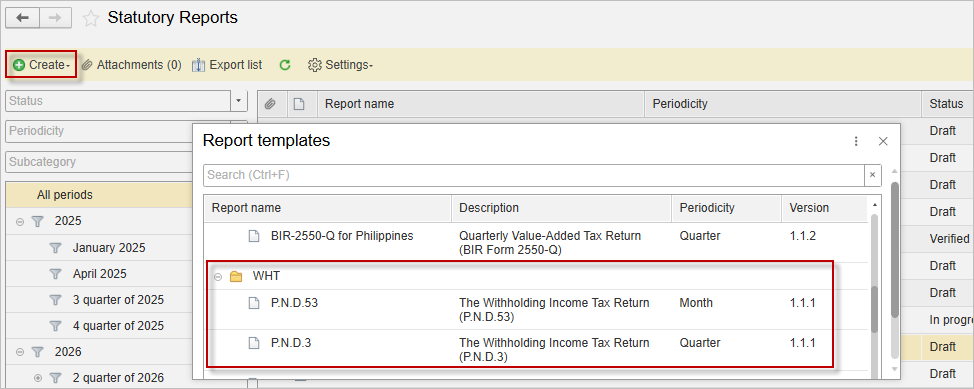
WHT return forms for Thailand are available in Statutory Reporting:
- PND 1 Withholding Income Tax Return (for tax from employees’ salaries and wages)
- PND 3 Withholding Income Tax Return (for tax from payments to non‑juristic persons, e.g. freelancers, certain service providers).
- PND 53 Withholding Income Tax Return (for tax from payments to juristic persons, e.g. companies providing services, rentals, management fees).
- PND 54 Withholding Tax and Profit Remittance Return (for tax on payments or profit remittances to foreign entities not carrying on business in Thailand).

Forms currently operate at the basic level, where only manual entry is supported. The forms function as compliant templates, reflecting the required structure, fields, and formatting prescribed by the relevant authority. All data must be entered manually, with no automated population. Compliance is ensured through accurate visual representation, including logos, layout, tables, and sections.
Installation #
Download the PND 1, PND 3, PND 53, PND 54 forms from the Marketplace. The same forms are compatible with both the on-premises and cloud versions.
Required Settings #
- Enable WHT in Tax Settings.
- In the Taxes list, add the WHT rates.
- Create tax groups including WHT rates, then assign them to relevant Items, Customers, and Vendors for automatic computation on transactions.
- Maintain the Address and Tax registration number for the Customers and for the Vendors.
- Enable the Statutory Reporting in the Accounting Settings.
- Install the form.
Generating the Form #
- Navigate to Statutory Reports and click Create
- Select the form