
Classes are the way to categorize and group transactions, which may later be used in reporting. They may be applied to Sales Quotes, Sales Orders, Sales Invoices, Credit Memos, Projects, Time tracking entries, Purchase Orders, Bills, Shipments, Assembly Builds, and Purchase Returns. Some examples of ways classes can be used to group transactions:
- Department in a company (Business Units).
- Sales teams.
- Lines of Business.
- Separate companies in one account all under one Tax Registration Number (TRN) or Tax Identification Number (TIN).
- Contracts
Classes represent meaningful segments in your company, such as store departments or product lines. Once class tracking has been enabled, create a class for each business segment. You can then organize your customer and vendor transactions by class, thereby gaining greater insight into your sales, expenses and profitability by business segment.

Enable accounting by Classes #
- Navigate to Lists – Chart of accounts.
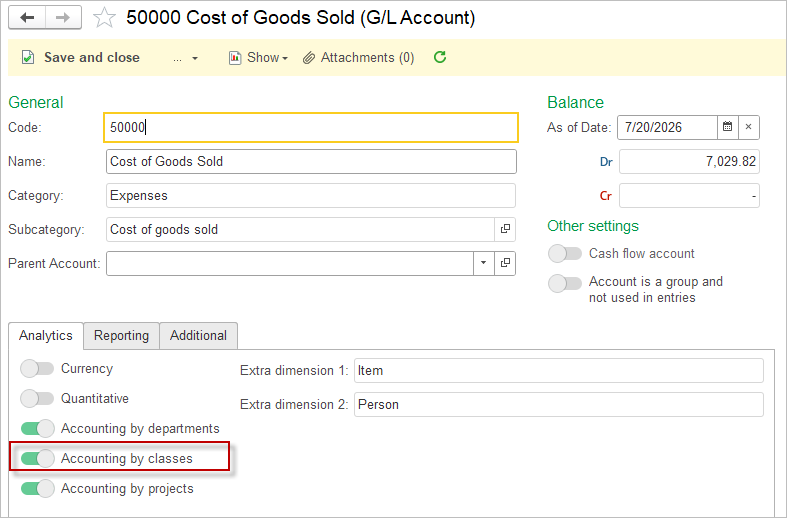
- Open each account, that will be affected by the Class postings and tick the toggle Accounting by classes.
Another option to group transactions are Projects / Jobs and Departments.
Classes can be used for record level security (RLS). Please see article and header Access Restrictions by Class.
Classes can be set as Required Attributes in all applicable documents.
Application of the Class in Accounting Entries #
Same rules apply to Project application in accounting entries.
Same rules apply to Department application in accounting entries.
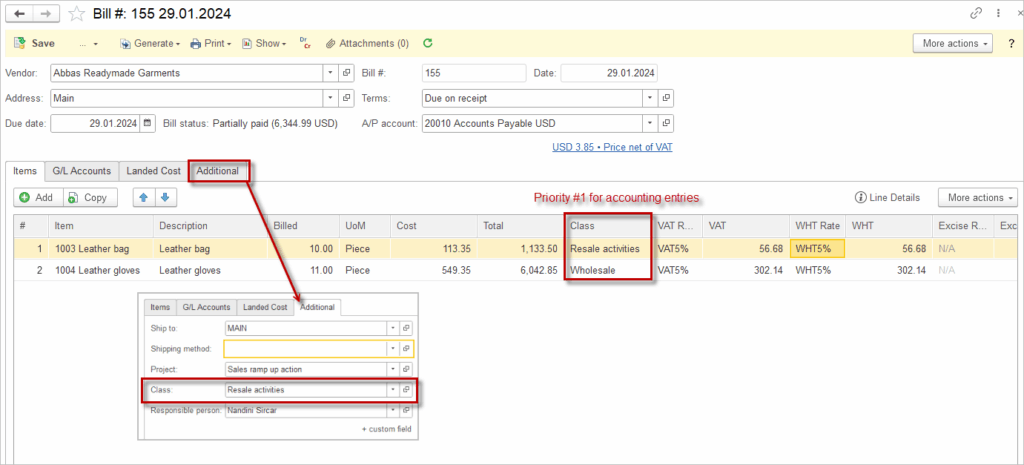
The Class attribute can be entered at different levels within the document. The rule that applies is: lower-level details take precedence over higher-level ones.
This means the following: The Class specified in the header (the Additional tab of the document) flows into the lines of the tabular section. In the line items, the Class can be manually changed or deleted. If there is a Class clarification inside a line item, it can also be modified or removed.
In the screenshot below, the Class attribute is set as Resale activities and this is reflected in the line items’ classes. However, the user manually changed the Class of line item #2 to Wholesale. The class specified at the line item level takes precedence and will be used in the accounting entries (even if it is empty).
Flexible Class Allocation in Accounting Entries #
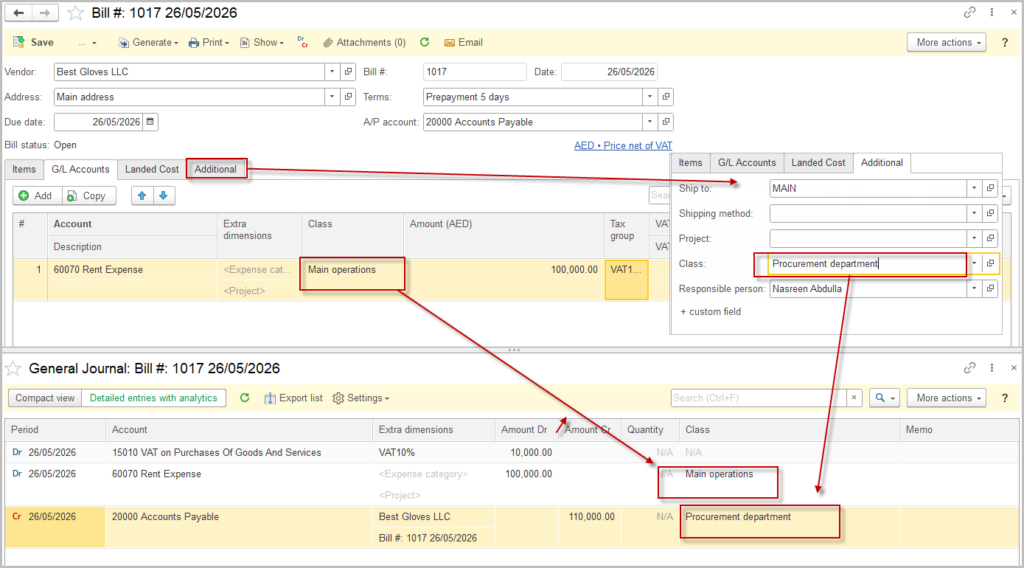
In AccountingSuite, the Class attribute can be assigned independently for debit and credit entries within the same transaction. This flexibility allows organizations to reflect different operational dimensions in financial reporting and improve the accuracy of class-based analysis.
Each accounting entry consists of at least two sides: debit and credit. In AccountingSuite:
- The debit side of a transaction can be assigned one class.
- The credit side can be assigned a different class.
This means that a single document can impact multiple classes simultaneously, depending on the business logic and configuration.
Impact on Reporting
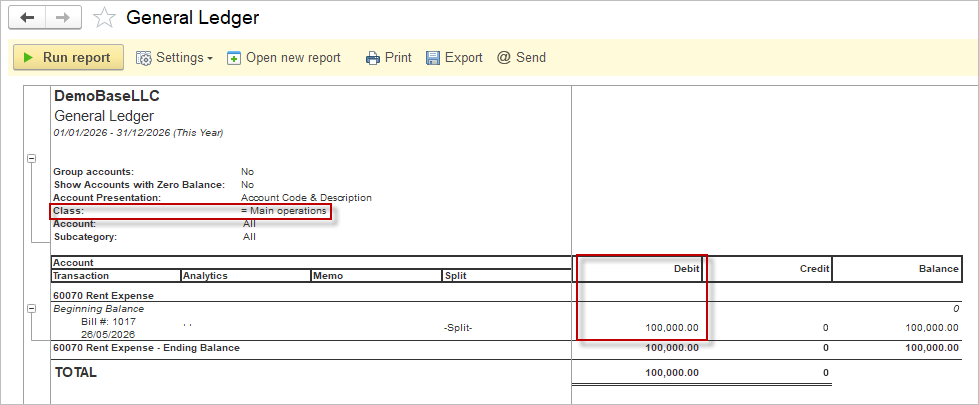
Class-based reports (such as Profit & Loss by Class or other analytical reports) rely on the Class assigned at the transaction line level. Because debit and credit lines may carry different classes:
- Transactions will be split across classes in reports.
- Each side of the entry contributes to the totals of its respective Class.
- This enables more granular visibility into operational responsibilities and cost allocation.
Consider a purchase transaction:
- The debit entry (e.g., inventory or expense account) is assigned to the class “Main Operations”.
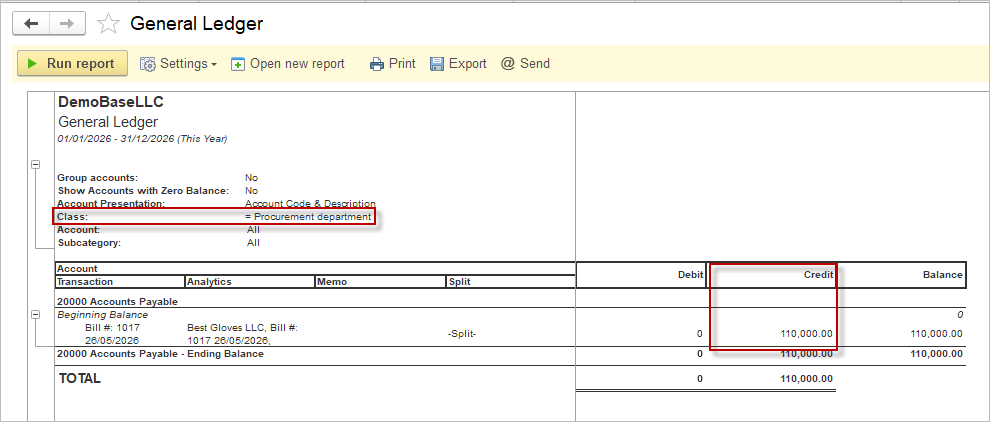
- The credit entry (e.g., accounts payable) is assigned to the class “Procurement Department”.
In this case:
- Expenses will appear under the “Main Operations” class.
- Liabilities will be reflected under the “Procurement Department” class.
As a result, reports segmented by class will show this transaction distributed across both operational areas.
This approach is particularly useful when:
- Different departments are responsible for different aspects of a transaction.
- You need to separate operational costs from administrative or support functions.
- Internal reporting requires multi-dimensional analysis without duplicating transactions.