
The Depreciation Accrued report displays detailed information about the depreciation of fixed assets, the amortization of intangible assets, and the recognition of expenses for prepaid expenses and low-value assets. It is used to review accrued depreciation and amortization amounts, verify expense recognition, and analyze depreciation details by asset, accounting period, and other report dimensions.
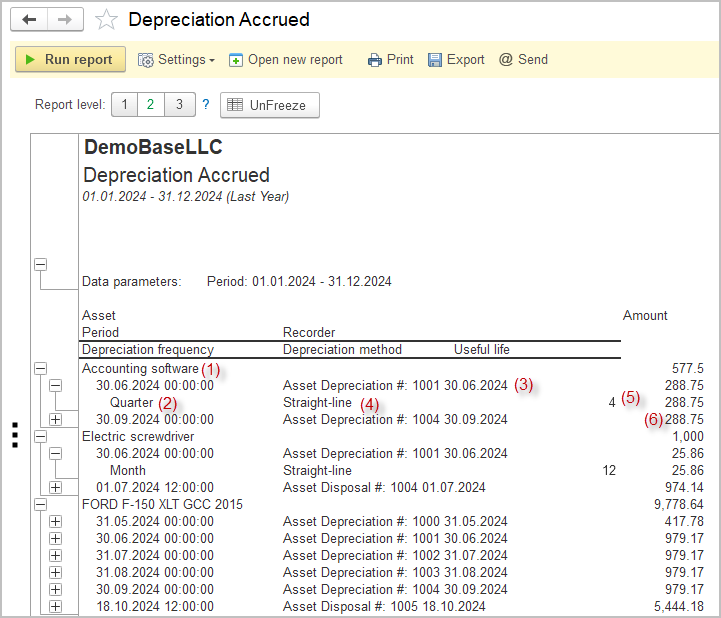
For the selected time period, the report shows:
- asset name (1);
- derpreciation frequency (2);
- document, that has recorded the depreciation (or amortization for an intangible asset, or expense recognition for prepaid expenses and low-value assets) – this is commonly the Depreciation or Disposal document (3);
- depreciation method (4);
- actual useful life (5);
- amount charged (6).
Structure
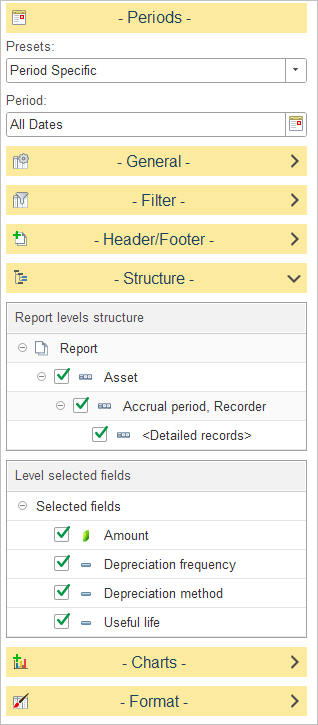
In Report levels structure, select how depreciation data is grouped in the report.
The default structure groups records by Asset, then by Accrual Period and Recorder, with Detailed records displayed at the lowest level. This allows the report to present depreciation by asset first, followed by the accounting period in which depreciation was accrued, the document used to record the transaction, and finally the individual depreciation entries.
To customize the report structure, expand the Structure section and select or clear the checkboxes next to each level to include or exclude it from the report hierarchy.
In Level selected fields, choose which columns are displayed for the selected report level.
The available fields include:
- Useful Life – Displays the asset’s defined useful life.
- Amount – Displays the depreciation amount accrued for the selected level.
- Depreciation Frequency – Displays the depreciation schedule assigned to the asset (for example, monthly or yearly).
- Depreciation Method – Displays the depreciation method used to calculate the asset’s depreciation.