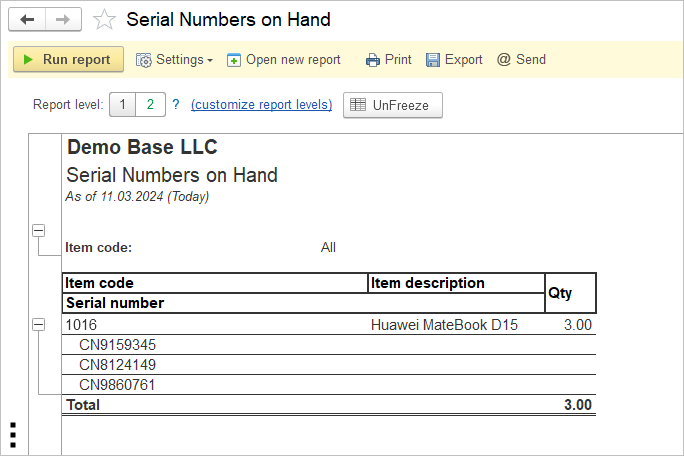
The Serial Numbers on Hand report provides a detailed list of all serial-numbered inventory items currently available in stock. It allows users to identify each individual serialized item, verify its current status, and trace inventory by serial number. The report supports inventory control, warranty management, stock verification, and audit activities by providing visibility into every serialized item that is currently on hand.
Navigate to Reports → Inventory → Serial Numbers on Hand
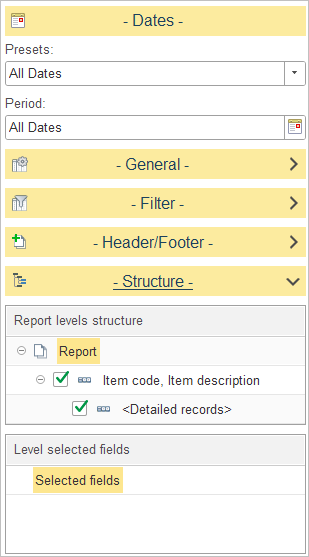
In Report levels structure, select how serialized inventory data is grouped in the report.
The default report structure groups data as follows:
- Item Code, Item Description – Groups serial numbers under their corresponding inventory item.
- Detailed Records – Displays the individual serial numbers and related information for each item.
To customize the report structure, expand the Structure section and select or clear the checkboxes next to each level to include or exclude it from the report hierarchy. You can also drag and drop levels to change the order in which data is grouped.
Level Selected Fields
This report does not include configurable Level selected fields. The report always displays the predefined information for serialized inventory items, and no additional columns can be added or removed through the Structure settings.