
An Excise (Excise duty) is a type of tax imposed on specific goods, such as alcohol, tobacco, carbonated drinks, products with added sugar and fuel. The list of excisable goods varies from one country to another, but AccountingSuite offers an flexible and transparent accounting treatment for it.
Excise Tax is an indirect tax imposed on specific goods deemed harmful to health or the environment (e.g., tobacco, energy drinks, carbonated and sweetened beverages). It is a one-time tax applied at the point of import or production, not on subsequent sales.
Who Pays and When?
| Scenario | Who is Liable | When Does Liability Arise? |
|---|---|---|
| Import | The importer (or their customs broker). | At the time of customs clearance. The tax is calculated and paid during the import process. |
| Production | The manufacturer (producer) in the country. | At the moment of “release for consumption” – when the goods are ready for sale or retail. |
| Sale | No separate liability. The tax is already embedded in the cost of the goods sold. | Not applicable. No additional Excise Tax is charged or paid on the final sale. |
Required settings #
Excise duty functionality can be enabled under Admin Panel – Tax settings.
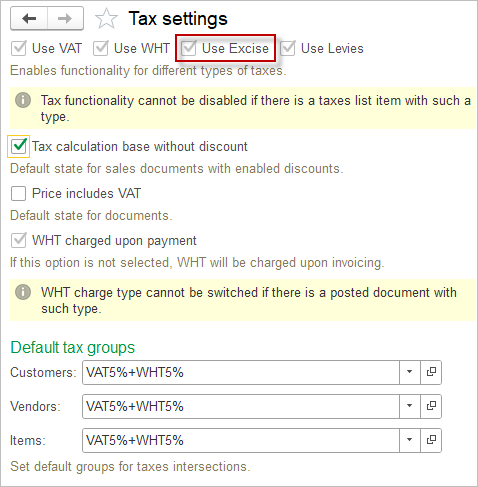

How to start accounting for Excise #
1. Create the Excise Tax. Please refer to the Create a Tax and Tax rates articles. Tick the toggle Fixed amount if the excise duty is expressed as a fixed amount rather than a relative value. If you have both fixed amounts and as relative value Excise duties, then set up two taxes with the Excise type in the Taxes list.
For the Excise tax type, Quantity Calculation base is available.
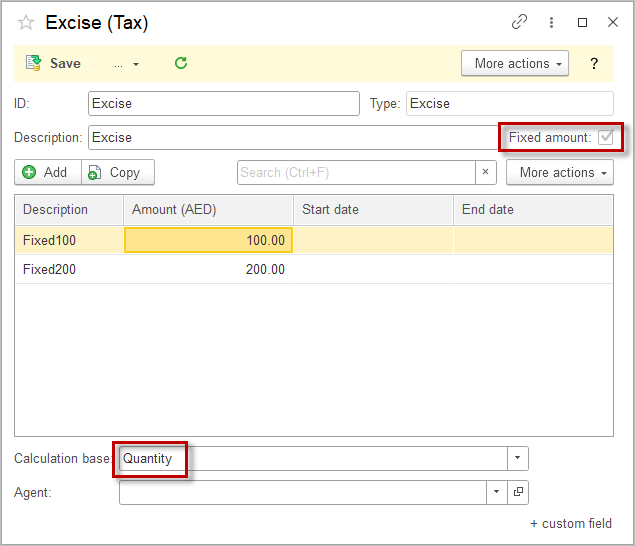
2. Maintain tax setting in the Vendor — specify if the Vendor is supplies excisable goods. Please refer to the article.
3. Set the default accounts for Excise liability in the Accounting settings.
4. Set up a Tax group with the required Excise rates.
5. In the excisable Items on the UoM tab, set the Excise conversion factor.
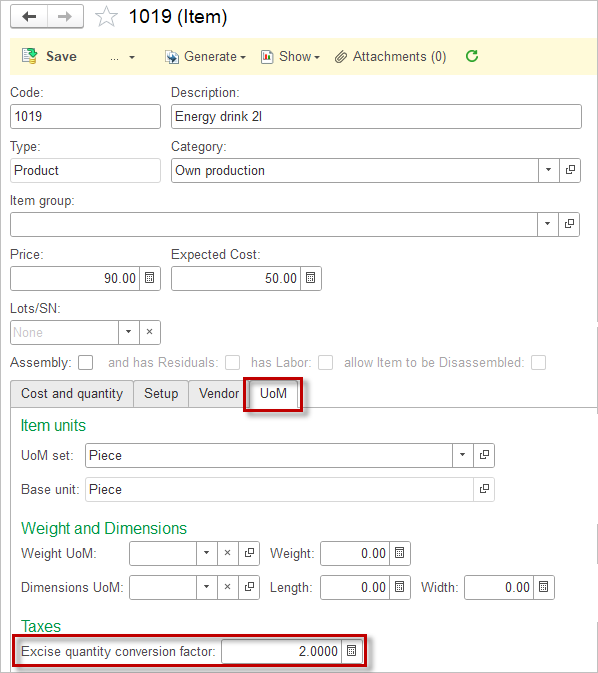
Excise Quantity Conversion Factor #
An excise quantity conversion factor is a numerical value used to convert quantities of goods or products into a standard measurement for the purpose of calculating excise duties or taxes. This factor is particularly important in industries where products are sold in different units of measurement (e.g., liters, gallons, kilograms, etc.) but need to be standardized for tax assessment.
For example, if an excise duty is applied per liter of a beverage, but the product is sold in gallons, the conversion factor would be used to convert gallons to liters so that the correct excise duty can be calculated based on the volume sold.
The Excise conversion factor is set on the UoM tab in the Item.
Accounting #
On Import (Purchasing)
- How it works: When you create a Bill for imported goods, the system is configured to automatically calculate the Excise Tax (since it is paid at customs).
- Accounting Treatment: The tax amount is capitalized into the cost of inventory. It increases the value of the goods on your balance sheet.
- Debits: Inventory (set in the Item)
- Credits: Excise liability account (set in the Accounting settings)
2. On Local Production (Manufacturing)
- How it works: There is no automatic system calculation at the point of production. You must manually record the tax liability as the goods are released for sale.
- Action: Use a Journal Entry to accrue the Excise Tax.
- Accounting Treatment: The tax is added to the production cost.
- Debit: Work in Process (WIP) / Production Cost (increases the value of finished goods)
- Credit: Excise liability account (set in the Accounting settings)
3. On Sales
- How it works: No additional Excise Tax is calculated or collected from the customer.
- Accounting Treatment: The Excise Tax is already embedded in the cost of goods sold.
- Only the revenue from the sale is recorded.
- Debit: Accounts Receivable / Cash
- Credit: Sales Revenue