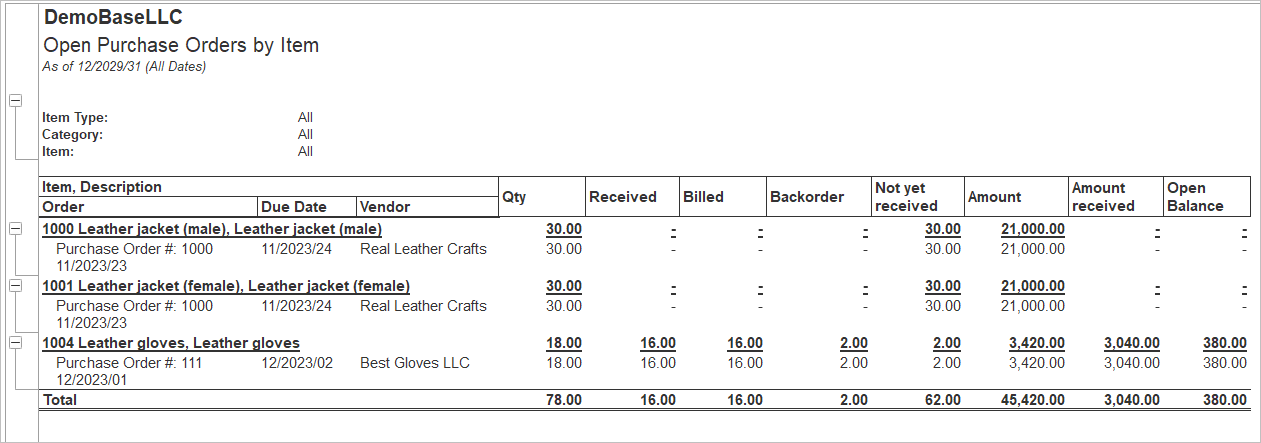
The Open Purchase Order by Item report will list all Open Purchase Orders, grouped by Item. The Open Purchase Orders by Item report provides a detailed overview of purchase orders that have not yet been fully received or completed. It displays open purchase order quantities and values for each inventory item, allowing users to monitor outstanding vendors orders, track received and remaining quantities, identify backorders, and manage purchasing commitments. The report supports procurement planning, inventory replenishment, and vendor follow-up.
To run this report, navigate to Reports → Purchases → Open Purchase Orders by Item.
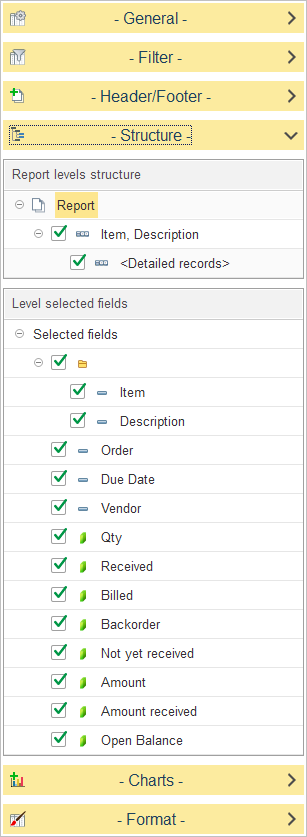
In Report levels structure, select how purchase order data is grouped in the report.
The default report structure groups data as follows:
- Item, Description – Groups open purchase orders by inventory item.
- Detailed Records – Displays the individual purchase order transactions for each item.
To customize the report structure, expand the Structure section and select or clear the checkboxes next to each level to include or exclude it from the report hierarchy. You can also drag and drop levels to change the order in which data is grouped.
In Level selected fields, choose which columns are displayed for the selected report level.
The available fields include:
Open Balance – Displays the remaining value of the purchase order that is still outstanding.
Item – Displays the inventory item.
Description – Displays the item description.
Order – Displays the purchase order number.
Due Date – Displays the expected delivery date for the purchase order.
Vendor – Displays the vendor associated with the purchase order.
Qty – Displays the total quantity ordered.
Received – Displays the quantity already received.
Billed – Displays the quantity or amount that has been invoiced by the vendor.
Backorder – Displays the quantity that remains on backorder.
Not Yet Received – Displays the quantity that has not yet been received.
Amount – Displays the total value of the purchase order line.
Amount Received – Displays the value of the quantity already received.