
Cash Receipt is used for recording the following kinds of transactions:
- payments received from a customer which may include partial payments and payments for multiple invoices;
- sales orders deposits, pre-payments and invoice over-payments;
- unapplied payments;
- refunds made by a vendor.

Create Cash Receipt #
Remember that the Cash Receipt can be generated from the preceding document – Sales invoice.
- Navigate to Sales → Cash Receipts.
- Click Create.
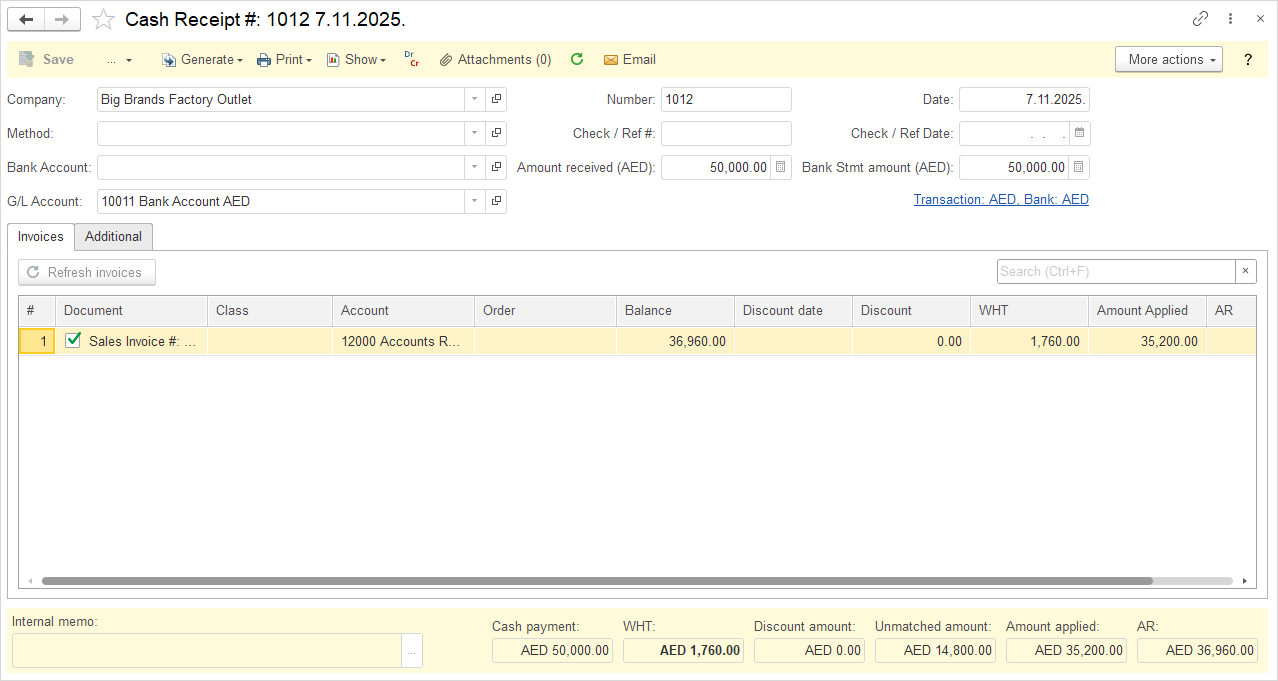
- Choose the Company from the drop-down list.
- Change the Cash Receipt Number, if necessary. The Cash Receipt document numbering is defined in Admin panel → Tools → Auto-Numbering and will increment automatically. For more information, see Document Numbering.
- Change the Date, needed.
- Choose the Payment Method from the drop down list.
- Enter Check / Ref # (optional), for more information, see Handling Post-Dated Checks.
- Enter Check / Ref Date (optional), for more information, see Handling Post-Dated Checks.
- Choose Bank Account to record the amount in a bank account.
- Enter the Amount received.
- Enter Bank Stmt amount.
- Select the payment Currency.
- Choose a Sales Invoice to link, if applicable.
- Enter a Memo (optional).
- Click Save to save a draft, or Post to record the transaction.
Accounting #
Recording a Cash receipt creates the following transactions in the General Journal:
- Debits: Bank or Cash account or Undeposited funds
- Credits: Account receivable