
A Loan Provided to Employee occurs when your company lends money to an employee. The money leaves your bank account, but it is not an expense – it is an asset, because you expect to receive it back, usually through payroll deductions. The loan principal is tracked in 16300 Employee Loans. Interest earned on the loan (if any) is recognized as 80100 Interest Income directly, without using an intermediate interest receivable account.
Employee loans are different from loans issued to other companies in one important way: repayment is typically collected through payroll. Instead of the employee sending you a payment each month, you deduct the repayment amount directly from their salary using the Payroll document and a dedicated Deduction Type.
This article covers the full lifecycle: issuing the loan, accruing interest, setting up the payroll deduction, collecting repayment through payroll, paying the net salary, early repayment outside payroll, and writing off an uncollectible loan.
Note: The interest income account (
80100 Interest Income) must be included in the taxable base for Profit/Corporate Tax – it is not taxed line-by-line at the time of accrual, but as part of the overall taxable profit for the period.
1. Issuing a loan to an employee #
When you transfer funds to the employee, you record the loan as an asset.
| Document | Debit | Credit |
|---|---|---|
| Payment | 16300 Employee Loans | |
10000 Bank Accounts (or 10011 Bank Account Currency) |
The loan principal is now recorded as an asset. Cash has decreased, but total assets remain unchanged – one asset (cash) is converted into another asset (employee loan receivable).
Note: Always use 16300 Employee Loans for employee loans, not 16000 Loans Issued. Keeping employee loans in a separate account makes it easier to reconcile payroll deductions and track outstanding balances per employee.
2. Accruing interest on an employee loan #
If the employee loan is interest-bearing, you recognize interest income at the end of each period, before running payroll. The interest is added to the loan balance, so the total amount to be repaid through payroll includes both principal and interest.
| Document | Debit | Credit |
|---|---|---|
| Journal Entry / Recurring Template | 16300 Employee Loans | |
| 80100 Interest Income |
For long-term employee loans, you may use 17000 Long-term Loans Issued or a dedicated sub-account instead of 16300 Employee Loans.
Use Recurring Templates to schedule repeatable interest accruals. If the loan has a fixed monthly interest amount, set up a recurring journal entry that automatically posts the accrual each month. This ensures interest is recognized consistently without manual entry.
Important: We do not use 16100 Interest Receivable for employee loans. The interest is added directly to the employee loan balance (16300 Employee Loans), and the income is recognized immediately (80100 Interest Income). This keeps the accounting simple and aligns with the payroll deduction process.
3. Setting up the payroll deduction #
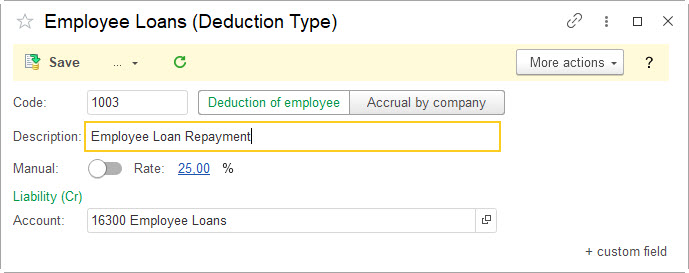
Before you can collect repayments through payroll, you need to create a Deduction Type for the loan. This tells AccountingSuite how to treat the deduction on each pay run.
Go to Payroll → Deduction Types and create a new deduction:
- Name:
Employee Loan Repayment - Type: Deduction of employee
- Liability Account:
16300 Employee Loans(this is the account that will be reduced when the deduction is applied) - Set Manual or Rate option
Once the Deduction Type is set up, you can assign it to the employee’s payroll profile and specify the amount to deduct each pay period.
Important: The deduction itself is not an expense. It is a reduction of the employee loan asset, collected through the payroll liability account. The expense (salary) was already recognized when you ran payroll.
4. Collecting repayment through payroll #
When you run payroll, the loan repayment is deducted from the employee’s gross pay. The Payroll document handles this automatically if the deduction type is assigned to the employee.
Example: Employee’s gross salary is AED 5,000. The monthly loan repayment (principal + accrued interest) is AED 500.
The Payroll document creates the following entries:
| Document | Debit | Credit |
|---|---|---|
| Payroll | 60510 Payroll Expense – Operating (or relevant payroll expense account) | |
| 22000 Payroll Liabilities (gross salary) | ||
| 22000 Payroll Liabilities (loan repayment portion = principal + interest) | ||
| 16300 Employee Loans (loan repayment portion = principal + interest) |
In practice, the Payroll document generates multiple lines. The loan repayment line appears as a credit to 16300 Employee Loans, reducing the outstanding loan balance. The employee’s net pay (gross salary minus the loan deduction and other deductions) remains in 22000 Payroll Liabilities until you pay it.
Key point: The loan repayment deduction does not create a new expense. It reduces the employee loan asset and reduces the amount of net pay owed to the employee.
5. Paying the net salary to the employee #
After payroll is processed and the loan deduction has been applied, you pay the employee the remaining net salary. The loan repayment has already reduced the amount owed.
| Document | Debit | Credit |
|---|---|---|
| Payroll Payment | 22000 Payroll Liabilities | |
10000 Bank Accounts (or 10011 Bank Account Currency) |
The amount paid is the net salary after the loan deduction. For example, if gross salary is AED 5,000 and the loan deduction is AED 500, the Payroll Payment is AED 4,500 (before other deductions and taxes).
This entry clears the payroll liability for that employee and reflects the actual cash leaving the bank account.
6. Early repayment outside payroll (optional) #
If the employee chooses to repay the loan early – or repays directly by bank transfer instead of through payroll – record it as a deposit. At this point, interest has already been accrued and added to the loan balance.
| Document | Debit | Credit |
|---|---|---|
| Deposit | 10000 Bank Accounts (or 10011 Bank Account Currency) | |
| 16300 Employee Loans |
The full repayment amount (principal + accrued interest) is credited to 16300 Employee Loans, clearing the outstanding balance. No separate interest receivable account is used.
7. Writing off an uncollectible employee loan (bad debt) #
If the employee leaves the company or defaults and the loan is deemed uncollectible, the asset must be written off. At this point, any accrued interest has already been added to the loan balance.
| Document | Debit | Credit |
|---|---|---|
| Journal Entry | 60800 Bad Debt | |
| 16300 Employee Loans |
Write off the full outstanding balance (principal + accrued interest) from 16300 Employee Loans. In some jurisdictions, employee loan write-offs may have tax implications – consult your tax advisor.
Summary: Complete Journal Entry Sequence #
| Step | Event | Document | Debit | Credit |
|---|---|---|---|---|
| 1 | Issue loan to employee | Payment | 16300 Employee Loans | 10000 Bank Accounts |
| 2 | Set up payroll deduction | Deduction Types | — | — |
| 3 | Accrue monthly interest | Journal Entry / Recurring Template | 16300 Employee Loans | 80100 Interest Income |
| 4 | Run payroll with loan deduction | Payroll | 60510 Payroll Expense | 22000 Payroll Liabilities |
| 22000 Payroll Liabilities | 16300 Employee Loans | |||
| 5 | Pay net salary to employee | Payroll Payment | 22000 Payroll Liabilities | 10000 Bank Accounts |
| 6 | Early repayment outside payroll (optional) | Deposit | 10000 Bank Accounts | 16300 Employee Loans |
| 7 | Write off uncollectible loan | Journal Entry | 60800 Bad Debt | 16300 Employee Loans |