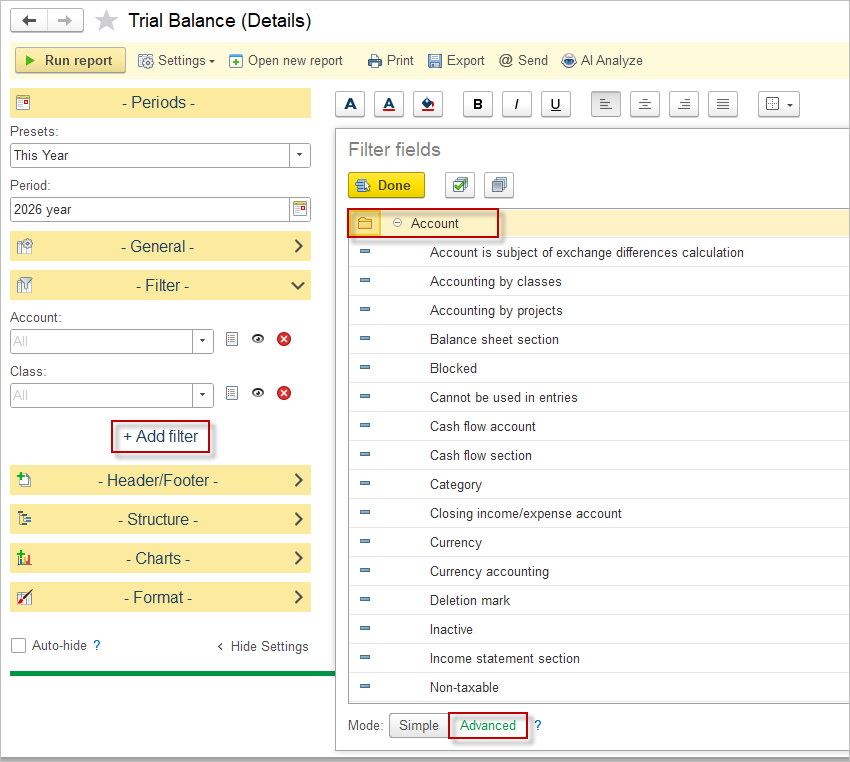
A trial balance in AccountingSuite is a financial report that lists the balances of all the accounts in the General Ledger at a specific point in time. It is prepared by extracting the ending balances of each account from the general ledger and listing them in two columns: one for debit balances and one for credit balances. The total debits should equal the total credits if the trial balance is in balance.
Trial Balance modes in AccountingSuite #
In AccountingSuite, the Trial Balance is available in three pre‑installed modes: Trial Balance Unadjusted, Trial Balance Adjusted, and Trial Balance Details.
- Trial Balance Unadjusted shows account balances before period‑end adjustments, giving a raw view of postings from day‑to‑day operations. Adjustments are made by a Journal Entry with an Adjustment type.
- Trial Balance Adjusted includes both regular postings and adjusting entries, providing a final view ready for financial statement preparation.
- Trial Balance Details is an extended version that not only shows balances by account, but also allows drilling down by Extra dimensions for more granular analysis.
Extra dimensions in Trial Balance Details #
In the Trial Balance Details mode, G/L accounts have extra dimensions that provide an additional informational breakdown of balances. These dimensions can represent analytical attributes such as department, project, cost center, location, or other custom tracking axes configured in the system. When running Trial Balance Details, users can filter, group, or expand balances by these dimensions, making it easier to see how the same account is used across different parts of the business. This turns the trial balance into a flexible analytical tool, not just a statutory control report.
Typical use cases #
A common use case is management reporting, where finance needs to see the same expense or revenue account broken down by department or project. Trial Balance Details with extra dimensions lets the user quickly answer questions like “What is total travel expense by department this quarter?” without exporting to external tools. Another use case is audit and internal control: auditors can review balances not only by account but also by project or cost center, checking consistency of postings and spotting misclassifications in specific dimensions. A further use case is reconciliation and cleanup, where accountants filter a single account (for example, “Suspense” or “Clearing”) by dimension to identify which project or location still has open balances that need reclassification.
The Option Menu on the Trial Balance Report allows you to choose to have the Transactions and Adjustments columns appear on the report. By default, these columns do not appear. If the adjusted option is chosen, these columns will appear.
For the most commonly used Trial balance setups (customized sorting of filtering), you can save the settings and use them the next time you need them.
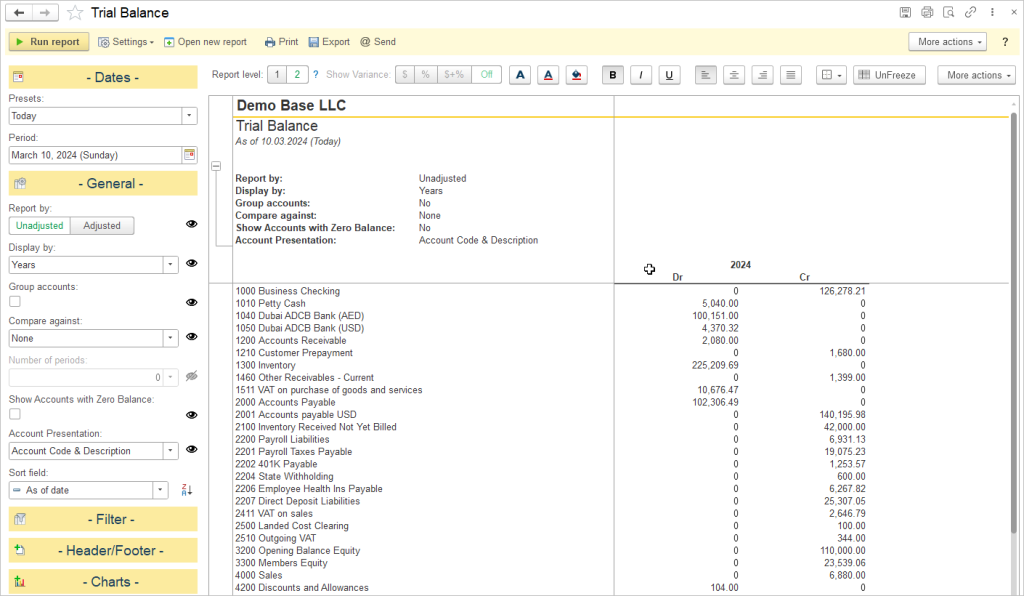
Settings #
Trial Balance (Unadjusted) #
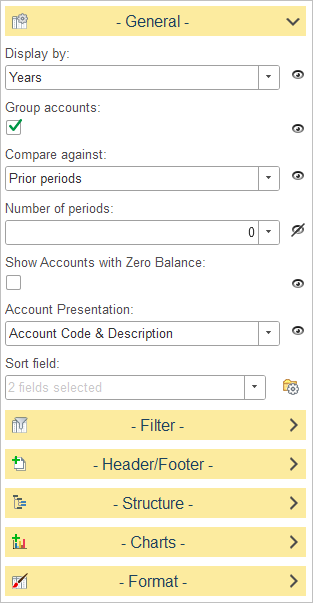
Available settings:
Display By
Determines how account balances are grouped in the report.
Select one of the available time intervals from the drop-down list. For example, when Years is selected, balances are summarized by reporting year. Other grouping options, such as Days, Weeks, Months and Quarters are available
Group Accounts
Controls how accounts are organized in the report.
- Disabled – Accounts are displayed in ascending numerical order, from the lowest account code to the highest.
- Enabled – Accounts are grouped by their account category (Assets, Liabilities, Equity, Income, and Expenses) and further organized into their respective subcategories.
Compare Against
Allows account balances to be compared with another reporting period.
Select the comparison basis from the drop-down list. When a comparison option is selected, the report displays balances for both the selected period and the comparison period.
Number of Periods
Specifies how many previous periods are included in the comparison.
This option is available only when a comparison method that supports multiple periods is selected.
Show Accounts with Zero Balance
Determines whether accounts without activity or balances are included in the report.
- Disabled – Only accounts with a balance are displayed.
- Enabled – All accounts are displayed, including those with zero balances.
Account Presentation
Defines how account information is displayed in the report.
Available options:
- Account Code Only – Displays only the account code.
- Account Description Only – Displays only the account description.
- Account Code & Description – Displays both the account code and the account description.
Trial Balance (Adjusted) #
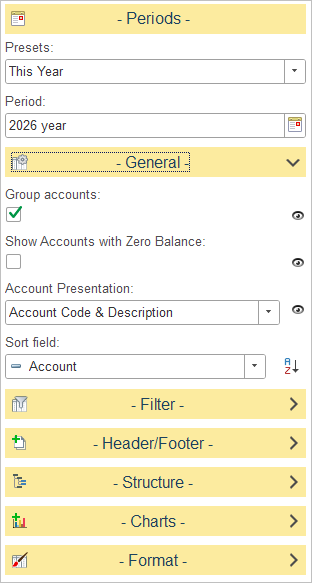
Available settings:
Group Accounts
Controls how accounts are organized in the report.
- Disabled – Accounts are displayed in ascending numerical order, from the lowest account code to the highest.
- Enabled – Accounts are grouped by their account category (Assets, Liabilities, Equity, Income, and Expenses) and further organized into their respective subcategories.
Show Accounts with Zero Balance
Determines whether accounts without balances are included in the report.
- Disabled – Only accounts with a balance are displayed.
- Enabled – All accounts are displayed, including those with zero balances.
Account Presentation
Defines how account information is displayed in the report.
Available options:
- Account Code Only – Displays only the account code.
- Account Description Only – Displays only the account description.
- Account Code & Description – Displays both the account code and the account description.
Trial Balance (Details) #
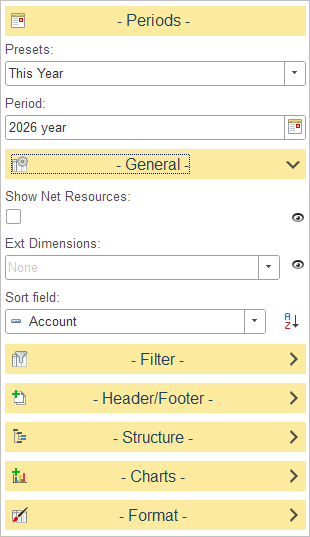
The General settings panel allows users to configure the display and analytical scope of the report:
- Ext Dimensions: A dropdown menu used to select specific extra dimensions for drill-down analysis, allowing for a more detailed breakdown of account information.
- Show Net Resources: A checkbox toggle that, when enabled, includes net resource data in the report output.
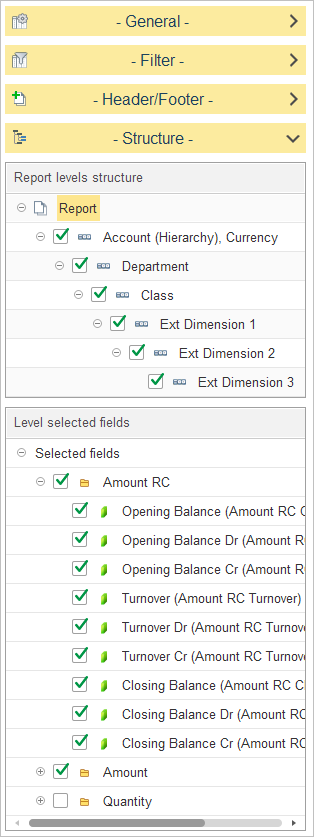
The Structure settings allow users to define the hierarchical organization of data and select the specific financial metrics displayed in the report. This configuration enables a multi-dimensional view of account balances.
Report Levels Structure
This section determines the granularity of the report by defining the grouping hierarchy. You can select or clear the following levels to customize the report’s depth:
- Account (Hierarchy), Currency: The primary grouping, organizing data by the account structure and its associated currency.
- Department: Segments the data by organizational department.
- Class: Further categorizes data based on defined financial classes.
- Ext Dimension 1, 2, and 3: Allows for deep-dive analysis by applying user-defined extra dimensions (e.g., specific projects, regions, or business units) to the hierarchy.
Level Selected Fields
This section allows users to choose the metrics displayed as columns. The report supports three main categories of measurement: Amount RC (Reporting Currency), Amount (Transaction/Base Currency), and Quantity. For each of these categories, the following fields can be enabled to provide a comprehensive view of account activity:
- Opening Balance: The starting balance of the account at the beginning of the reporting period.
- Opening Balance Dr: The opening debit balance.
- Opening Balance Cr: The opening credit balance.
- Turnover: The total movement (debit and credit activity) within the account during the reporting period.
- Turnover Dr: The total debit turnover for the period.
- Turnover Cr: The total credit turnover for the period.
- Closing Balance: The final balance of the account at the end of the reporting period.
- Closing Balance Dr: The closing debit balance.
- Closing Balance Cr: The closing credit balance.
Users may toggle the checkboxes to include or exclude these metrics for any of the three categories—Amount RC, Amount, or Quantity—depending on the analytical focus required.
Advanced filters in Trial Balance #
Users can extend the basic filtering of the Trial Balance by using the advanced filter path: select Add filter – Open selection window – Advanced. Along this path, the report offers access to many additional analytical fields that are not visible in the standard filter list. For example, users can filter by account attributes (non‑taxable accounts; accounts that are subject to exchange rate differences), allowing very precise slices of the Trial Balance for audits, reconciliations, and management analysis.