
The Sales by Location report provides a detailed overview of sales performance segmented by geographic Locations. It displays key sales metrics such as total revenue, Gross Sales, Discount Amount, Cost of Sales, Gross Profit, Gross Margin, Cumulative Revenue and Cumulative Gross Profit, helping users analyze revenue distribution across different sites. This report supports better decision-making by highlighting which Locations contribute most to overall sales, identifying trends, and revealing opportunities for growth or reallocation of resources.
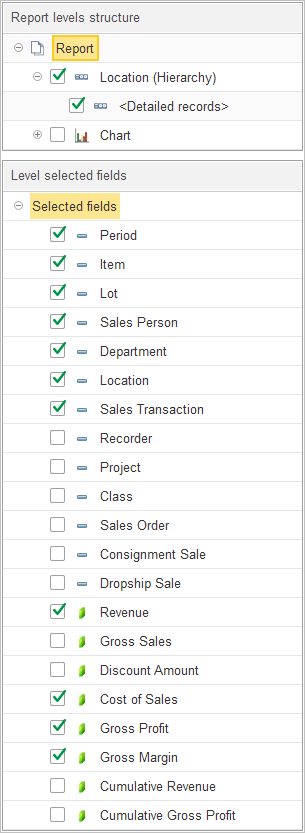
The Report levels structure section enables users to configure the hierarchy of data aggregation for the report.
- Location (Hierarchy): Groups sales data according to the established location hierarchy, facilitating multi-level analysis of regional or departmental sales.
- Detailed records: When enabled, this level provides granular visibility into the specific transactions that constitute the totals for each location.
- Chart: An option to include graphical representations of location-based sales performance.
To customize the report, users may expand the Structure section to include or exclude specific levels via checkboxes or use drag-and-drop actions to reorder the grouping hierarchy.
The Level selected fields section provides the capability to choose the specific data points to be displayed as columns in the report, tailoring the output to specific analytical requirements.
- Key Dimensions and Attributes:
- Period: Displays the time frame for the transaction.
- Item: Identifies the product sold.
- Lot: Displays the lot number associated with the item.
- Sales Person: Indicates the employee responsible for the sale.
- Department: Shows the department associated with the transaction.
- Location: Confirms the location attributed to the sale.
- Sales Transaction: References the specific transaction record.
- Recorder: The name of the document confirming financial transaction
- Class: An additional classification related to the sale’s category.
- Project: Association with any specific project, if applicable.
- Sales Order: Displays the associated sales order number.
- Consignment Sale: Indicates if the transaction is a consignment sale.
- Dropship Sale: Indicates if the transaction is a dropship sale.
- Financial Performance Metrics:
- Revenue: Displays the total revenue generated at the specified location.
- Gross Sales: Shows the total gross sales amount.
- Discount Amount: Displays the value of applied discounts.
- Cost of Sales: Shows the direct costs associated with items sold at the location.
- Gross Profit: Provides the calculated profit after deducting the cost of sales.
- Gross Margin: Indicates the gross margin percentage per location.
- Cumulative Revenue: Displays the running total of revenue.
- Cumulative Gross Profit: Displays the running total of gross profit.
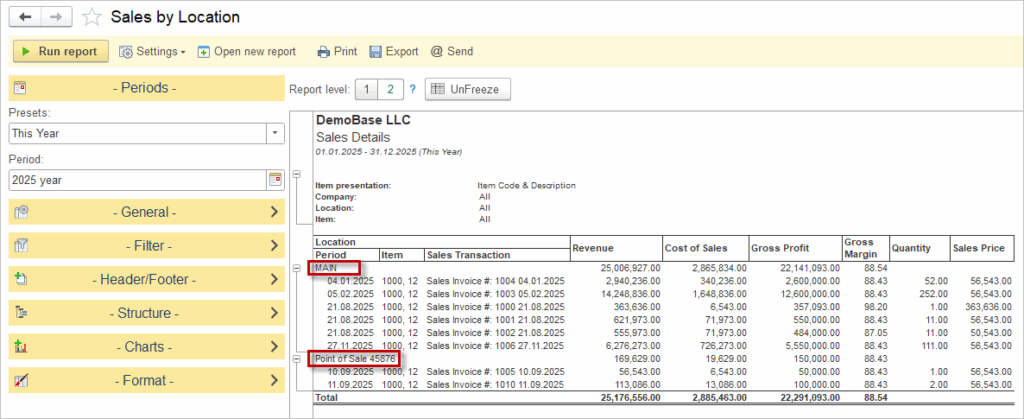
Other sales reports available for performance analysis include Sales by Customer, Sales by Item and Sales by Representative.

If there is an insufficient balance in the current location to sell Items, use the Warehouse Transfer document to move the items between different Locations.