

A separate Tax Adjustment document for all types of taxes will be available in the upcoming AccountingSuite release.
Currently, only the VAT Adjustment document can be deployed.
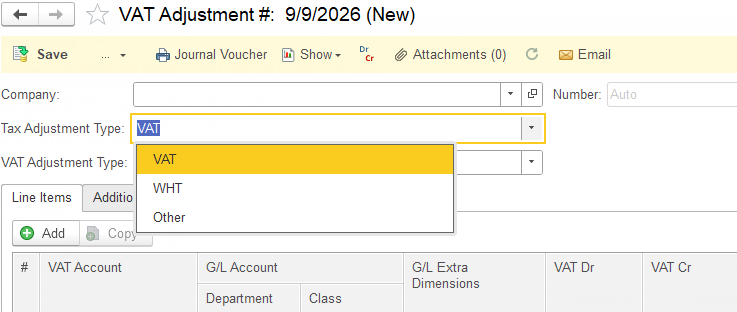
A Tax Adjustment document is a dedicated tool in AccountingSuite for correcting or fine‑tuning previously recorded tax amounts without changing the original invoices or bills. Depending on the tax type, it can be used for VAT, Withholding Tax (WHT) and Other (which covers Excise and Levy) adjustments.
In AccountingSuite, Tax Adjustment is a common name for this functionality. When a user selects a specific tax type, the document header updates to reflect that type, for example:
- VAT Adjustment
- WHT Adjustment
- Other Tax Adjustment (covers Excise and Levy)
This dynamic header makes it clear which tax is being adjusted while keeping a single underlying document type in the system. This document not only effects the G/L accounts, but also makes the required entries in the tax registers and is traceable in the VAT Details report, WHT Details report and Other tax Details report respectively.
Typical high‑level scenarios where you would use a Tax Adjustment document include:
- Correcting tax amounts after invoices/bills have been posted.
- Making period‑end adjustments to align system reports with filed tax returns.
- Reflecting changes in tax rates or rules that apply retroactively.
- Reconciling system‑calculated tax with tax authority returns (VAT, WHT, excise, levy).
- Adjusting tax related to cash discounts or payment corrections.
- Reallocating tax between entities, projects, or cost centers for reporting purposes.
Detailed usage scenarios for each tax type are described in the respective articles: