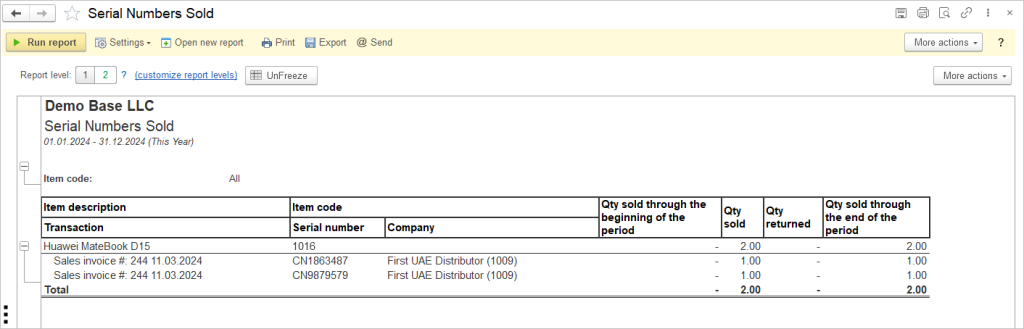
The Serial Numbers Sold report provides a detailed history of sales transactions for serialized inventory items during the selected reporting period. It allows users to track the sale of individual serial-numbered items, review the associated sales documents and customers, monitor quantities sold and returned, and verify the sales history of each serialized item.
Track the sold items with serial numbers, using the Reports – Inventory – Serial Numbers Sold report.
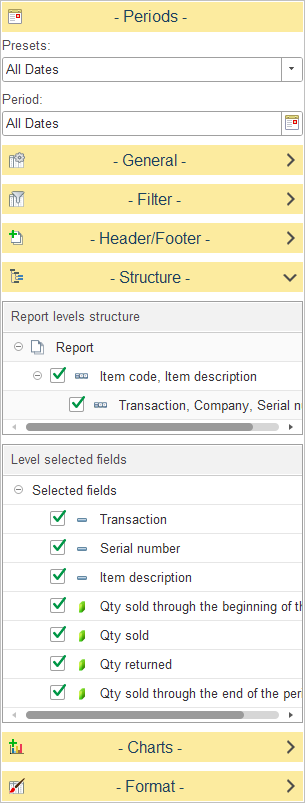
In Report levels structure, select how serialized sales data is grouped in the report.
The default report structure groups data as follows:
- Item Code, Item Description – Groups transactions by inventory item.
- Transaction, Company, Serial Number – Displays the individual sales transaction, the associated customer or company, and the serial number of the item involved in the transaction.
To customize the report structure, expand the Structure section and select or clear the checkboxes next to each level to include or exclude it from the report hierarchy. You can also drag and drop levels to change the order in which data is grouped.
In Level selected fields, choose which columns are displayed for the selected report level.
The available fields include:
- Transaction – Displays the sales transaction document associated with the serialized item.
- Serial Number – Displays the unique serial number assigned to the inventory item.
- Item Description – Displays the description of the inventory item.
- Qty Sold Through the Beginning of the Period – Displays the cumulative quantity sold before the start of the selected reporting period.
- Qty Sold – Displays the quantity sold during the selected reporting period.
- Qty Returned – Displays the quantity returned during the selected reporting period.
- Qty Sold Through the End of the Period – Displays the cumulative quantity sold up to the end of the selected reporting period.