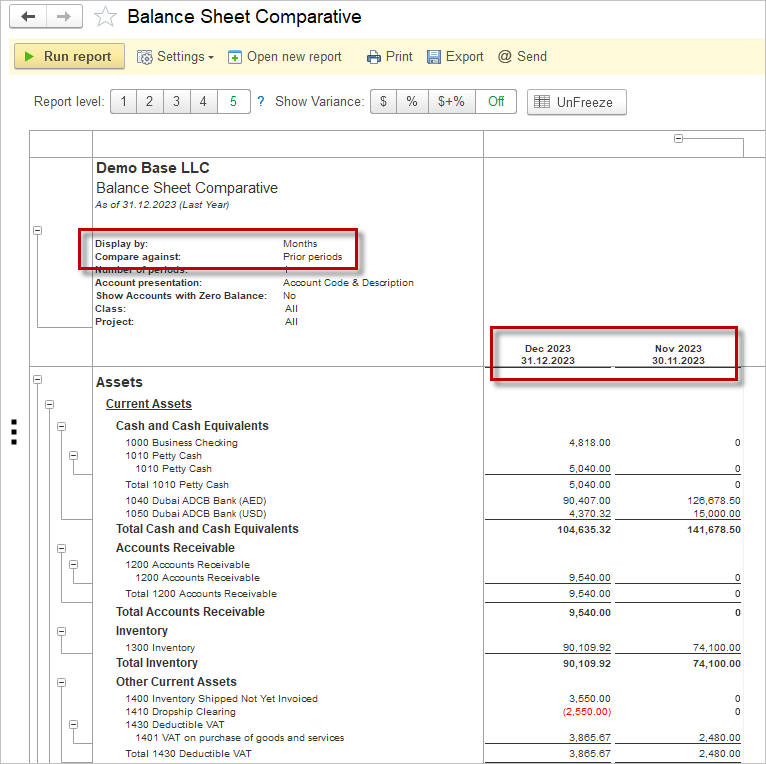
The Balance Sheet presents the financial status of a company using its assets, liabilities and equity. The report presents this for a given moment in time and can be seen as a snapshot of the health of the company. Balance Sheet Comparative represents this snapshot for the last date of the given range in comparison to an earlier date.
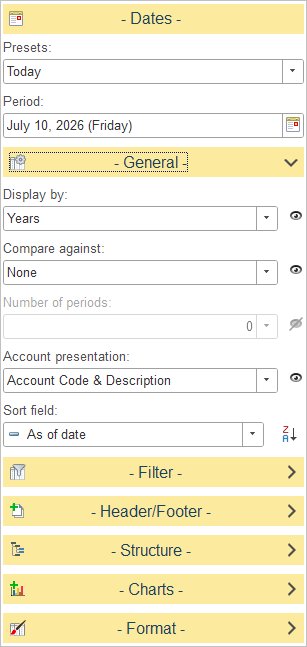
General Settings
The following configuration options are available to tailor the report for comparative analysis:
Display By
Determines how account balances are grouped in the report.
Select one of the available time intervals from the drop-down list. For example, when Years is selected, balances are summarized by reporting year. Other grouping options, such as Days, Weeks, Months and Quarters are available
Compare Against
Allows account balances to be compared with another reporting period.
Select the comparison basis from the drop-down list. When a comparison option is selected, the report displays balances for both the selected period and the comparison period.
Number of Periods
Specifies how many previous periods are included in the comparison.
This option is available only when a comparison method that supports multiple periods is selected.
Account Presentation
Defines how account information is displayed in the report.
Available options:
- Account Code Only – Displays only the account code.
- Account Description Only – Displays only the account description.
- Account Code & Description – Displays both the account code and the account description.