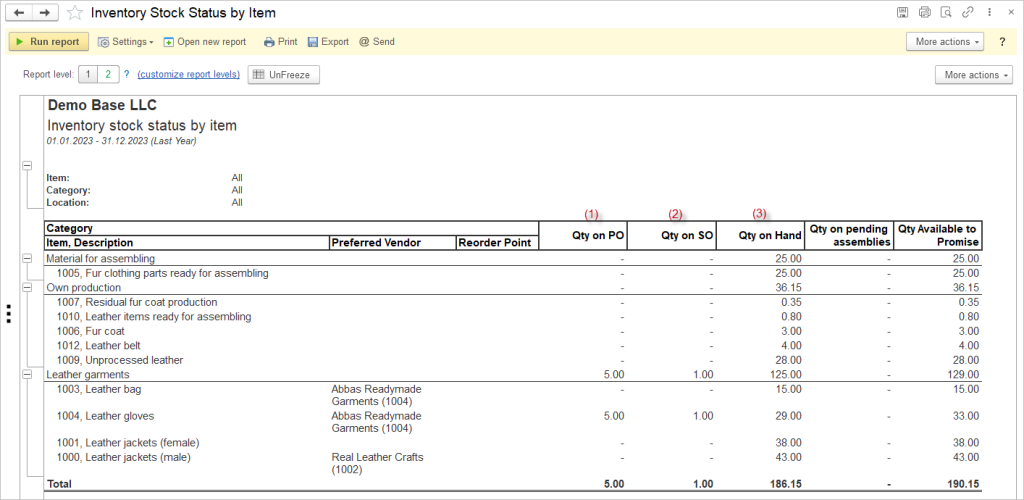
By analyzing stock by item status, you can effectively manage inventory levels to meet customer demand and avoid stockouts. Understanding the quantities on purchase orders (1) helps you anticipate incoming stock, while monitoring quantities on sales orders (2) allows you to prioritize fulfilling customer orders promptly. By optimizing the quantity on hand (3), you can balance supply and demand to minimize carrying costs and maximize operational efficiency.
Analyzing stock by item status empowers you to make data-driven decisions to optimize inventory management and financial performance. By leveraging insights from quantities on purchase orders, sales orders, and hand, you can forecast demand accurately, reduce excess inventory, and improve cash flow. This strategic approach allows you to align your inventory levels with market demand, minimize stock obsolescence, and drive profitability for your business.
Navigate to Reports → Inventory → Inventory Stock Status by Item
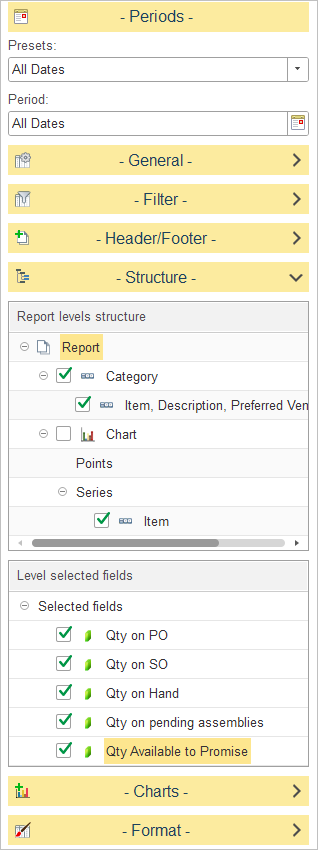
In Report levels structure, select how inventory data is grouped in the report.
The default report structure groups data as follows:
- Category – Displays inventory items grouped by their assigned inventory category.
- Item, Description, Preferred Vendor, Reorder Point – Displays detailed information for each inventory item within the selected category, including the item description, preferred supplier, and the configured reorder point.
The report also includes Chart settings, where Item can be used as the chart series for graphical analysis.
To customize the report structure, expand the Structure section and select or clear the checkboxes next to each level to include or exclude it from the report hierarchy.
In Level selected fields, choose which inventory quantity columns are displayed for the selected report level.
The available fields include:
- Qty on PO – Displays the quantity currently on open purchase orders that has not yet been received.
- Qty on SO – Displays the quantity allocated to open sales orders.
- Qty on Hand – Displays the current physical inventory quantity available in stock.
- Qty on Pending Assemblies – Displays the quantity reserved for assembly orders that have not yet been completed.
- Qty Available to Promise – Displays the quantity available to fulfill new customer orders after considering current stock and existing inventory commitments.