
In AccountingSuite, Department can be used as the highest-level breakdown for where the cost or revenue belongs, Class can split that further by a business line or activity, and Project can track the most detailed, individual job or initiative. This lets you analyze the same transaction from broad to narrow levels. The breakdown should be assigned based on the company’s business structure and reporting needs, from general organizational units to specific operational activities and individual jobs.
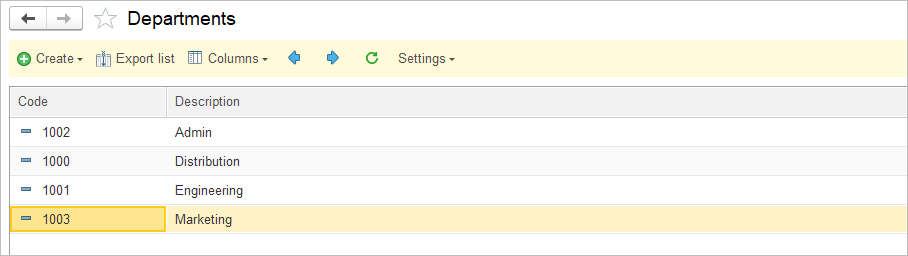

Enable accounting by Department #
- Navigate to Lists – Chart of accounts.
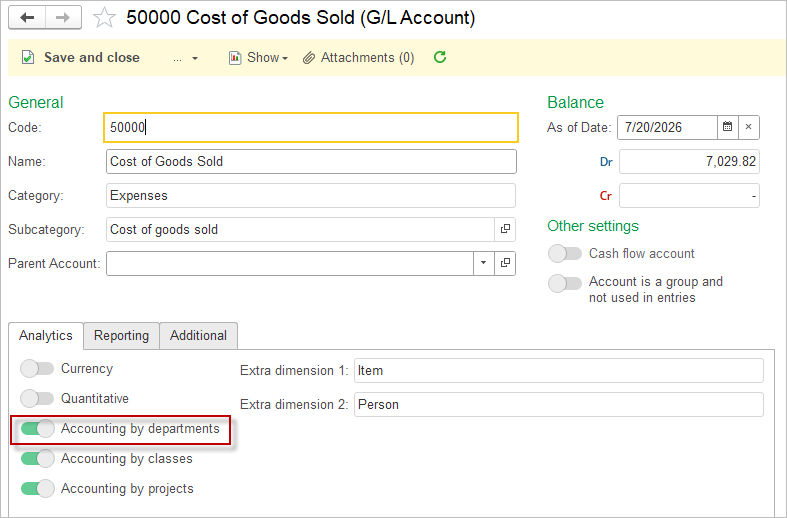
- Open each account, that will be affected by the Department postings and tick the toggle Accounting by departments.
Another option to group transactions are Projects / Jobs and Classes.
Department can be set as Required Attributes in all applicable documents.
Application of the Department in Accounting Entries #
Same rules apply to Project application in accounting entries.
Same rules apply to Class application in accounting entries.
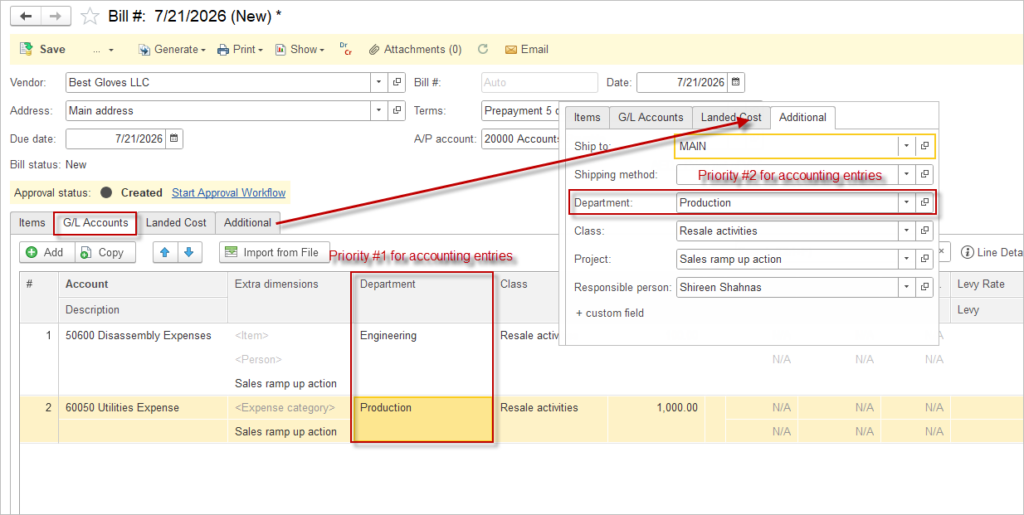
The Department attribute can be entered at different levels within the document. The rule that applies is: lower-level details take precedence over higher-level ones.
This means the following: The Department specified in the header (the Additional tab of the document) flows into the lines of the tabular section. In the line items, the Department can be manually changed or deleted.
In the screenshot below, the Department attribute is set as Production and this is reflected in the line item. However, the user manually changed the Department of line item #1 to Engineering. The Department specified at the line item level takes precedence and will be used in the accounting entries (even if it is empty).
Flexible Department Allocation in Accounting Entries #
In AccountingSuite, the Department attribute can be assigned independently for debit and credit entries within the same transaction. This flexibility allows organizations to reflect different operational dimensions in financial reporting and improve the accuracy of Department-based analysis.
Each accounting entry consists of at least two sides: debit and credit. In AccountingSuite:
- The debit side of a transaction can be assigned one Department.
- The credit side can be assigned a different Department.
This means that a single document can impact multiple Department simultaneously, depending on the business logic and configuration.
Impact on Reporting
Department-based reports (such as Profit & Loss by Department or other analytical reports) rely on the Department assigned at the transaction line level. Because debit and credit lines may carry different Departments:
- Transactions will be split across Departments in reports.
- Each side of the entry contributes to the totals of its respective Department.
- This enables more granular visibility into operational responsibilities and cost allocation.
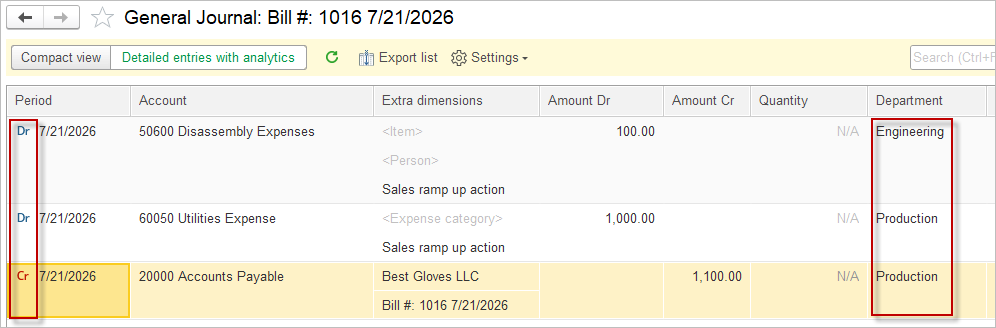
Consider a purchase transaction:
- The debit entry (e.g., inventory or expense account) is assigned to the Department “Engineering”.
- The credit entry (e.g., accounts payable) is assigned to the Department “Production”.
In this case:
- Expenses will appear under the “Engineering” Department.
- Liabilities will be reflected under the “Production” Department.
As a result, reports segmented by Department will show this transaction distributed across both operational areas.
This approach is particularly useful when:
- Different departments are responsible for different aspects of a transaction.
- You need to separate operational costs from administrative or support functions.
- Internal reporting requires multi-dimensional analysis without duplicating transactions.