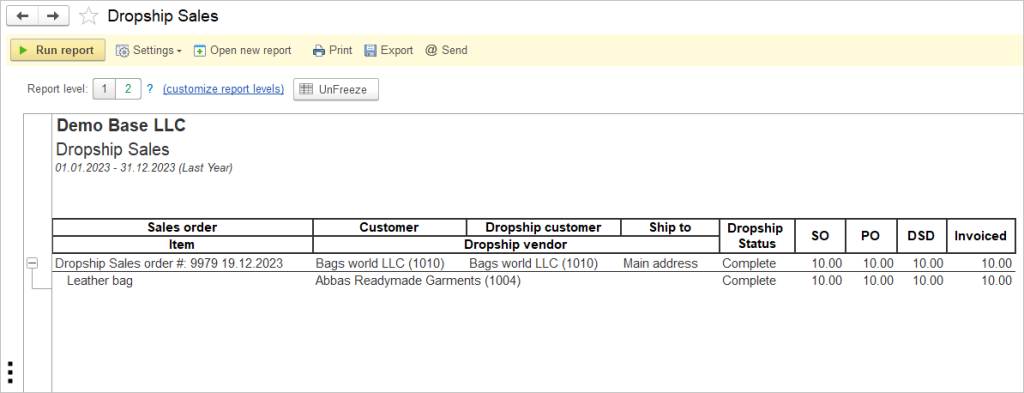
Navigate to Reports →Sales → Dropship Sales.
By analyzing dropship sales, you can identify trends and patterns in customer preferences, allowing you to adjust your product offerings to better meet their needs. This data-driven approach can help you stay ahead of market demands and increase customer satisfaction, ultimately leading to higher sales and repeat business.
Tracking dropship sales can help you pinpoint inefficiencies in your supply chain and logistics processes, enabling you to streamline operations and reduce costs. By optimizing your dropshipping operations based on data insights, you can improve order fulfillment times, minimize shipping errors, and enhance overall customer experience.
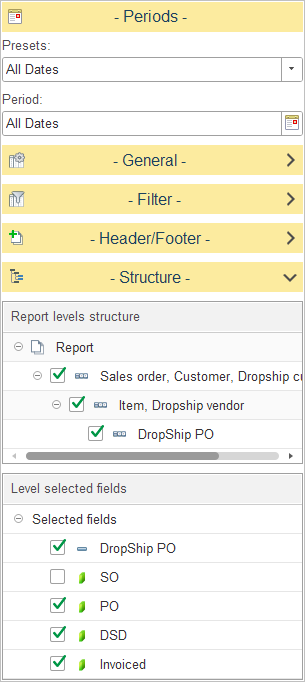
In the Report levels structure section, users can define how dropship sales data is aggregated and displayed. This hierarchical structure enables a drill-down analysis of sales data.
The report offers the following grouping levels:
- Report: The top-level container for all dropship sales data.
- Sales order, Customer, Dropship customer: Groups data by individual sales orders, identifying the specific customer and the designated dropship recipient.
- Item, Dropship vendor: Groups data by the items sold and the respective vendor responsible for fulfilling the dropship order.
- Dropship PO: Groups data by the specific dropship purchase order linked to the transaction.
To customize the hierarchy, expand the Structure section. You may select or clear the checkboxes adjacent to each level to include or exclude it from the report layout. Additionally, you may utilize drag-and-drop functionality to reorder the grouping hierarchy to suit your analytical requirements.
The Level selected fields section allows for the selection of specific data points to be displayed as columns in the report. By toggling the checkboxes, users can determine which metrics are visible in the generated output.
The following fields are available for configuration:
- Dropship PO – the unique identifier for the Dropship Purchase Order associated with the sale.
- SO – the quantity or value associated with the Sales Order.
- PO – the quantity or value associated with the Purchase Order.
- DSD – the data related to the Direct Store Delivery or Dropship status.
- Invoiced – the invoiced amount or status for the transaction.