
You can use this report to:
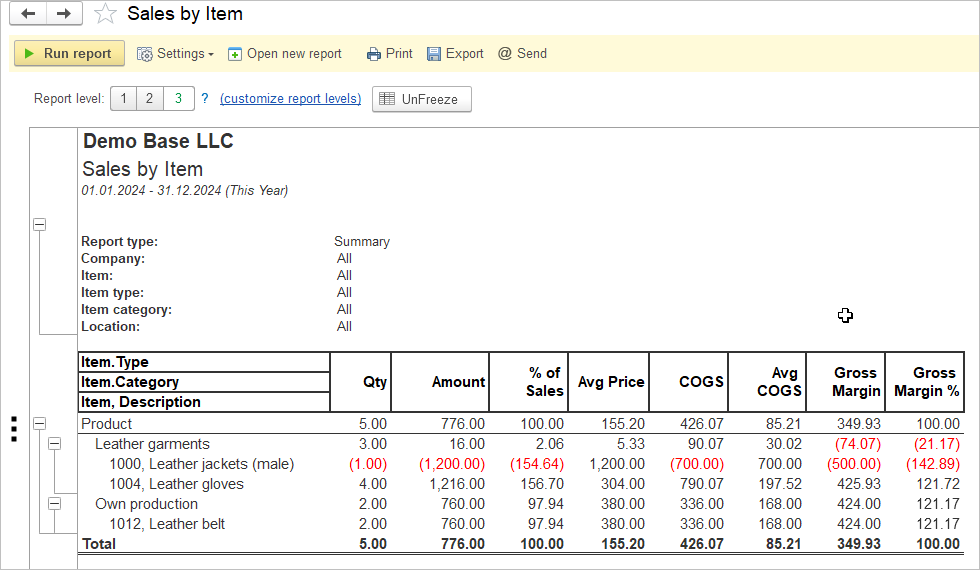
- Identify Profitable and Unprofitable Items: determine which products are generating the most profit and which ones are not performing well. This information helps in making informed decisions about product pricing, promotion, and inventory management.
- Improve Pricing Strategies: understanding the gross margin deviations for different items allows businesses to adjust their pricing strategies accordingly. By focusing on high-margin products and optimizing pricing for low-margin items, maximize the profitability.
- Inventory Management: analyzing sales by item helps in optimizing inventory levels by identifying slow-moving or obsolete items. By focusing on items with high sales volumes and margins, you can better manage theinventory turnover and reduce carrying costs.
Navigate to Reports →Sales → Sales by Item.
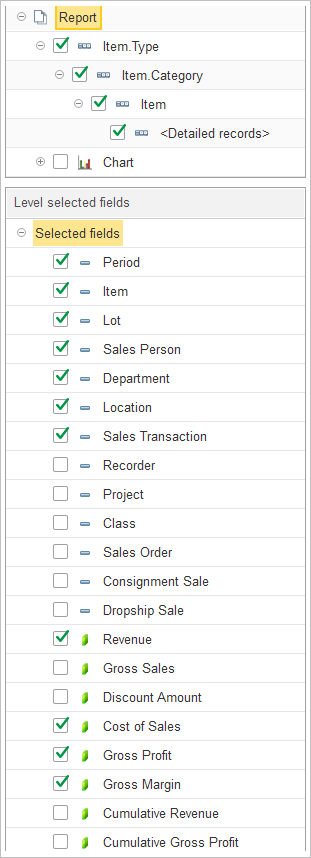
The Report levels structure enables users to configure the hierarchy of the report to suit their analytical needs.
- Item.Type: Groups sales data by the primary type of the item.
- Item.Category: Sub-groups items based on their defined category.
- Item: Provides data specifically for individual items.
- Detailed records: When enabled, displays granular transaction-level details for each item.
- Chart: An option to include visual charts for a graphical representation of sales data.
To customize the report structure, users may expand the Structure section, toggle the checkboxes to include or exclude specific levels, and use drag-and-drop to adjust the grouping order.
The Level selected fields section allows for the selection of data columns to be displayed in the report. Users can toggle the following fields:
- Attributes and Dimensions:
- Period – the time frame of the sale.
- Item – the name or code of the product.
- Lot – the lot number associated with the item.
- Sales Person – the employee responsible for the sale.
- Department – the department associated with the transaction.
- Location – the physical or logical location of the sale.
- Sales Transaction – the specific transaction reference.
- Recorder – the name of the document confirming financial transaction.
- Class – an additional classification related to the sale’s category.
- Project – association with any specific project, if applicable.
- Sales Order – the linked sales order document.
- Consignment Sale – indicates if the item was sold on consignment.
- Dropship Sale – indicates if the item was a dropship transaction.
- Financial Metrics:
- Revenue – the total revenue generated by the item.
- Gross Sales – the gross amount before adjustments.
- Discount Amount – total discounts applied to the sale.
- Cost of Sales – the direct costs associated with the item.
- Gross Profit – profit calculated after deducting the cost of sales.
- Gross Margin – the gross margin percentage.
- Cumulative Revenue – a running total of revenue.
- Cumulative Gross Profit – a running total of gross profit.
Other sales reports available for performance analysis include Sales by Customer, Sales by Location and Sales by Representative.