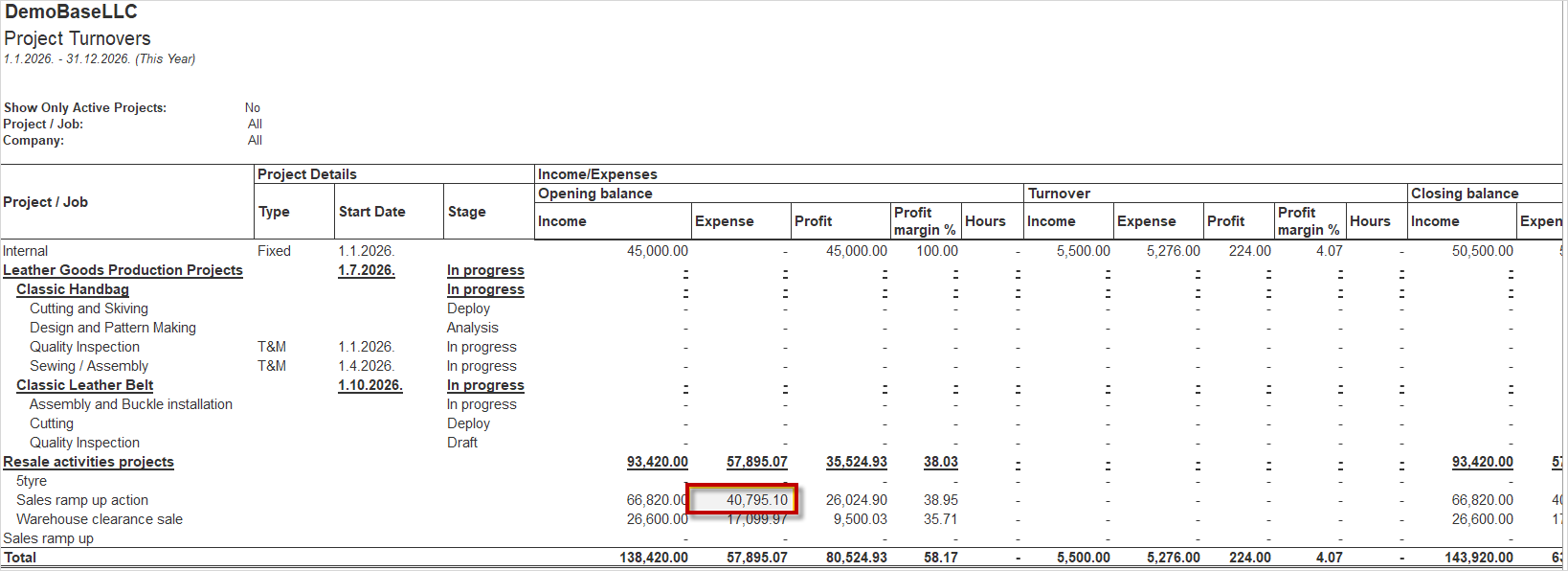
Project Turnovers is a financial report in AccountingSuite designed to provide an overview of financial activity and financial data associated with Project/Job.
The report provides a comprehensive view of a project across three main categories:
- Income / Expenses – Income, Expenses, Profit, Profit margin % and Hours;
- Cash Flow – Incoming, Outgoing and Net Cash Flow;
- Others – Liabilities, Assets, and Other financial values associated with the project.
This structure allows users to review the project’s financial performance, cash movements, and other relevant financial information in one place. Within each category, the data is presented through Opening Balance, Turnover, and Closing Balance, allowing users to review the opening position, activity during the reporting period, and the resulting closing position.
Project Turnovers is primarily intended for financial monitoring, analysis, and reporting of Jobs/Projects, providing a structured overview of Project Income, Expenses, Profitability, Cash flow and Other related financial values. The report is intended as a financial overview of recorded project activity and is not designed for Plan vs. Actual analysis, project budgeting, or advanced KPI-based project controlling, such information can be found in the Project Financial report.
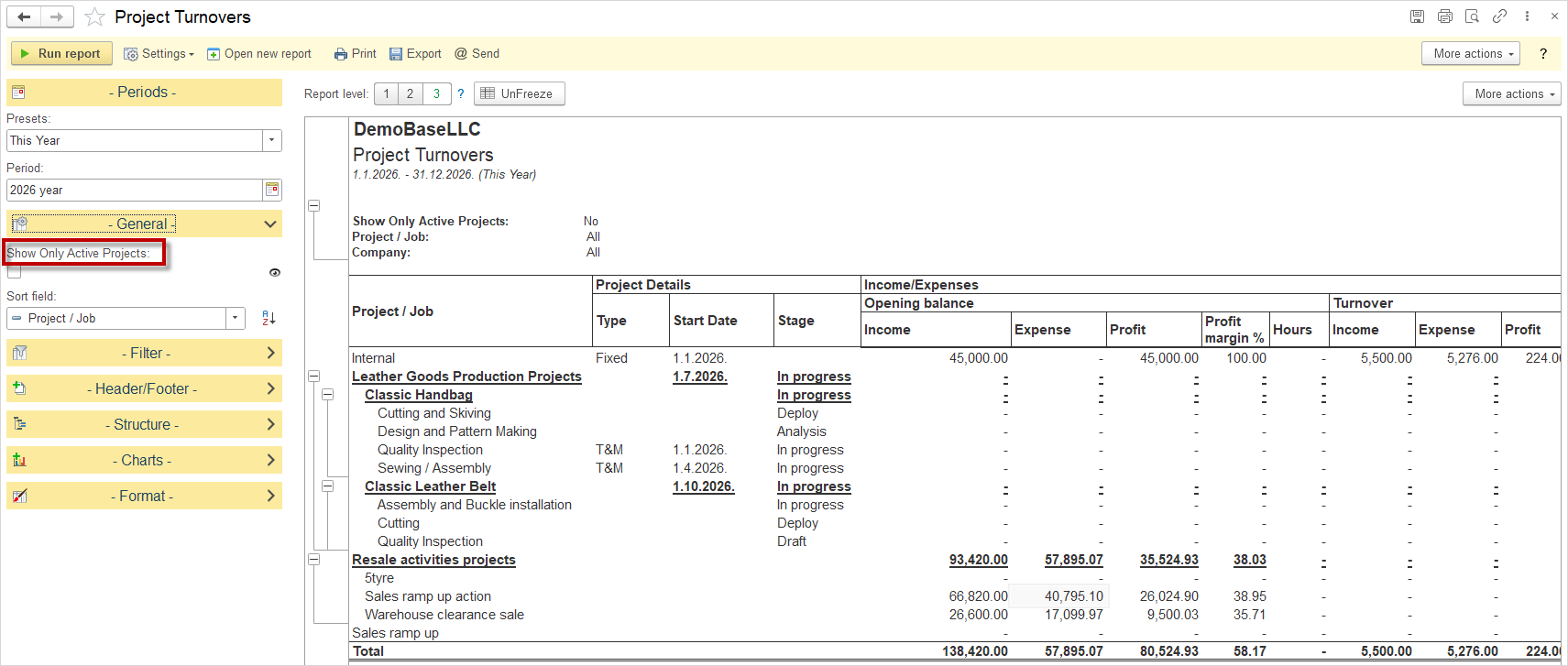
The report provides the Show Only Active Projects option, which is enabled by selecting the checkbox. When this option is enabled, the report displays only active projects, while inactive projects are omitted from the view. This option allows users to focus on projects that are currently in progress and relevant for analysis, thereby simplifying the overview and improving the readability of the report.
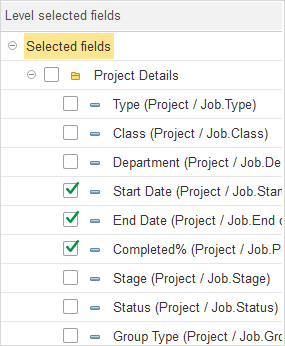
- Project Details
- Type (Project / Job.Type): The type of the project that defines its primary category.
- Class (Project / Job.Class): The project class used for additional classification.
- Department (Project / Job.Department): The department to which the project belongs.
- Start Date (Project / Job.Start date): The date when the project started.
- End Date (Project / Job.End date): The date when the project was completed or is planned to be completed.
- Completed % (Project / Job.Percent Completd): The percentage indicating how much of the project has been completed.
- Stage (Project / Job.Stage): The current stage of the project.
- Project / Job.Group Type: The group type to which the project belongs.
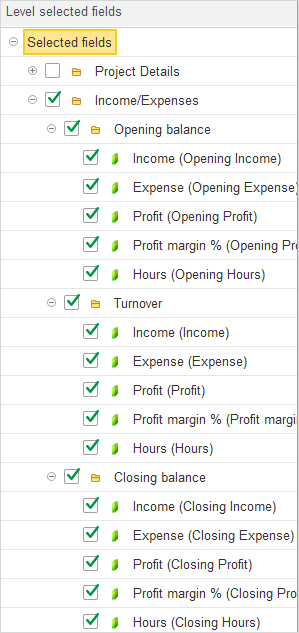
- Income/Expenses
- Opening balance
- Income (Opening Income): The opening balance of income associated with the project at the beginning of the selected period.
- Expense (Opening Expense): The opening balance of expenses associated with the project at the beginning of the selected period.
- Profit (Opening Profit): The opening profit balance, calculated as the difference between opening income and opening expenses.
- Profit margin % (Opening Profit margin): The profit margin calculated based on the opening income and expenses.
- Hours (Opening Hours): The opening balance of total hours recorded for the project.
- Turnover
- Income (Income): Income generated by the project during the selected period.
- Expense (Expense): Expenses incurred by the project during the selected period.
- Profit (Profit): Profit generated during the selected period, calculated as the difference between income and expenses.
- Profit margin % (Profit margin): The profit margin generated during the selected period, expressed as a percentage.
- Hours (Hours): The number of hours recorded for the project during the selected period.
- Closing balance
- Income (Closing Income): The closing income balance, calculated as the opening income plus income generated during the selected period.
- Expense (Closing Expense): The closing expense balance, calculated as the opening expenses plus expenses incurred during the selected period.
- Profit (Closing Profit): The closing profit balance, calculated as the opening profit plus profit generated during the selected period.
- Profit margin % (Closing Profit margin): The profit margin calculated based on the closing income and closing expenses.
- Hours (Closing Hours): The closing balance of total hours, calculated as the opening hours plus hours recorded during the selected period.
- Opening balance
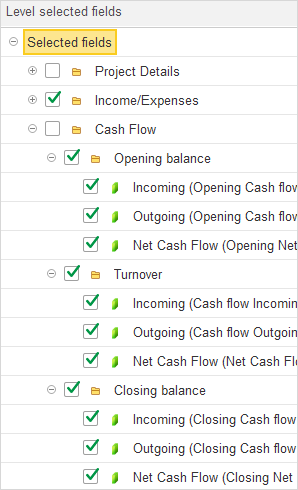
- Cash Flow
- Opening balance
- Incoming (Opening Cash flow): The opening balance of cash inflows associated with the project at the beginning of the selected period.
- Outgoing (Opening Cash flow): The opening balance of cash outflows associated with the project at the beginning of the selected period.
- Net Cash Flow (Opening Net Cash flow): The opening net cash flow, calculated as the difference between opening cash inflows and cash outflows.
- Turnover
- Incoming (Cash flow Incoming): Cash inflows associated with the project during the selected period.
- Outgoing (Cash flow Outgoing): Cash outflows associated with the project during the selected period.
- Net Cash Flow (Net Cash flow): The net cash flow during the selected period, calculated as the difference between cash inflows and cash outflows.
- Closing balance
- Incoming (Closing Cash flow): The closing balance of cash inflows, calculated as the opening cash inflows plus cash inflows during the selected period.
- Outgoing (Closing Cash flow): The closing balance of cash outflows, calculated as the opening cash outflows plus cash outflows during the selected period.
- Net Cash Flow (Closing Net flow): The closing net cash flow, calculated as the opening net cash flow plus the net cash flow during the selected period.
- Opening balance
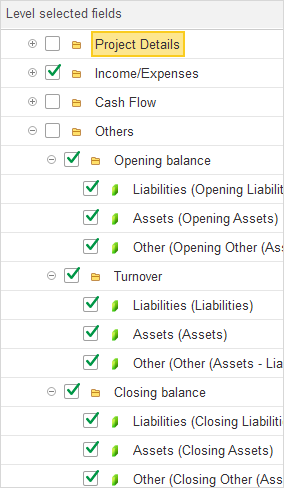
- Others
- Opening balance
- Liabilities (Opening Liabilities): The opening balance of liabilities associated with the project at the beginning of the selected period.
- Assets (Opening Assets): The opening balance of assets associated with the project at the beginning of the selected period.
- Other (Opening Other (Assets-Liabilities)): The opening balance of the difference between assets and liabilities at the beginning of the selected period.
- Turnover
- Liabilities (Liabilities): The change in liabilities associated with the project during the selected period.
- Assets (Assets): The change in assets associated with the project during the selected period.
- Other (Other (Assets-Liabilities)): The change in the difference between assets and liabilities during the selected period.
- Closing balance:
- Liabilities (Closing Liabilities): The closing balance of liabilities, calculated as the opening liabilities plus the change in liabilities during the selected period.
- Assets (Closing Assets): The closing balance of assets, calculated as the opening assets plus the change in assets during the selected period.
- Other (Closing Other (Assets-Liabilities)): The closing balance of the difference between assets and liabilities, calculated as the opening balance plus the change during the selected period.
- Opening balance
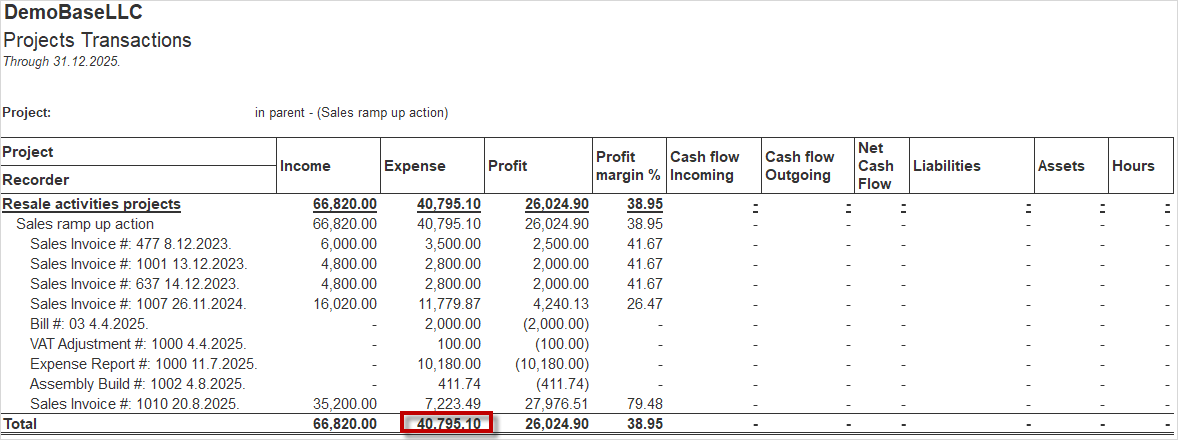
The Project Turnovers report displays summarized amounts for each project, by double-clicking a specific amount or field in the report, it is possible to open the corresponding Project Transaction document, providing direct access to the detailed transaction that contributed to the displayed value.