
Reimbursable miscellaneous refers to expenses you pay on behalf of a customer or client that will be reimbursed to you later. These are pass-through costs – you incur the expense and then bill the customer for reimbursement.
What It Is and When It Occurs #
A reimbursable miscellaneous expense arises during Purchasing when your company pays for goods or services that are ultimately the responsibility of a customer or client. Common examples include travel costs, shipping fees, or third-party services paid on behalf of a client. The key characteristic is that you do not bear the economic burden of the cost – you are simply advancing the payment and will be repaid.
Under IFRS 15 Revenue from Contracts with Customers (B34–B38), if your company acts as an agent (merely arranging for a third party to provide goods or services), you should not recognize the gross reimbursement amount as revenue. Only any commission or fee you earn is revenue. The reimbursable amount itself is a cost recovery, not income. Treating it as revenue would overstate your company’s income.
Recommended Chart of Accounts Setup #
| Code | Name | Category | Subcategory | Parent |
|---|---|---|---|---|
| 14200 | Reimbursable Miscellaneous | Assets | Other current asset | — |
| 80300 | Commission Income | Income | Other income | 80000 Other Income |
How to Purchases the Reimbursable Account #
When entering a vendor Bill in AccountingSuite, you will record the reimbursable expense on the G/L Accounts tab. Follow these steps:
- Navigate to Purchases → Bills and create a new Bill.
- Select the vendor who provided the goods or services.
- On the G/L Accounts tab, add a line for the reimbursable expense.
- For the Account field, select your designated Reimbursable Miscellaneous account. This should be a Balance Sheet account (typically Current Asset), not an Income or Expense account.
- Enter the amount of the expense and set text to Memo field to recognize that after in reports.
- Enter purchased goods on Items tab.
- Post the bill using the standard Accounts Payable account.
The journal entry at this stage is:
- Debit: Reimbursable Miscellaneous
- Credit: Accounts Payable
This records the liability to the vendor and establishes the receivable from the customer.
How to Close the Reimbursable Account #
The Reimbursable Miscellaneous account is closed when you receive payment from the customer in the Cash Receipt or Deposit document:
- Debit: Cash / Bank
- Credit: Reimbursable Miscellaneous
The account is not closed through income or expense. It must be settled either through Cash Receipt or by offsetting against the related Accounts Receivable with Journal Entry.
- Debit: Accounts Receivable
- Credit: Reimbursable Miscellaneous
Use text in Memo field to recognize that closing after in reports.
How to Accrual the Commission #
When you earn a commission or fee on top of a reimbursable expense, the reimbursable portion and the commission portion must be recorded separately:
- Reimbursable portion – stays on the Balance Sheet (Reimbursable Miscellaneous account)
- Commission/fee portion – goes to an Income account (P&L)
Example: You pay a supplier 100 on behalf of a client and bill the client 115 (100 reimbursable + 15 commission).
Under IFRS 15 (B34–B38), only the commission is revenue – never record the full 115 as income.
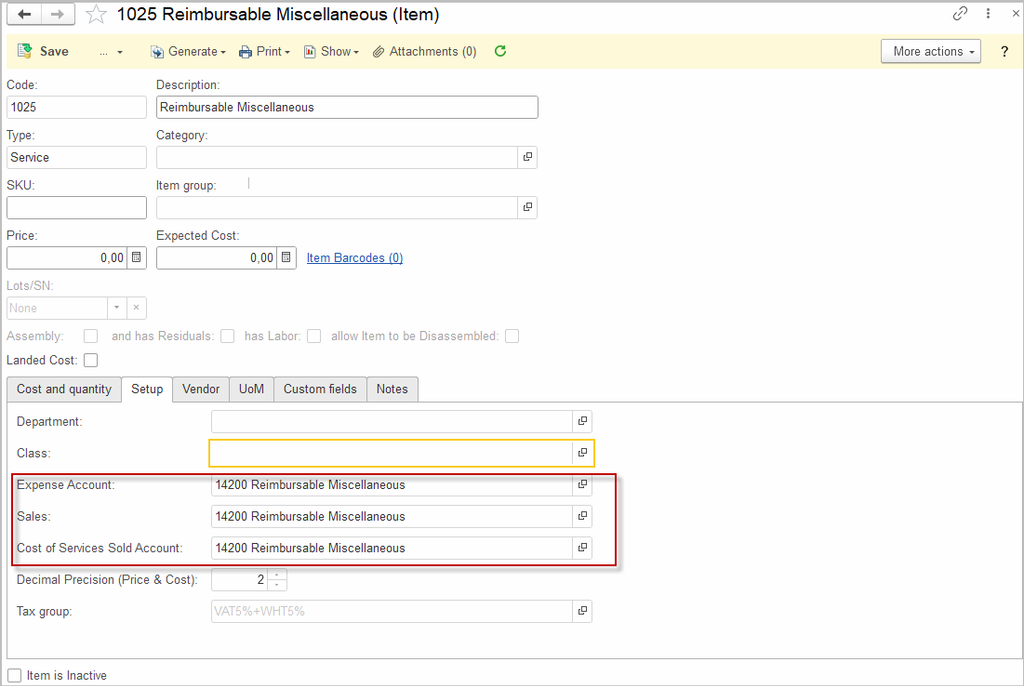
Step 1 – Vendor Bill G/L Accounts tab or Item Reimbursable Miscellaneous with Service type and G/L Reimbursable Miscellaneous:
- Debit: Reimbursable Miscellaneous 100
- Credit: Accounts Payable 100
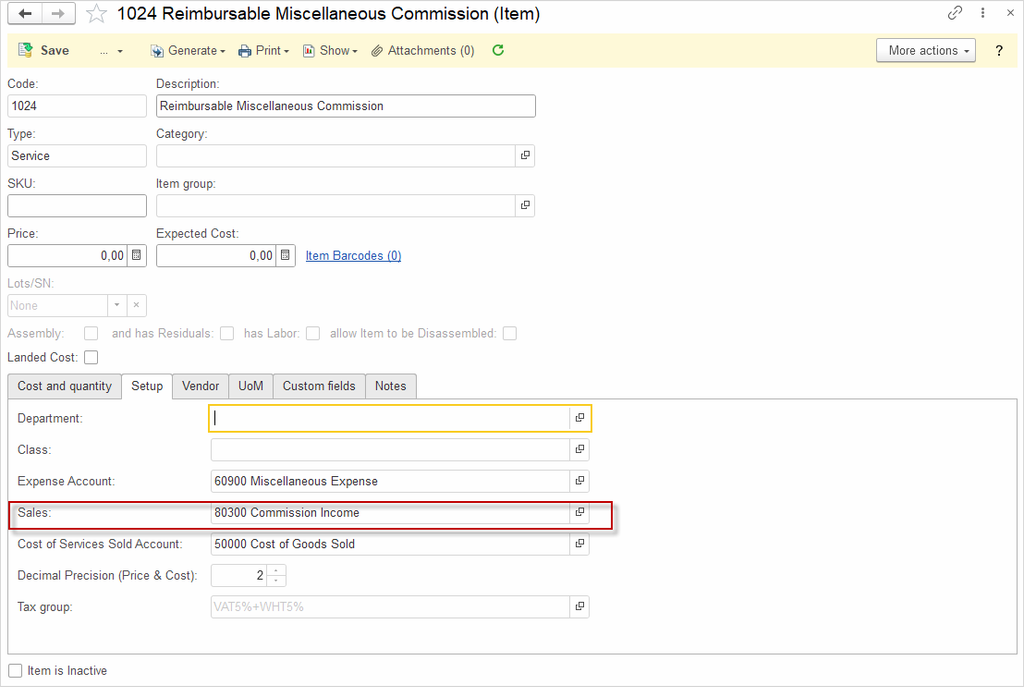
Step 2 – Sales Invoice, Item Reimbursable Miscellaneous Commission with Service type and G/L Account Commission Income and Item Reimbursable Miscellaneous with Service type and G/L Reimbursable Miscellaneous:
- Debit: Accounts Receivable 115 + VAT
- Credit: Reimbursable Miscellaneous 100
- Credit: Commission Income 15
- Credit: VAT (optional, if applicable to Commission and Reimbursable Miscellaneous)
Step 3 – Receive payment from customer with Cash Receipt:
- Debit: Cash / Bank 115
- Credit: Accounts Receivable 115
The Reimbursable Miscellaneous account clears to zero, and only the 15 commission remains in the P&L as revenue. Use the Memo field on each line to identify the transaction in reports.
Item Reimbursable Miscellaneous with Service type and G/L Reimbursable Miscellaneous.
Item Reimbursable Miscellaneous Commission with Service type and G/L Account Commission Income
You may use alterative short scheme:
If there are no taxes on reimbursed expenses and auditors in your country allow such entries.
Step 1 – Vendor Bill G/L Accounts tab:
- Debit: Reimbursable Miscellaneous 100
- Credit: Accounts Payable 100
Step 2 – Sales Invoice, Item Reimbursable Miscellaneous Commission with Service type and G/L Account Commission Income:
- Debit: Accounts Receivable 15 + VAT
- Credit: Commission Income 15
- Credit: VAT (optional, if applicable to Commission)
Step 3 – Receive payment from customer with Deposit G/L Accounts tab:
- Debit: Cash / Bank 115
- Credit: Accounts Receivable 15
- Credit: Reimbursable Miscellaneous 100
Where to View the Balance #
You can track the current balance of your Reimbursable Miscellaneous account in two financial reports:
- Trial Balance: Lists the ending balance of every General Ledger account at a specific point in time, showing both debit and credit balances.
- General Ledger: Displays the opening and closing balances of accounts, along with the detailed debit and credit transactions for each account.
Both reports allow you to verify that the Reimbursable Miscellaneous account is clearing properly and that no amounts remain outstanding longer than expected.