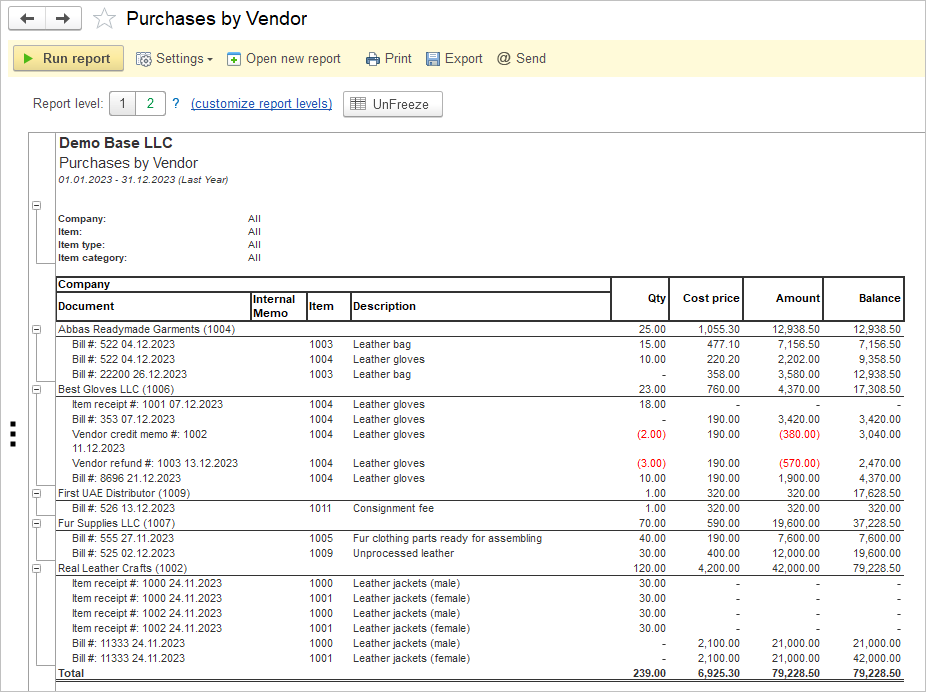
By analyzing purchases by vendor, you can identify which vendors are providing the best value for your business. This information allows you to cultivate stronger relationships with key vendors, negotiate better terms, and ensure consistent quality and reliability in your supply chain.
Understanding purchasing patterns by vendor helps you pinpoint opportunities for cost savings and efficiency improvements. By consolidating purchases with preferred vendors, you can leverage volume discounts, reduce administrative costs, and streamline procurement processes to optimize your overall purchasing strategy.
Analyzing purchases by vendor enables you to mitigate risks associated with vendor dependencies and disruptions. By diversifying your vendor base and monitoring performance metrics, you can proactively address issues, strengthen your supply chain resilience, and ensure continuity of supply to meet customer demand effectively.
Navigate to: Reports → Purchases → Purchsases by Vendor
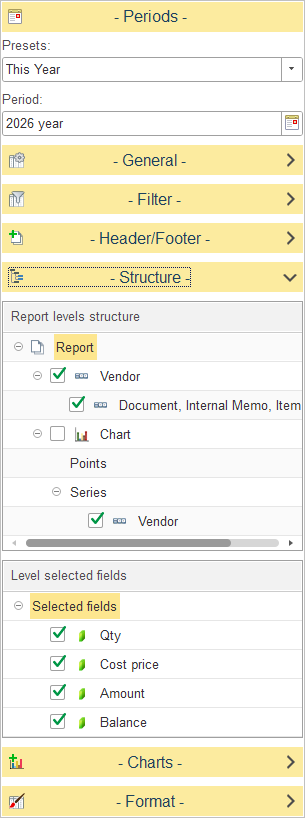
In Report levels structure, select how purchase data is grouped in the report.
The default report structure groups data as follows:
- Vendor – Groups all purchasing transactions by vendor.
- Document, Internal Memo, Item – Displays the individual purchasing documents for each vendor, including the related internal memo and purchased item.
To customize the report structure, expand the Structure section and select or clear the checkboxes next to each level to include or exclude it from the report hierarchy. You can also drag and drop levels to change the order in which data is grouped.
The Chart section allows you to configure graphical analysis of the report. When Vendor is selected as a series, charts summarize purchasing data by vendor.
In Level selected fields, choose which numeric columns are displayed for the selected report level.
The available fields include:
Balance – Displays the cumulative purchase value for the vendor after each transaction.
Qty – Displays the quantity purchased.
Cost Price – Displays the unit purchase cost.
Amount – Displays the total amount of the purchasing transaction.