
The Personal Income Tax Amounts list is designed to store personal income tax rates and related parameters, which can be specified for a particular employee or left blank to apply to all Employees, and these rates are then used when calculating PIT in the Payroll document.

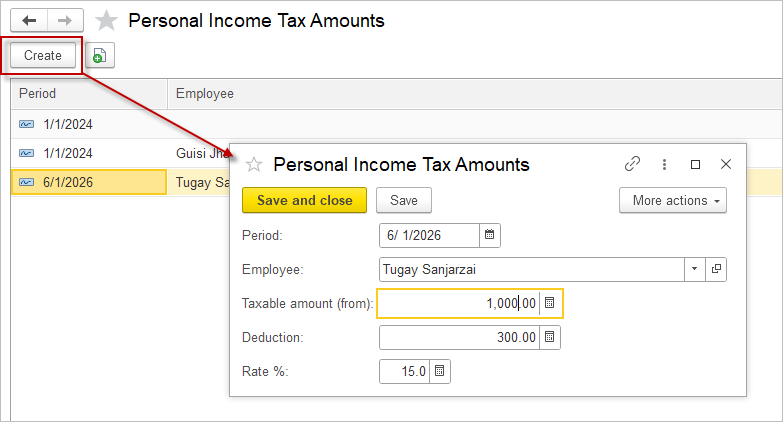
Create a new Personal Income Tax entry #
- Navigate to Payroll – Personal Income Tax.
- Click Create.
- Select the effective date for this tax setting.
- Choose the employee from the drop‑down list. If the Employee is not specified, the rate will be applied to all Employees.
- Enter the minimum income from which this tax rate is applied in the Taxable amount (from) field.
- Enter the Deduction amount that reduces the taxable base.
- Enter the personal income tax rate as a percentage.

Support for calculating progressive Personal Income Tax (PIT) will be available in AccountingSuite in an upcoming release. This functionality is currently under development and is not yet active in the system.
Until this feature is delivered, users who are required to apply progressive PIT should calculate PIT outside of AccountingSuite (for example, in an external payroll or spreadsheet tool) and then import the resulting payroll document into AccountingSuite.
Users are responsible for verifying that all PIT calculations, rates, thresholds, and deductions comply with the applicable legislation and internal company policies.