
The Project Analysis Report provides a comprehensive financial overview of turnover at the project level, with the option of detailed segmentation by Chart of Accounts, Class, and Extra Dimensions. The report presents, in a single view, how funds have moved through each project – separately tracking the debit and credit sides of business transactions.
A key feature of this report is the simultaneous presentation of turnover in two currencies:
- the reporting currency, which enables uniform comparison of all projects regardless of their place of operation, and
- the original currency, which preserves the actual transaction amount exactly as it was posted.
In this way, the user obtains both a stable framework for aggregation and insight into the actual monetary value of each individual transaction.
To use Project Analysis report navigate to Project & Time → Projects and Time Reports → Projects Analysis
In addition to the project information, account, class, and extra dimensions (which are explained in detail via interactive links within the report itself), the Project Analysis Report also presents financial data grouped into two key contexts – Amount RC and Amount. Both contexts contain the same types of data: debit turnover (Turnover DR) and credit turnover (Turnover CR). The difference between the two contexts lies in the currency in which these amounts are expressed.
Data shown within the Amount RC group is expressed in the reporting currency. The reporting currency is a single, predefined reporting currency (e.g., euro or US dollar) applied to all projects, regardless of the currency in which transactions were originally recorded. Each transaction is converted into the reporting currency at the exchange rate valid on the posting date.
- Turnover DR (Amount RC) – Total debit turnover expressed in the reporting currency. The debit side indicates an increase in costs, assets, or receivables, or a decrease in liabilities.
- Turnover CR (Amount RC) – Total credit turnover expressed in the reporting currency. The credit side indicates an increase in revenue, liabilities, or equity, or a decrease in assets.
Thanks to the presentation in the reporting currency, users can directly compare the financial results of different projects without the impact of exchange rate fluctuations, as well as aggregate data at the portfolio level.
Data shown within the Amount group is expressed in the original currency – the currency in which each transaction was originally created and posted. For example, an invoice from a supplier in the United Arab Emirates will be shown in dirhams (AED), while a payment to a supplier in the United States will be shown in US dollars (USD). These amounts are not subject to any conversion and represent the actual posted value.
- Turnover DR (Amount) – Total debit turnover expressed in the original currency. The meaning of the debit side corresponds to that described for the reference currency, with the difference that the amount is not converted.
- Turnover CR (Amount) – Total credit turnover expressed in the original currency. It allows users to see the actual cash flow as it occurred in the business unit.
The presentation in the original currency is particularly important for multi-currency operations, as it enables verification against the primary accounting records, as well as insight into the effects of exchange rate differences when compared with amounts in the reporting currency.
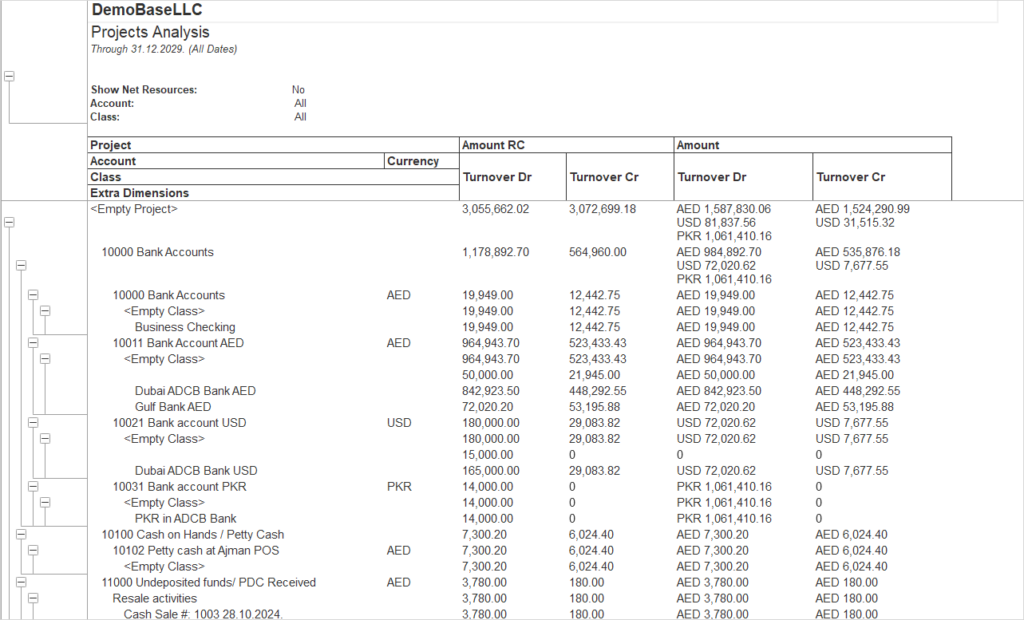
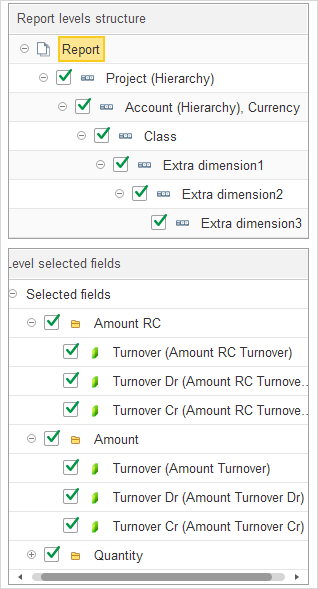
The report structure defines a multi-level grouping and the list of fields shown in the detailed lines.
- The top level of the report groups data by Project, which separates main sections according to Project hierarchy.
- Within each Project, data is further grouped by Account (according to account hierarchy), and then by Currency.
- After Currency, data is grouped by Class, then by Extra dimension 1, then by Extra dimension 2, and finally by Extra dimension 3. Detailed records are displayed inside this last level.
- The detailed records level includes the following fields: Amount RC Turnover, Amount RC Turnover Dr, Amount RC Turnover Cr, Amount Turnover, Amount Turnover Dr, Amount Turnover Cr, Quantity Turnover, Quantity Turnover Dr, Quantity Turnover Cr.