
The Period Closing is a systematic tool designed to guide users through the process of closing accounting periods. This procedure is a critical component of the financial closing cycle, as it ensures the integrity, accuracy, and finality of financial data by restricting further modifications to transactions within closed periods. Regular period closing is essential for maintaining reliable financial records and enabling timely and accurate financial reporting. By closing accounting periods, organizations can prevent unauthorized or unintended changes to historical data, thereby safeguarding the consistency of financial statements and supporting compliance with statutory reporting requirements and internal accounting policies.
Closing the books is a critical but often time-consuming process. AccountingSuite’s Period Closing tools are built to help finance teams achieve a faster, more reliable close – moving towards a “Zero-day close” ideal. The system provides a structured framework that guides you through closing sequences, automates key operations, and ensures the finality and integrity of your financial data.
At its core, the Period Closing functionality allows you to automate essential tasks such as closing income and expense accounts, registering exchange differences, and calculating depreciation according to your chosen schedule. The integrated wizard provides a step-by-step interface, giving you complete oversight. By automating these repetitive but vital steps, you minimize manual errors, safeguard historical data, and free your team to focus on analysis rather than routine tasks.
The following section presents a BPMN diagram that illustrates the process flow of Closing the Books.
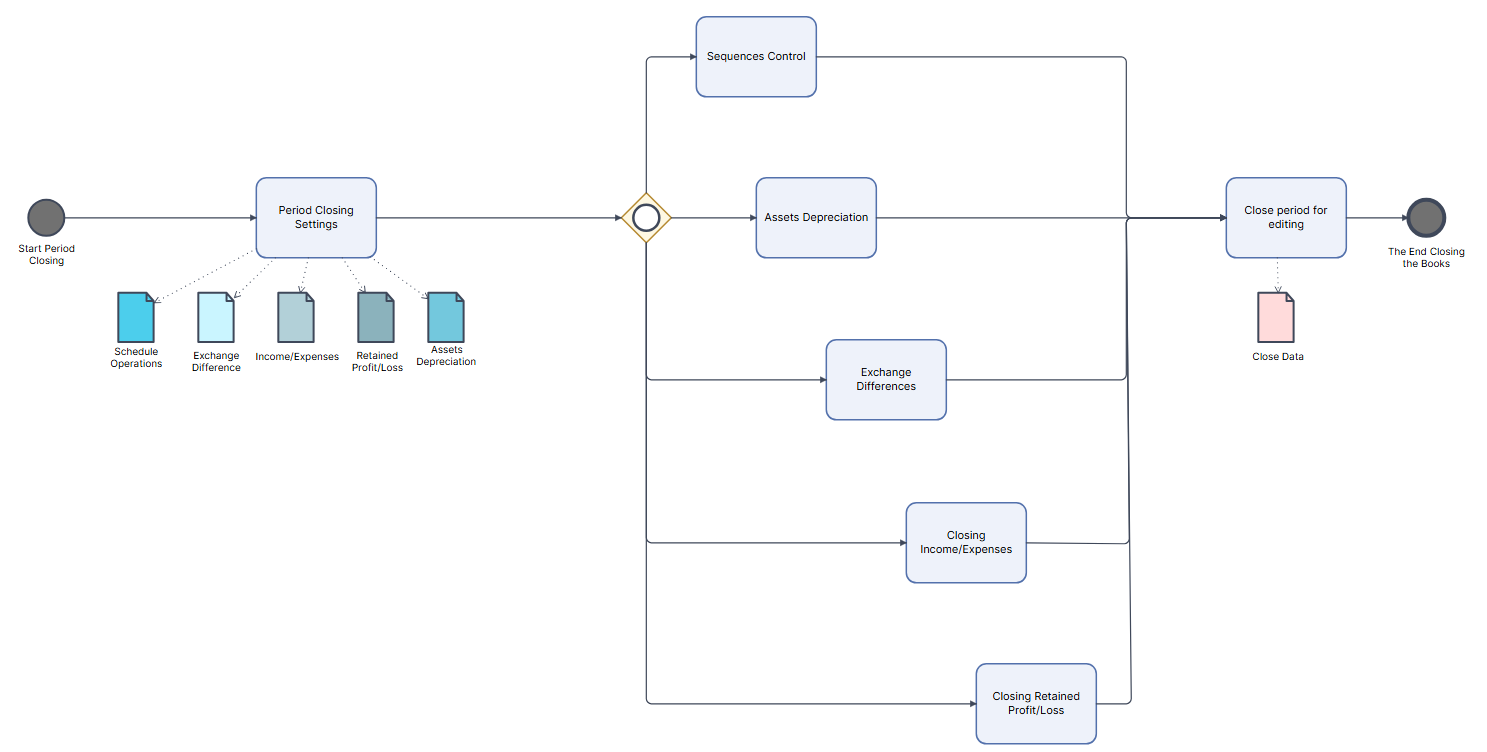
Period Closing Settings #
The following settings enable the automation of key period-end closing operations. They determine the frequency at which revenue and expense accounts are closed and the frequency at which the resulting net profit or loss is transferred to the retained earnings account. Proper configuration of these parameters is essential to ensure that the financial closing process is executed in accordance with both internal accounting policies and applicable statutory reporting requirements.
Navigate to Accounting → Period closing → More actions → Period Closing Settings
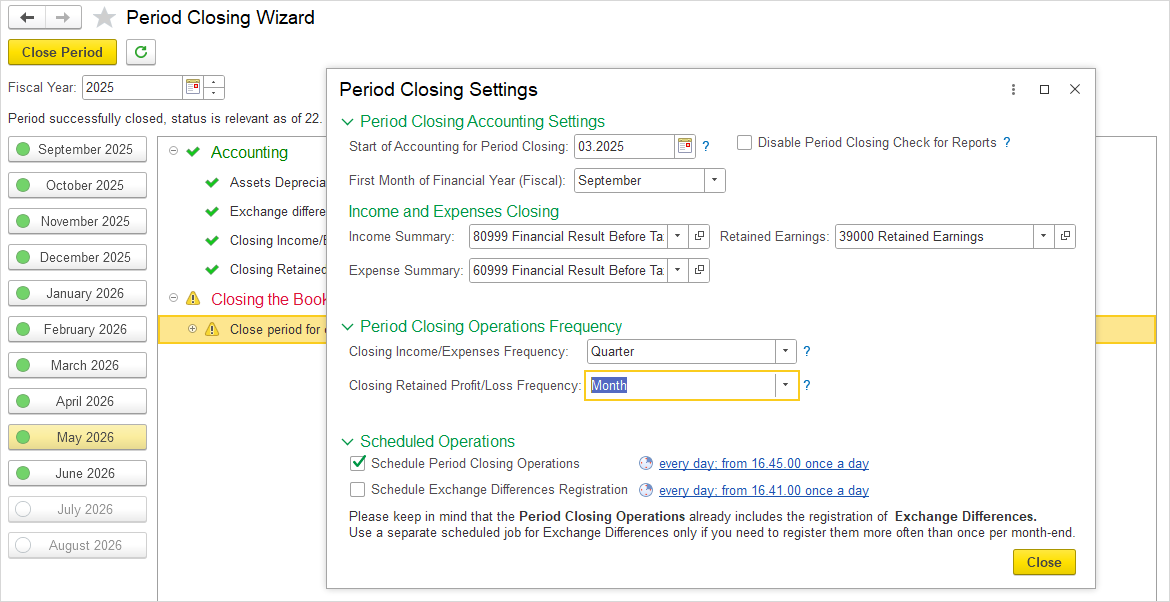
Period Closing Accounting Settings #
The Period Closing Accounting Settings section allows for the configuration of the starting point for permitted postings, the establishment of the fiscal year calendar, and the adjustment of report generation behavior in accordance with organizational requirements.
- Start of accounting for period closing – Defines the accounting period from which postings are allowed. All periods prior to this date are considered closed and are not available for transaction entry.
- First month of financial year (fiscal) – Defines the starting month of the business year. Based on this setting, the system determines date ranges for financial reports generated for the current fiscal year.
- Disable period closing check for reports – Skips the verification of period closure status during report generation. When this option is enabled, reports can be generated for periods that are not yet closed, thereby allowing for the review of financial data prior to the finalization of the closing process.
Period Closing Operations Frequency #
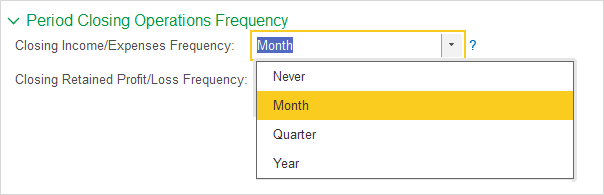
The frequency of Closing Income/Expense accounts determines the periodic interval at which their balances are transferred to the profit/loss summary account. The following options are available:
- Never – closing is not performed automatically; the procedure may be carried out manually as required.
- Monthly – closing is performed at the end of each calendar month.
- Quarterly – closing is performed at the end of each fiscal quarter.
- Year– closing is performed exclusively at the end of the fiscal year.
Closing Retained Profit/Loss Frequency #
The frequency of Closing Retained Profit/Loss determines the periodic interval at which the net result (profit or loss) is transferred from the profit/loss summary account to the retained earnings account. The following options are available:
- Never – the transfer is not performed automatically.
- Monthly – the transfer is performed at the end of each calendar month.
- Quarterly – the transfer is performed at the end of each fiscal quarter.
- Year – the transfer is performed exclusively at the end of the fiscal year.
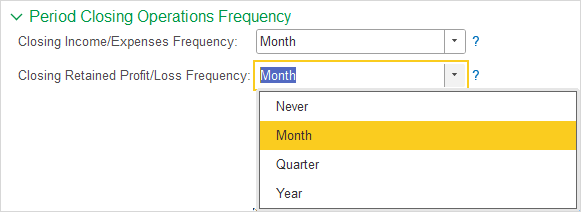
The selected frequencies determine the periodicity of financial closing and directly impact the availability of financial statements for specific reporting periods. It is recommended to align these settings with statutory reporting requirements and internal accounting policies.
Scheduled Operations #
This tab provides Scheduling options for automated period‑end processes. The following operations can be configured to run at predefined intervals:
- Schedule period closing operations – Schedules the automatic execution of period closing operations, including the closure of income and expense accounts, the transfer of net results to retained earnings, the calculation of depreciation, and the registration of exchange differences.
- Schedule exchange difference registration – Schedules the automatic registration of exchange differences as a standalone operation.
Both options can be configured to run daily, weekly, or monthly, with the ability to specify exact dates, start times, and repetition patterns.
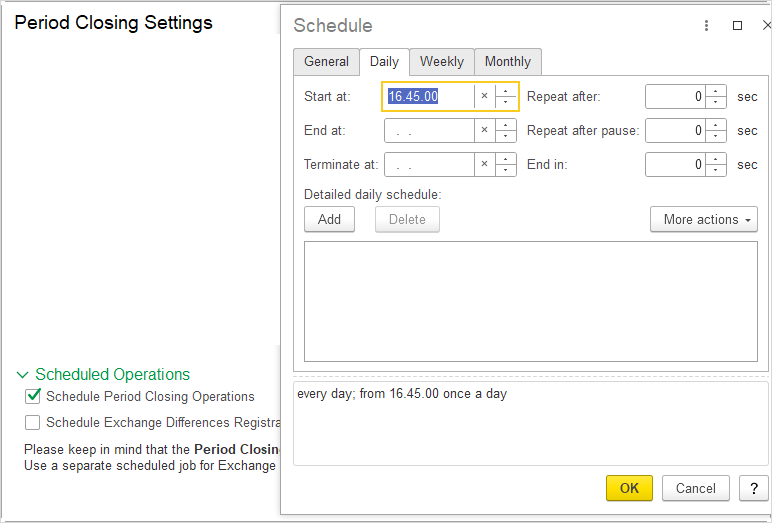
The Period Closing Operation already includes the registration of Exchange Differences. A separate scheduled job for Exchange Differences should only be used if there is a business requirement to register them more frequently than once per month‑end.
Period Closing Wizard #
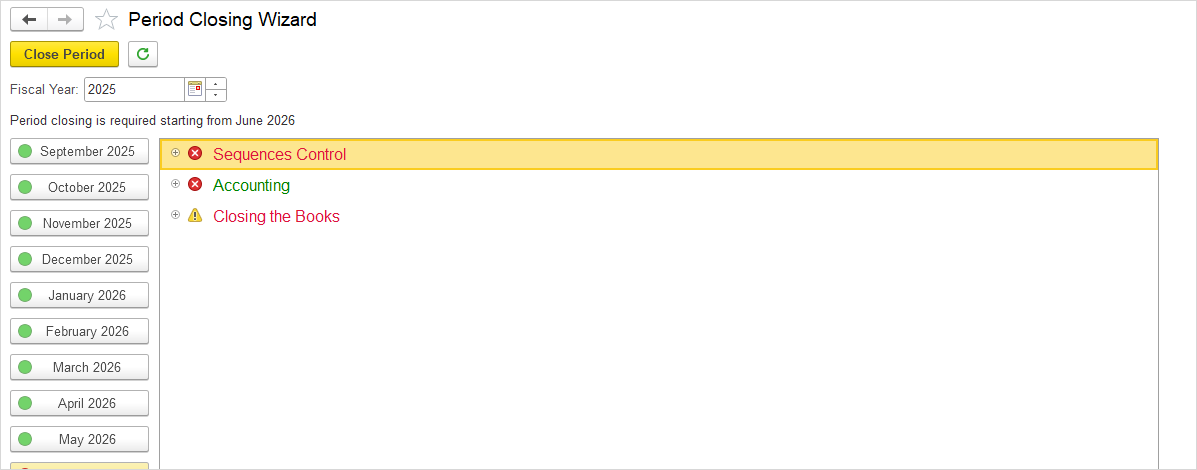
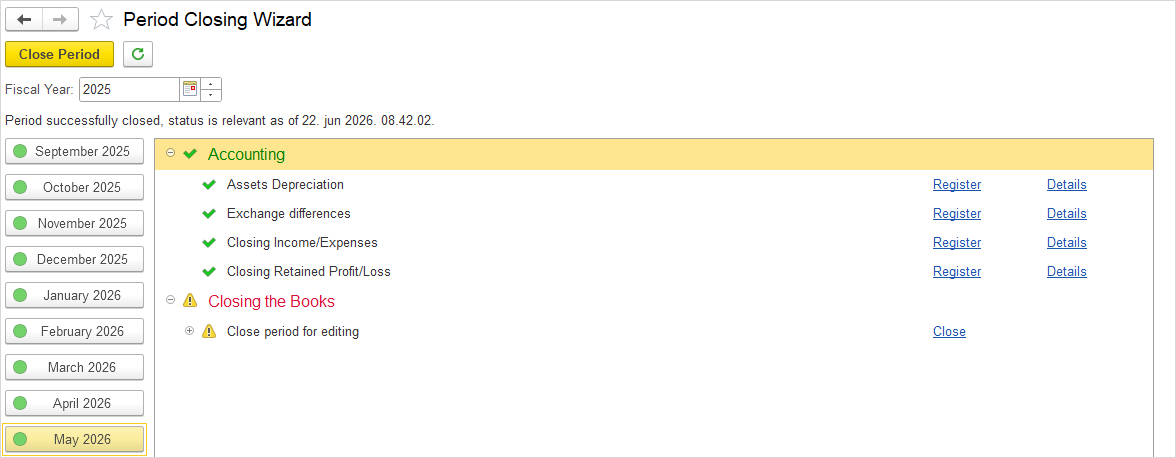
The Period Closing Wizard provides a step-by-step interface for executing the period-end closing process. This wizard consolidates all necessary closing operations into a single workflow, guiding users through sequence control, accounting verifications, and the final closure of the books.
Navigate to Accounting > Tools > Period Closing
The Period Closing Wizard is divided into three sections:
- Sequences Control
- Accounting
- Closing the Books
Sequences Control #
This step is used for closing a month or period, as well as for re-establishing the correct state after changes have been made to documents within a Closed period. During regular month-end closing, clicking Restore performs the posting of all transactions within the selected period and closes it. In the event that a document belonging to a closed period has been modified (e.g., a bill has been reverted to draft status and saved again), the system detects that all subsequent periods from the date of modification onward are affected by this change and marks them as unclosed. Clicking Restore performs reposting of all transactions from the date of modification to the selected period, thereby closing the period again.
Clicking the Restore button opens the Transactions Sequence Control screen, where the system displays the number of transactions that will be reposted. The date range is predefined from the beginning of the period being closed (or from the date of modification) to the end of the current month.The user has the option to select the period up to which they wish to perform the posting.
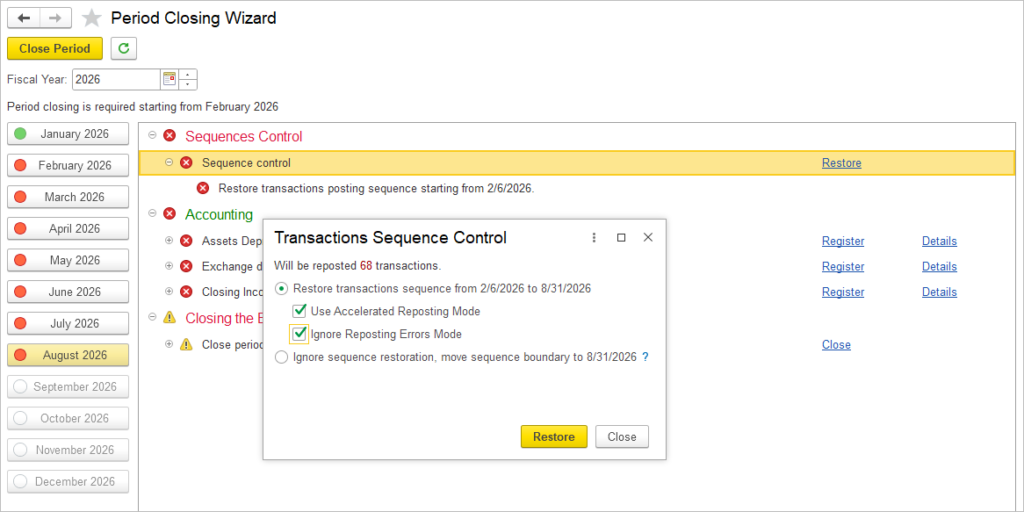
Two options are available:
1. Restore transactions sequences from [displayed date] to [selected month] – confirms the posting of transactions for the selected time range and closes the period
Use Accelerated Reposting Mode – When enabled, the system temporarily disables BackOrdering statuses update before posting documents. This reduces the time required for:
- Posting purchase and sales documents.
- Recalculating document statuses.
- Processing related reposting operations.
The option is recommended for scenarios where faster document processing is required.
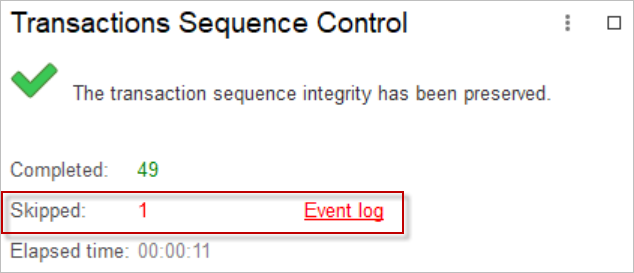
Ignore Reposting Errors Mode – When enabled, the system skips documents that cannot be reposted and displays the number of successfully reposted and skipped documents after sequence restoration, with an Event Log link for reviewing and manually correcting the failed documents.
2. Ignore sequence restoration, move sequence boundary to – cancels the posting, whereby the sequence boundary is moved so that transactions through the end of the current period are considered correct

Please note: Sequence Control is available only when the period has not yet been closed. Once the month or months are closed (marked in green), this option is no longer displayed. If the month is red (indicating it is not closed), Sequence Control remains available.
The Sequence Control’s speed depends on number of documents to repost. The average value is 0.7-1.6 seconds per document. It depends on the processor core frequency and the speed of the database hard disk (the M.2 NVME is the fastest).
If you have a lot of documents (5000+) per month, then the closing of the month can take 60-200 minutes. Start the process at lunchtime or at night in the evening. Protect the closed period from changes, because the re-closing of the entire year will last many times longer, then you already need to run a year recalculation for the whole weekend. Or do it for months in a few days.
Accounting #
This section displays a list of documents that are closed or will be closed in the observed accounting period. The principle is as follows: if the month is closed (marked in green), clicking on it displays the documents that have been closed in that month. If the month is not yet closed (marked in red), clicking on it displays the documents that will be closed in that month.
The following documents are included:
- Exchange differences – closed monthly
- Closing Income/Expenses – closing frequency depends on the settings defined in Accounting settings
- Closing Retained Profit/Loss – closing frequency depends on the settings defined in Accounting settings
- Assets Depreciation – closing frequency depends on the depreciation frequency defined in asset parameters
Closing the Books #
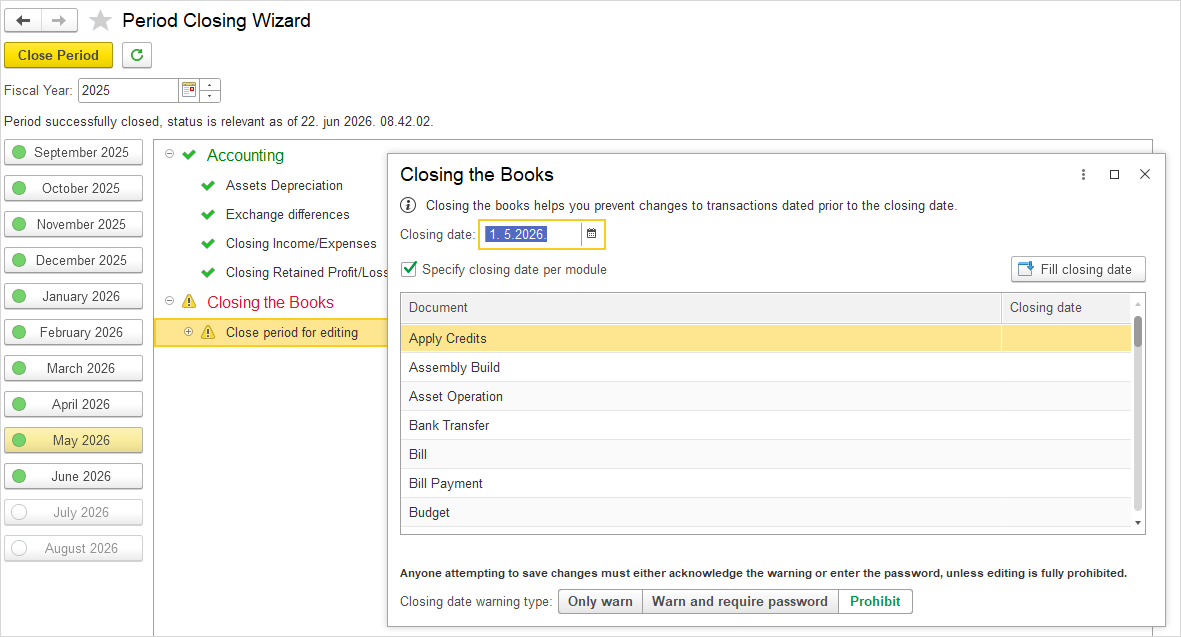
In this step, clicking the Close period for editing option opens the Closing the Books window, where the user can set the closing date and the warning type for the period being closed.
Period Closing Status in Reports #
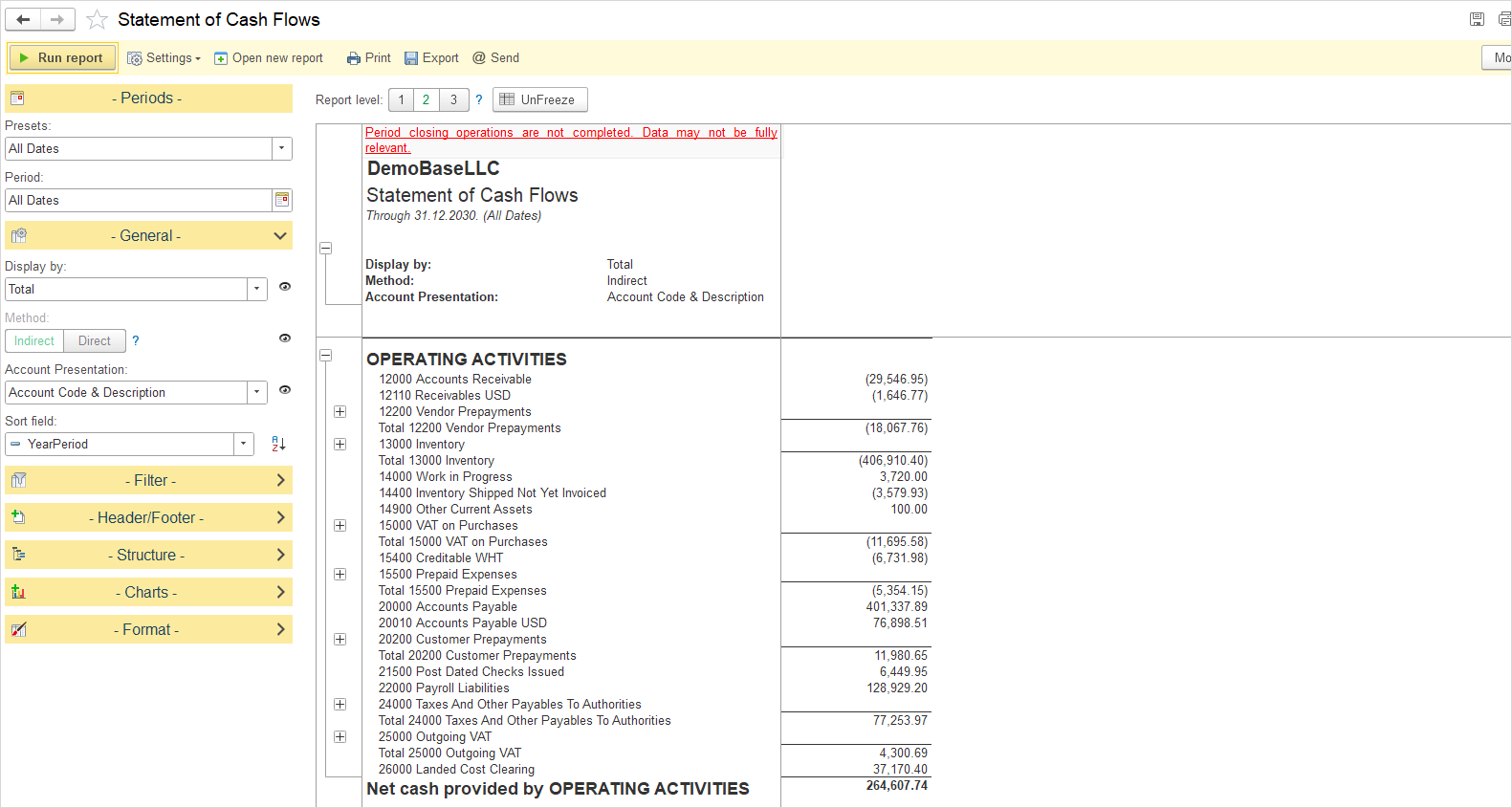
When generating the Income Statement or Statement of Cash Flows, the following message may appear at the top of the report: “Period closing operations are not completed. Data may not be fully relevant.”
This message serves as a warning that the period-end closing process has not been finalized for the reporting period in question. It is designed to alert users that the financial data presented may be subject to subsequent adjustments, as certain closing operations—such as Depreciation calculation, Exchange Difference computation, or the closure of Income and Expense accounts—have not yet been performed.
The purpose of this notification is twofold:
- It ensures transparency by informing users that the report is based on preliminary data.
- It helps prevent misinterpretation of financial results that may change once the period is formally closed.