
Under IFRS, discounts received on inventory purchases are generally treated as a reduction of the cost of inventory, not as separate income. This applies when the discount is part of the purchase price, including trade discounts and many prompt-payment discounts. The accounting depends on when the discount is known and whether it is truly linked to the purchase price.
Scenario 1. Record inventory at net amount #
If the supplier’s discount is already reflected on the invoice, record inventory at the net amount. When single disconted price is not explicilty given in the invoice, enter the total line item amount and quantity directly. The system will calculate the unit price automatically from total ÷ quantity.
If any linked Purchase Order does not include the discount, post the Order Closing for this order.
Example
Inventory list price: 54,000
Trade discount: 5%
Net purchase price: 51,300
Bill entries:
- Dr Inventory (account set in the Item Card) 51,300
- Dr any applicable Taxes in accordance with the Tax group set in the Item and in Vendor card
- Cr Accounts Payable (set in the Bill header) 51,300
Scenario 2. Use G/L Tab in the Bill for income #
When it is required to record purchases at full invoice price, use the Bill for items at gross amount and G/L tab for discount adjustment. This splits the transaction to maintain audit trail while achieving correct financial reporting. This creates separate income rather than reducing inventory cost.
Example:
Purchase order totalling to 1,000
Item Receipt (if applicable) totalling to 1,000 with no discount in line items
Bill totalling to 850 (1,000 on the Items tab and negative amount of -150 on the G/L Tab to represent discount)
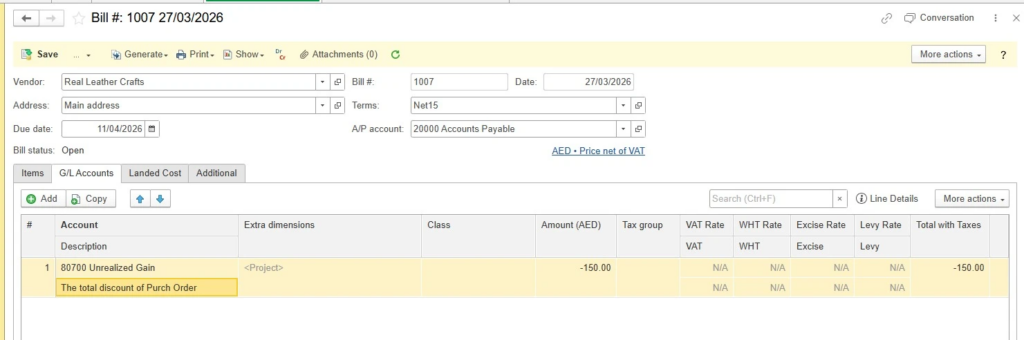
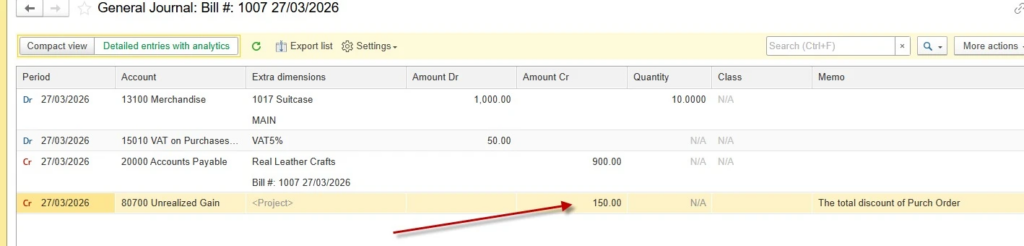

For Scenario 2, manual adjustment for applicable taxes on the Items tab may be required, since Taxes are calculated on gross amounts before discount. Always consult your local tax advisor for jurisdiction-specific treatment.