
The Withholding Tax Details report provides a detailed list of transactions subject to Withholding tax for a selected period. It is used to review WHT credited and WHT liability, reconcile WHT balances, and support statutory withholding tax filings.
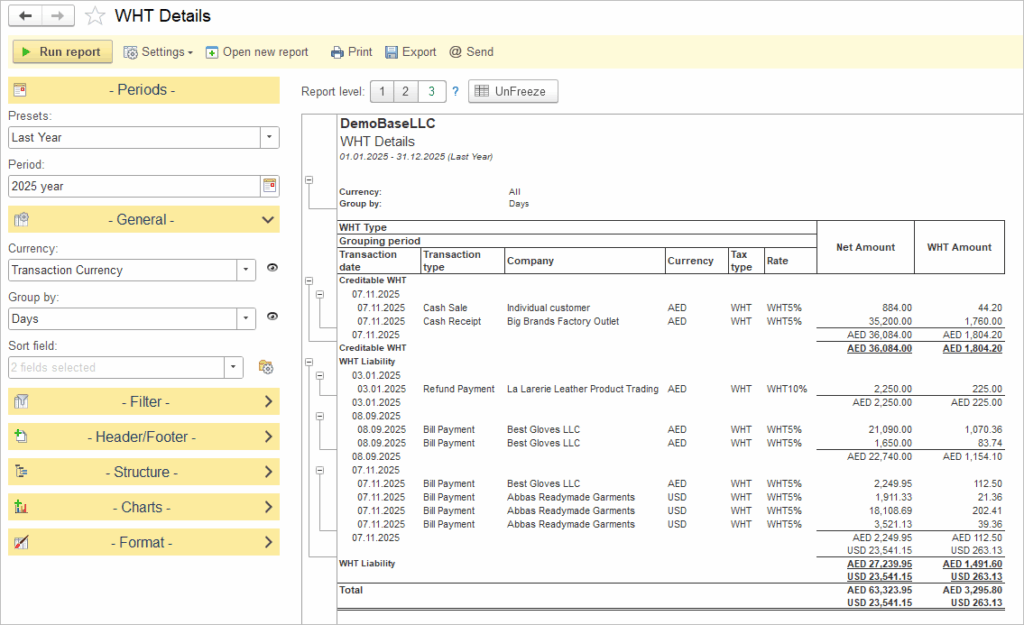
Periods and general settings #
- Presets: Provides quick period selections (Last Year, This Year, custom ranges).
- Period: Defines the precise reporting interval that will be shown in the report.
- Currency: Allows you to show amounts in transaction currency or in a default system currency.
- Group by: Lets you group transactions by days, months, quarters.
- Sort field: Defines the default sort order for lines in the report.
These settings work in the same way as in the VAT Details report and are shared across tax reports.
Filters and additional options #
The left panel also contains expandable sections such as Filter, Header/Footer, Structure, Charts, and Format.
- Filter: Restrict the report to specific companies, accounts, tax types, or other dimensions.
- Header/Footer: Configure additional text and layout options for printed or exported versions.
- Structure: Choose which columns to display, add or remove groupings, and adjust the hierarchy of totals.
- Charts: (if enabled) build visual charts based on the WHT amounts by period or company.
- Format: Define page orientation, font size, and export parameters for printing or sending.
Report structure and columns #
The report is divided into sections by WHT Type, such as Creditable WHT and WHT Liability.
Within each WHT Type, data is grouped by the selected period (for example, day), and each transaction appears on a separate line with the following information:
- Transaction date
- Transaction type (Cash Sale, Cash Receipt, Bill Payment, Refund Payment, etc.)
- Company (customer or vendor)
- Currency
- Tax type (WHT) and rate (for example, WHT5%, WHT10%)
- Net Amount
- WHT Amount
Each grouping section ends with a subtotal line showing the aggregated Net Amount and WHT Amount for the group and currency. At the bottom of the report, a Total section summarizes the overall WHT liability and creditable WHT for the selected period.
Interpreting the report #
Use the Creditable WHT section to see amounts of withholding tax that can be claimed or offset. Use the WHT Liability section to see amounts that must be remitted to the tax authority or reported on statutory forms. By comparing subtotals and totals, users can reconcile WHT ledger accounts with transaction-level details and ensure that payments and filings are accurate.