
Navigate to Admin panel – Tax settings. Some of the settings will already be in place if you have successfully run the Setup wizard.
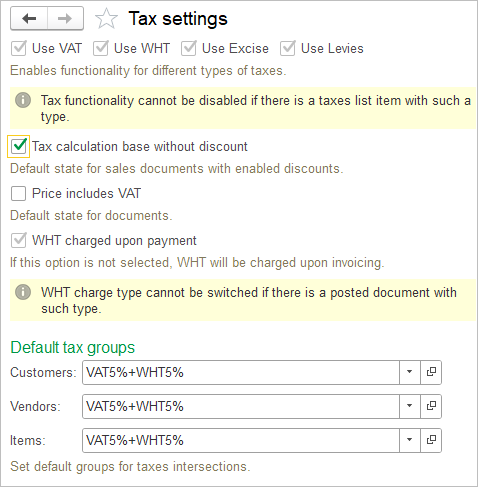
This page displays settings available for configuring tax calculation and default tax behavior in AccountingSuite.
- Use VAT / WHT / Excise / Levies: Enables or disables the use of each respective tax type in documents. A tax type cannot be disabled while tax records of that type exist. Please refer to a separate pages Taxes and Tax Groups, VAT accounting, Withholding tax, Excises and Levies to learn more.
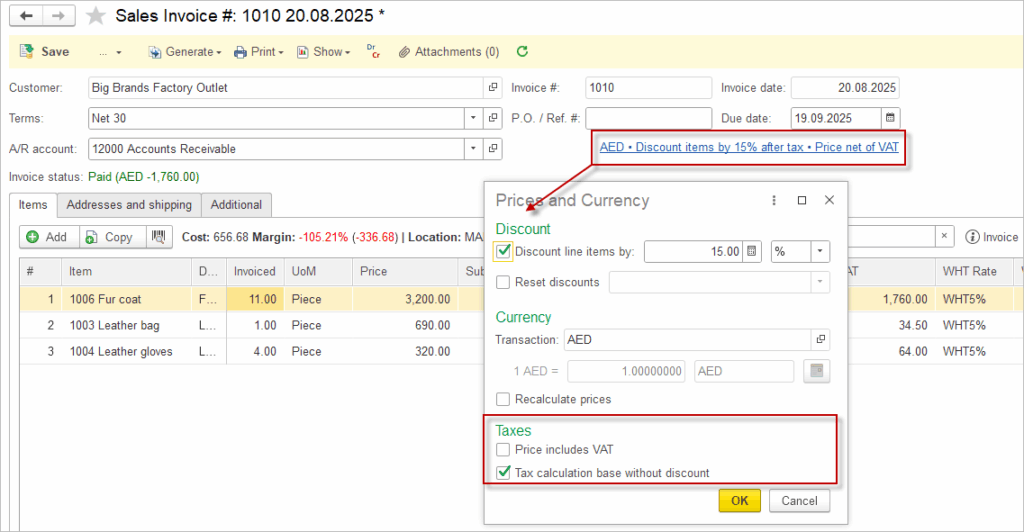
- Tax calculation base without discount: When enabled, taxes are calculated on the original document amounts before discounts, rather than on discounted amounts. This is an overall setting that can be changed in individual sales documents.
- Price includes VAT: When enabled, item and document prices are treated as VAT‑inclusive, and the system allocates the VAT portion from the entered price instead of adding VAT on top. This is an overall setting that can be changed in individual sales or purchase documents.
- WHT charged upon payment: When enabled, withholding tax is recognized at the time of payment; when disabled, it is recognized at the time of invoicing. This setting cannot be changed after documents using the current method have been posted.
- Default tax groups (Customers, Vendors, Items): Specifies the default tax group to be automatically assigned to new customers, vendors, and items, ensuring consistent application of tax rates and combinations. Please refer to a separate pages Taxes and Tax Groups.
Please refer to a separate pages Taxes and Tax Groups, VAT accounting and Withholding tax to learn more.