
Overview #
This roadmap is designed for new users without accounting experience who want to learn AccountingSuite (ACS) through hands-on practice.
Follow these steps in order to go from zero to confidently running basic business processes in ACS.
Throughout the course, we will:
- break down real accounting processess step by step
- explain why accounting software enforces certain rules
- show how business reality becomesdocument, transactions, and ledger entries
- connect UI actions to accounting meaning
All examples are based on real-world business scenarios.
Learning Resources Available to You #
To make this roadmap practical and effective, we provide several complementary learning resources. You can watch, read, explore and experiment safely – all within one ecosystem. We encourage you to move between them constantly.
AccountingSuite Academy
Our Video Tutorials contain step-by-step guides that walk through:
- core system concepts
- key workflows (purchasing, sales, inventory)
- configuration screens
- best practices
Best way to use it:
- Pause and replay while following along in the system
- Before you start working with the UI, take a look at how it looks in action.
- Use videos as a refresher when returning to a topic
Demobase
The demo database is a pre-defined environment with:
- a fully configured companies
- completed purchase and sales cycles
- inventory movements
- VAT and financial reports already generated
Best way to use it:
- Use it to verify your understanding
- Compare your own results against a known-good example
The main advantage of this demobase is that it contains fully developed and accurately executed real-life business scenarios. These cases allow you to learn how to correctly record a specific process in the system.
Full list of Demo Cases here.
User’s Guide
Our documentation enhanced with AI assistant provides:
- detailed explanations of features
- field-level definitions
- configuration references
It offers precision and depth that videos cannot, and it is the best source for accurate behavior and constraints.
Best way to use it:
- Use documentation as a reference
- Look things up when something is unclear
- Revisit it when implementing or testing complex scenarios
Cloud Version
The cloud version allows you to create your own company database and work through the system from the very beginning. This is the most important learning tool you can use.
By using cloud version, you will:
- get Premium edition of our software, with full backup of your progress
- run the Setup wizard
- configure items, locations, and taxes
- execute purchase and sales flows end to end
- observe how each action impacts accounting and inventory
Best way to use it:
- Follow each lesson from this roadmap using your own database
- Rebuild examples
- Experiment and observe changes in reports and balances
Learn how to activate your Trial Subscription here AccountigSuite Portal.

Please note: All the progress that you have made in Demobase will be lost. The system returns to its initial state every 24 hours.
Please use your Trial Cloud ACS base for studying and entering practical data.
Fundamentals of Accounting #
We recommend that you begin your study of accounting by watching this video, which explains why accounting is more than just numbers and what the core principles are.
In this video, we break down the fundamentals of accounting in a simple and practical way.
You’ll learn the core principles that make accounting reliable, how double-entry bookkeeping works, and how to read and understand financial records.
More about accounting basics
Accounting Categories
Accounting does not track “money” in general. It tracks economics facts, classified into five general categories:
- Assets
- Liabilities
- Equity
- Income
- Expenses
These categories are universal. Every accounting in the world uses them. Every accounting entry must affect two or more of these categories and preserve balance between them. Using this structure, accounting can be maintained explainable, verifiable and resistant to manipulation
Assets
Assets are the resources the business controls and expects to benefit from them.
Examples:
- Cash
- Bank balances
- Inventory
- Equipment
- Accounts receivable
Liabilities
Liabilities are obligations to others.
Examples:
- Vendor payables
- Payrolls
- Loans
- Taxes payable
Equity
Equity represents the owners’ claim on the business.
Equity = Assets - LiabilitiesEquity grows when:
- Owners invest
- The business earns profit
Income
Income represents value earned from operations.
Examples:
- Sales revenue
- Dervice fees
- Interest income
Income explains why assets increased or liabilities decreased. Income is not cash it is economic perfomance.
Expenses
Expenses represent resources consumed to generate income.
Examples:
- Rent
- Salaries
- Utilities
- Cost of goods sold
Expenses explain where value went.
Double-entry
Understanding of this topic is crucial for anyone who is working with accounting software. If you understand double-entry, you understand why software is strict and why certain “simple” shortcuts are forbidden.
Double-entry accounting is built on a simple but powerful rule:
Every financial event have at least two sidesIf something increases somewhere, it must decrease somewhere else. There is always a source and a destination.
All accounting systems obey this equation:
Assets = Liability + EquityDouble-entry exists to enforce this equation at all times. Every transaction must keep this equation balanced.
Debit and Credit
Debit and Credit do NOT mean increase and decrease. They mean:
- Debit – left side of an account
- Credit – right side of an account
Whether debit increases or decreases a value depends on the account type.
Here is how Debit and Credit behave by account type:
| Account type | Increase | Decrease |
| Assets | Debit | Credit |
| Expenses | Debit | Credit |
| Liabilities | Credit | Debit |
| Equity | Credit | Debit |
| Income | Credit | Debit |
Advantages of double-entry:
- Built-in error detection. If debits ≠ credits that means that there is error
- Traceability. Every number can be tracked back to its origins and every report is explainable
- Audability. Historical truth is preserved
We highly recommend to watch the video below. Here you will be shown some real-life examples for better understanding of this topic.
In this video, we explain the three core financial statements in the simplest possible way.
You will learn how the Income Statement, Cash Flow Statement, and Balance Sheet work together through one clear example of buying and selling a product.
We break the process down into four stages.
From initial investment, to purchasing inventory, to making a sale, and finally receiving payment.
By the end, you will see how a simple business operation turns into financial results across all three reports.
Practice #
In the practice section, we move from theory to real operational accounting.
AccountingSuite is built in compliance with international accounting standards while also supporting local legal and tax requirements of different jurisdictions. This combination allows the same core accounting logic to work consistently across countries, industries, and company sizes.
The role of AccountingSuite is to capture, separate, and connect business realtionships correctly.
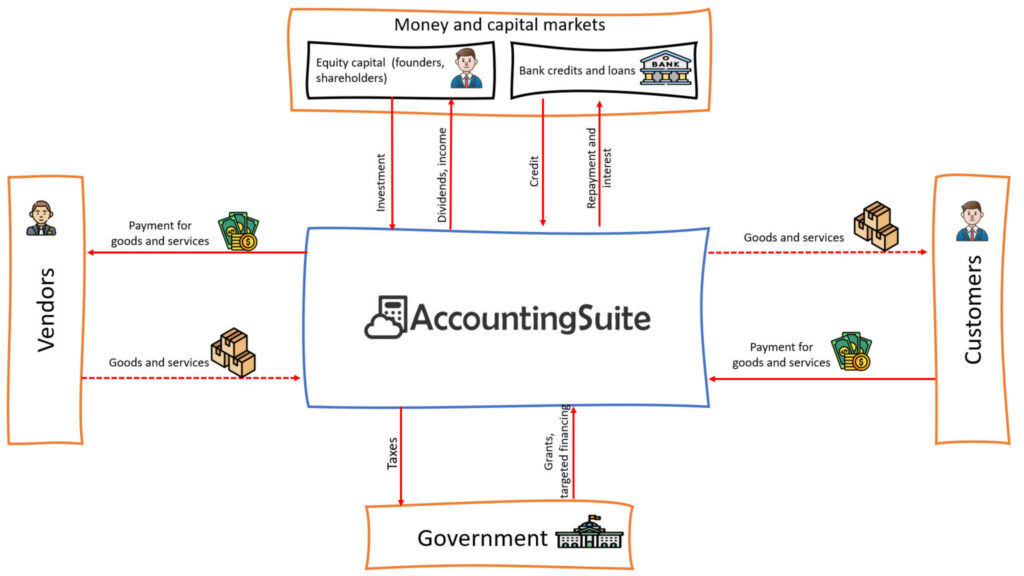
In the practical part of this course, we will work with a company based in the United Arab Emirates that trades leather goods. This practical scenario mirrors the example used in the demo database. Here, we focus only on the simplest possible case: purchasing goods and reselling them to customers. This approach allows you to build confidence with the basics first, and then gradually move toward real-world complexity without losing clarity.
The goal is not to cover every variation, but to help you clearly see:
- how documents are created
- how they are connected
- how accounting results are formed step by step
Throughout the course, you will have access to a video guide that will help you set up and use the documents correctly. You will also have a demobase with a ready-made example to follow.
Company legend
A UAE-based trading company specializes in the import, assembly and resale of leather goods such as bags, wallets, and accessories.
The company purchases finished products or materials from vendors, stores them in a warehouse in the UAE, and sells them to local customers. All operations are subject to VAT regulations of the United Arab Emirates.
The company’s goal is simple:
- buy goods at a predictable cost
- maintain clear inventory records
- sell products with a stable margin
- correctly account for VAT, cash, and profit
Throughout practical tasks, you will set up the company’s accounting system and walk through its entire operational cycle – from purchasing inventory to selling goods and receiving payment – using real accounting documents and real business logic.

For better learning experience we strongly recommned repeating the practical part on a real database. You can access our application via Cloud Trial subscription. You can learn how to start one here.
Initialization #
The first thing you need to do is complete our Setup Wizard, which will set up your Chart of accounts, settings and other details for your account. You must complete the wizard in order to use the account. It will run automatically after first log in to system.
You can learn more about Setup Wizard here and in our YouTube video
After completing the Setup Wizard, we recommend visiting the Admin Panel to enable and customize the features that best suit your needs. Our videos and documentation can help you understand the various settings and interface options available.
Links to YouTube videos and documentation
How to setup your workplace
General settings video
Accounting settings
Bank settings
Sales settings
Purchase settings
Inventory settings
Security settings – managing users, rights and settings
UI Navigation
Inventory #
Company legend Inventory managment
Our leather goods trading company in the UAE is growing. At the beginning, it was possible to track stock manually or simply remember how many leather bags or jackets were available. As product variety increased – different colors, sizes, and models – manual tracking became unreliable.
If the company loses track of inventory, several business risks appear. The company may sell items that are no longer physically available, which damages customer trust. It may overstock slow-moving goods, freezing working capital. It may also calculate profit incorrectly because inventory cost directly affects cost of goods sold.
Inventory management allows the leather shop to maintain accurate stock visibility, understand product availability in real time, and scale operations without losing operational control.
Inventory management addresses the following core business problems:
- establishing a clear understanding of what resources the company owns
- defining the exact physical or logical location of those resources
- tracking the current condition and status of inventory items
- determining the true cost embedded in inventory
- understanding whether items are available for immediate sale or use
Without an inventory system in place, the business faces fundamental limitations:
- profit calculations become unreliable
- stock balances cannot be trusted
- business growth cannot be scaled without chaos and manual control
Inventory management is not a warehouse feature. It is a foundational system for control, transparency, and scalable operations.
Inventory Setup
Item Setup
In AccountingSuite we have 2 types of Items Products and Services and undestanding the difference between them is important for proper inventory managment.
A Product is a good that:
- physically exists
- is stored in a warehouse
- is purchased and sold
- has a cost of goods
Accounting meaning:
- recorded as an Asset (Inventory)
- increases assets when purchased
- is expensed to COGS when sold
When to use:
- goods trading
- manufacturing
- distribution
- e-commerce
A Service is an intangible offering or activity.
Accounting meaning:
- not recorded as an asset
- does not exist in inventory
- costs are recognized directly as expenses
When to use:
- consulting
- subscriptions
- installation services
- rentals
Locations
A Location is a physical place where inventory is held. Inventory does not exist “in general.” It exists somewhere. Locations allow businesses to control stock levels, move inventory between places and reserve items for orders.
When Locations Are Required:
- multiple warehouses
- retail stores
- temporary storage
- dropshipping scenarios
When a Single Location Is Sufficient:
- small businesses
- one warehouse
- minimal inventory control needs
Inventory Tracking Models
There are two primary inventory tracking models. Lots/Characteristics and Serial Numbers.
Lots/Characteristics – Inventory is tracked by lots or batches. Each batch may include: production date, specific characteristics (size, color, etc.)
| Pros | Cons |
When to use:
- regulated industries
- perishable goods
- certification requirements
Serial Number – each individual unit is tracked separately.
| Pros | Cons |
| full traceability | the most complex model |
| warranty tracking | maximum data requirements |
| theft control |
When to use:
- high-value items
- warranty obligations
- service and maintenance tracking
Practice task #1
Create your own items.
- one Product (inventory item)
- one Service (non-inventory item)
For the Product:
- Type – Product
- On the Lots tab, Lots type – characteristic,
- Characteristic – size; size values – S, M, L, XL,
- On the UoM tab, UoM set – piece
Setup multiple locations in Locations list.
Self-check questions
Your leather shop purchased 50 jackets but has not sold any yet. Where should these jackets appear in financial statements? Think about whether inventory is considered an expense or an asset before sale
Your company has produced a limited edition of 100 items. Which type of tracking would be best for these items?
Purchasing Goods from a Vendor #
Company legend Purchasing process
Our leather goods company regularly imports finished jackets and accessories from vendors. These purchases involve negotiations, vendor invoices, delivery logistics, and payments that may happen on different dates.
Without a structured purchasing workflow, the company risks losing control over supplier obligations, paying incorrect amounts, or recording inventory incorrectly. It may also fail to calculate input VAT correctly, which leads to tax compliance risks.
The purchasing process ensures that vendor relationships, inventory acquisition, and financial obligations are recorded accurately and remain fully traceable.
In the real world, purchasing goods is not a single event but a chain of independent facts:
- an agreement to buy
- a bill issued by the supplier
- physical receipt of the goods
- payment of money
These events:
- may occur in different order
- may happen on different dates
- may happen partially
Our software helps to keep these facts separated.
| Document | Purpose | G/L entries |
| Purchase Order | Records our intention to buy the product | No |
| Bill | Records how much we owe to whom. | Yes |
| Item Receipt | Records of what we have received in physical form. | Yes |
| Bill Payment | Records whether we have paid the money. | Yes |
Here you will find a detailed description of each document used during the purchasing process.
Purchase Order
A Purchase Order is a recorded intention to purchase goods or services from a supplier under specific conditions. It is not an invoice, not a liability, not an accounting transaction. This docmunet have no accounting role. A Purchase Order does not create accounting entries because:
- goods have not been received
- no obligation exists yet
- no money has been spent
Although this document is not essential for accounting purposes, it plays a significant business role and assists in addressing the following tasks:
- purchasing control
- budget approval
- price and quantity fixation
- foundation for subsequent documents
When a Purchase Order is required:
- working with multiple suppliers
- multi-level approval processes
- large companies
- purchasing limit control
Bill
A Bill is the supplier’s legal claim for payment for delivered goods or services. This is a mandatory document in all purchasing scenarios because from this moment:
- a liability is created
- a tax obligation (VAT) arises
- accounting must record the transaction
Bill records:
- amount of the liability
- obligation date
- tax details
- supplier reference
Item Receipt
An Item Receipt confirms that goods have been physically received. This document addresses following needs of bisuness:
- logistics
- warehouse operations
- operational control
This is a separate document because goods may be delivered in parts or payment may occur earlier or later.
Item Receipt is an optional document and can be disabled in system settings. More details are available in the documentation.
We recommend using Item Receipt for:
- warehouse inventory tracking
- partial deliveries
- stock level control
Bill Payment
A Bill Payment represents the fact of money movement. There are several reasons why Bill Payment is a separate document:
- Payment may cover only part of Bill
- Bill Payment can cover multiple Bills
- Paymnet may occur later
Along with Bill this documnet is mandatory for every purchase scenario.
Practice task #2
Setup Vendor company. Locations, Taxes, TRN
Simulate the product purchase process by creating a Purchase Order, adding items to it, specifying quantities and prices.
Then, convert the Purchse Order into a Bill. Review created liability, review Incoming VAT
Create an Item Receipt to confirm that the product has arrived in your warehouse.
Finally, record a Bill Payment
Relatable Demo cases:
- Demo case #102 Scenario 1. Purchase of goods from a vendor with deferred payment terms (Net 15)
- Demo case #109 Scenario 8. Purchase of goods from a Vendor
Self-check questions
You created a Purchase Order for goods worth 1,000 AED. Did this action increase your liability to the vendor in the Balance Sheet?
At what stage does the company officially recognize a liabillity to a vendor?
Selling Goods to a Customer #
Company legend Sales process
The company sells products to both retail and wholesale customers. Sales often involve price negotiations, customer confirmations, delivery planning, invoicing, and payment collection.
Without structured sales documentation, the company cannot reliably track revenue, customer debt, or inventory availability. This creates risks of revenue misstatement, inventory shortages, and cash-flow problems.
The sales workflow allows the company to control customer commitments, ensure proper revenue recognition, and maintain transparency between operations and accounting.
Selling goods in the real world is not an instantaneous event but a sequence of related actions. First we offer a price, then customer agrees, we request payment and only then we receive money and send goods. And because of this complexity some of these events may occur partially, may occur on different dates, or not occur at all (in case of offline store sale).
| Document | Purpose | G/L entries |
| Sales Quote | Records our offer | No |
| Sales Order | Records intention of customer to buy the product | No |
| Sales Invoice | Records the customer’s obligations to pay money | Yes |
| Cash Receipt | Records whether we have received the money | Yes |
Detailed description of sales documents
Sales Quote
A Sales Quote is a commercial offer with no legal obligation. It works as a price proposal and description of terms. It serves no role in accounting. Quotes does not create a revenue, does not affect inventory.
Role in business:
- negotiations
- comparison of conditions
- recording sales promises
When a Sales Quote is required
- B2B sales
- individualized pricing
Sales Order
A Sales Order is a confirmed customer order. A sales order does not affect accounting. This document only records the customer’s intention to purchase goods from the company.
When Sales Order is recommended:
- selling goods from inventory
- partial deliveries
- pre-orders
Sales Invoice
A Sales Invoice is a legal demand for payment for delivered goods or services.
It is the key accounting document in the sales process.
Sales Invoice records
- the moment revenue is recognized
- the tax obligation
- accounts receivable
This document serves as legal confirmation of revenue and is later used in the taxation process.
Cash Receipt
A Cash Receipt records the fact of receiving money from a customer. This document is required in all sales scenarios.
Payments may involve:
- partial settlements
- overpayments
- fees and commissions
- one payment covering multiple invoices
This is why we need a separate document for payments.
Practice task #3
Setup Customer company. Locations, Taxes, TRN
Simulate the product selling process by creating a Sales Quote, adding items to it, specifying quantities and prices. Confirm no accounting impact.
Then, create a Sales Order based on the Quote.
Generate a Sales Invoice to confirm that the product is ready arrived to be sent to customer. Review revenue recognition, review Outgoing VAT, review accounts receivable
After receiving paymnet, create a Cash receipt to confirm payment. Verify cash increase.
Additional task. Send Sales Invoice to your client via email.
Relatable Demo cases:
- Demo case #103 Scenario 2. Goods purchased under Scenario 1 sold to the Customer using a sales quote and “Due on Receipt” payment terms
- Demo case #104 Scenario 3. Goods purchased under Scenario 1 sold to the Customer using a sales order and cash receipt
- Demo case #106 Scenario 5. Goods purchased under Scenario 1 sold to Customer
Self-check questions
Is it possible to make partial payment for the sales invoice?
Can a customer make multiple purchases and pay for them in one transaction?
Taxing #
In real business operations, taxes do not exist as a single action or button. They appear as a consequence of economic events that happen during purchases and sales.
Just like purchasing and sales, tax accounting is built on separating facts and tracking them consistently.
Value Added Tax
VAT (Value Added Tax) is not a cost for the business itself. It is a tax collected and paid on behalf of the government.
For a company, VAT creates temporary obligations:
- sometimes the company owes VAT to the tax authority
- sometimes the tax authority owes VAT back to the company
AccountingSuite helps to track these obligations precisely and transparently.
VAT always moves in two opposite directions:
Incoming VAT – VAT paid to vendor
Outgoing VAT – VAT charged to customers
VAT is recognized when an invoice is issued or received, not when money is paid or received.
At the end of a reporting period, the company calculates: Outgoing VAT − Incoming VAT
- if Outgoing VAT is higher → VAT payable to the government
- if Incoming VAT is higher → VAT recoverable or carried forward
AccountingSuite automates this calculation while preserving full traceability.
Incoming VAT
Incoming VAT is VAT that the company pays when purchasing goods or services. It appears when vendor issues a Bill with VAT.
Accounting meaning:
- Incoming VAT is not an expense
- It is recorded as a recoverable tax asset
- It represents the company’s right to offset or reclaim VAT
Without proper Incoming VAT tracking:
- VAT reports become incorrect
- tax refunds may be denied
- compliance risks increase
Outgoing VAT
Outgoing VAT is VAT that the company charges customers when selling goods or services. It appears when compnay issues Sales Invoice to a customer.
Accounting Meaning:
- Outgoing VAT is not revenue
- It is recorded as a tax liability
- It represents money owed to the tax authority
Incorrect Outgoing VAT leads to:
- underpaid or overpaid taxes
- penalties and interest
- audit exposure
Practice task #4
To better understand how VAT works in real business operations, let us review a simple scenario from our leather goods company.
The company purchases leather materials from a supplier:
Purchase price: 100 AED
Incoming VAT (5%): 5 AED
Total paid to supplier: 105 AED
Later, the company manufactures or sells a finished leather product:
Selling price: 200 AED
Outgoing VAT (5%): 10 AED
Total charged to customer: 210 AED
From an accounting perspective, VAT does not belong to the company. It is temporarily collected and passed to the government.
At the end of the reporting period, the company calculates:
Outgoing VAT – Incoming VAT = VAT Payable
10 AED – 5 AED = 5 AED
This means the company must transfer 5 AED to the tax authority.
If the Incoming VAT were higher than the Outgoing VAT, the company would instead have a VAT recoverable balance.
Create and post Tax Invoice Received document for a Bill received from a Vendor in task #2.
Create and post Tax Invoice Issued document based on a Sales Invoiced issued to a Customer in task #3.
Run VAT Details report. Analyze the net VAT position: VAT payable or VAT recoverable
Reporting #
Reports exist to provide a structured, objective, and verifiable representation of business activity. Their purpose is not to store data, but to interpret it in a form suitable for decision-making. While operational documents capture individual events, reports aggregate those events, apply consistent rules, and present the results in a standardized way.
Reports in AccountingSuite allow a business to:
- assess profitability and cost structure
- monitor liquidity and financial obligations
- evaluate customer and supplier behavior
- manage inventory and operational efficiency
- detect risks and inefficiencies early
Examples of reports in AccountingSuite
A/P Aging shows outstanding amounts owed to suppliers, grouped by how long they have been unpaid.
What this report shows:
- how much the company owes in total
- which bills are overdue
- how long liabilities have been outstanding
Why it matters:
- helps manage cash outflows
- prevents missed payments and penalties
- supports negotiation with suppliers
This report is essential for cash planning and supplier relationship management.
A/R Aging shows amounts owed by customers, grouped by how long invoices have remained unpaid.
What this report shows:
- how much customers owe the company
- which invoices are overdue
- which customers pose collection risk
Why it matters:
- protects cash inflow
- highlights payment discipline issues
- supports credit control decisions
This report is essential for cash flow forecasting and customer risk management.
Quantity on Hand by Location report shows inventory balances broken down by storage location.
What this report shows:
- how much inventory exists
- where it is physically located
- which locations are overstocked or understocked
Why it matters:
- prevents stockouts and overstocking
- supports logistics and replenishment decisions
- enables accurate fulfillment planning
This report connects inventory data directly to operational reality.
In addition to detailed reports, the application offers customizable dashboards that provide a high-level, real-time view of business performance.
Dashboards can display key indicators such as:
- revenue
- gross and net profit
- margin and profitability ratios
- outstanding receivables and payables
- inventory value and turnover
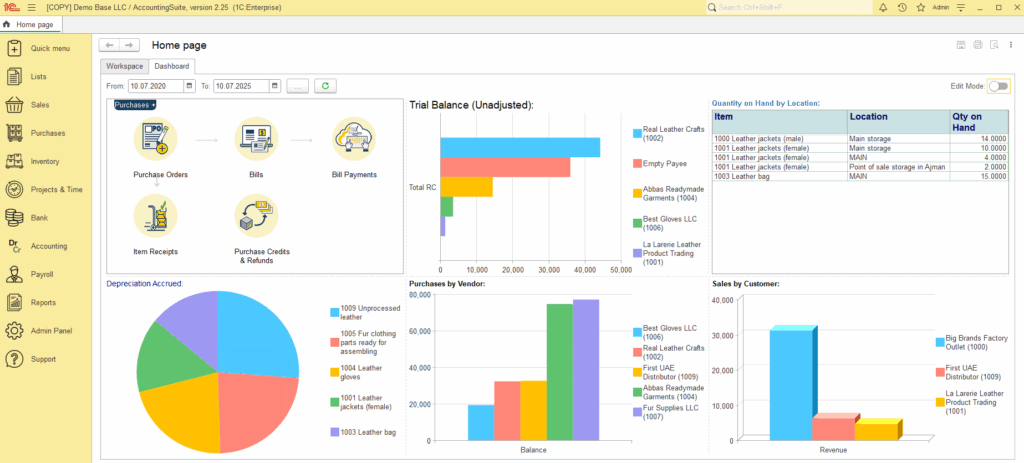
Here, you can learn how to easily customize your dashboards to meet your specific needs.
What to Learn Next #
In this roadmap, we covered the foundations of accounting and showed how those principles work in practice through a real, end-to-end purchase and sales scenario.The goal of this course was not to turn you into a professional accountant, but to give you a clear model of how accounting logic works inside a real business application.
Once the fundamentals are clear, the next step is working with more complex, real-world scenarios.
For that, we recommend continuing with:
- our online documentation
- our YouTube channel with advanced guides and walkthroughs
These resources focus on deeper system behavior, edge cases, and operational complexity.
| Topic | Documentation Link | When to Learn |
|---|---|---|
| Inventory adjustments | Inventory adjustment | When dealing with shrinkage, damage, theft |
| Landed cost | Landed cost | When dealing with freight and custom duties |
| Backorders | Backordering | When dealing with vendors who deliver goods in stages or cannot fulfill orders at once |
| Vendor prepayments | Vendor prepayment | When dealing with vendor who require payment befor delivery |
| Sales returns and refunds | Sales returns | When dealing with returns and cancelations |
| Reverse charge scenarios | VAT reverse charge | When dealing with cross-border vendors |
Advanced Modules #
For users working with more mature or complex businesses, the system also includes dedicated modules for:
- Payroll – salary payments, accruals, and payments
Payroll overview
- Assets managment – capitalization, depreciation, and disposal
- Banking – bank accounts, reconciliations, and cash flow tracking
- CRM – leads and events
CRM overview
These modules build on the same accounting principles you learned in this course and extend them into specialized areas of financial management.