The Project/Job module in AccountingSuite allows users to group all transactions, documents, and activities related to a specific business undertaking into a single container called a Project. Each Project serves as the fundamental tracking unit for budgeting, cost allocation, and financial analysis. All documents created in the system – including Sales Invoices, Bills, Payments, Inventory, Bank, Asset, and Payroll transactions – can be associated with a specific Project, providing complete visibility into project performance and comparison of budgeted versus actual results.
Master Data Setup #
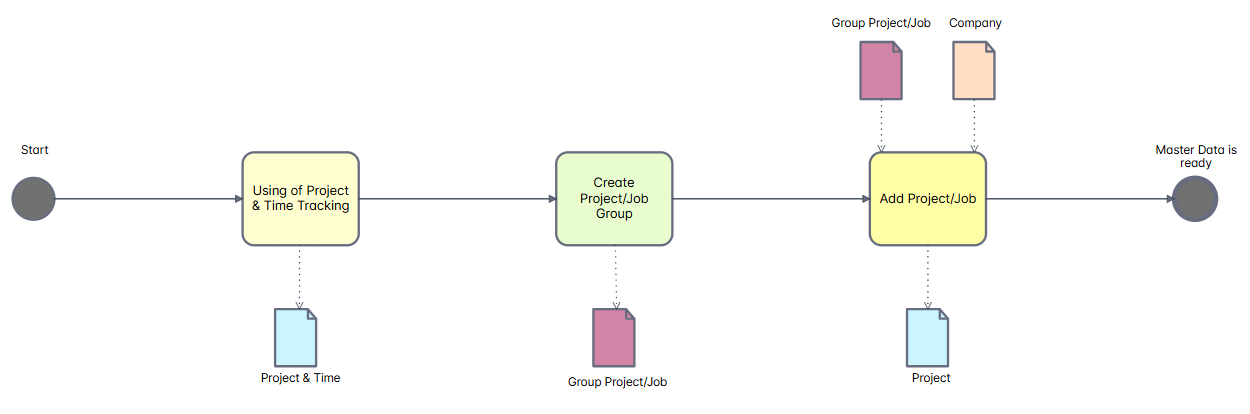
First, enable Projects and Time Tracking in General Settings.
Initialization of master data for lists:
- Group Project/Job tagging option that helps group related projects together for streamlined organization and reporting. You can use Tree view mode.
- Project is a container within AccountingSuite that includes all transactions and documents related to a specific business undertaking, serving as the fundamental tracking unit for budgeting, cost allocation, and financial analysis.
Project/Job Workflow #
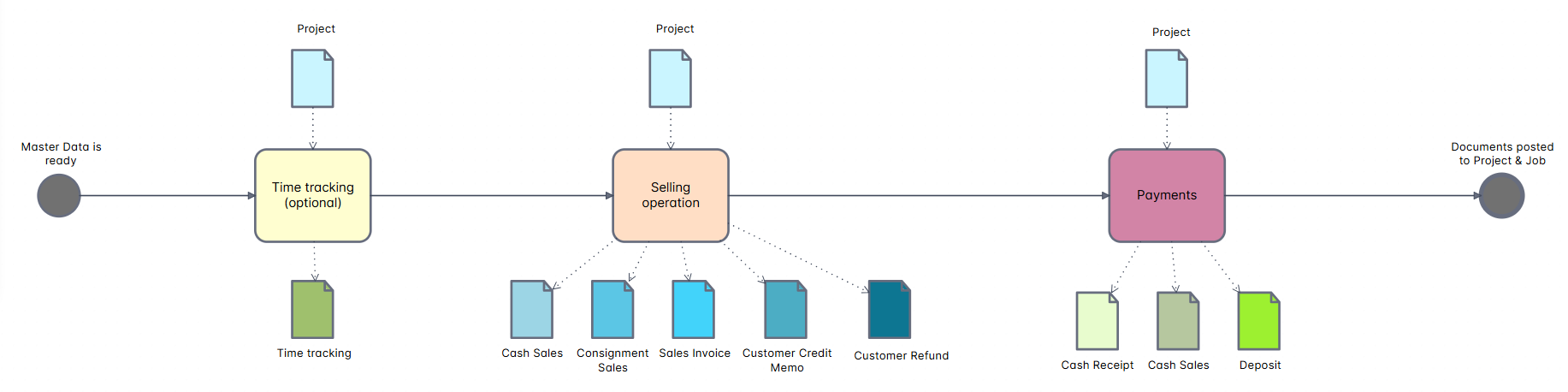
The Sales process on the part of Project/Job:
- Time tracking is a feature within AccountingSuite that enables users to record billable or non-billable hours against specific customer projects, utilizing service items as tasks to facilitate accurate job costing and subsequent invoicing.
- The selling operation takes a Project as its input. As an output, it generates five customer-related documents: Cash Sales, Consignment Sales, Sales Invoice, Customer Credit Memo, and Customer Refund. All five documents are automatically associated with the Project and have a direct effect on the Project‘s budget and financial reports.
- The payments operation within the selling process takes a Project as its input. As an output, it generates four customer-related financial documents: Cash Receipt, Cash Sales, and Deposit. These documents represent cash received from customers (cash inflow). All four documents are automatically linked to the Project and directly affect the Project‘s budget, cash flow tracking, and overall financial reports.
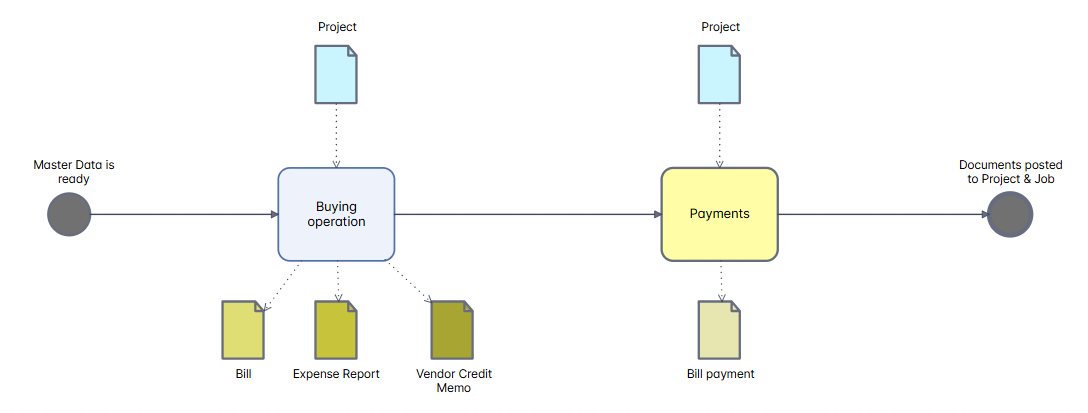
The Purchase process on the part of Project/Job:
- The buying operation takes a Project as its input. As an output, it generates three vendor-related financial documents: Bill, Expense Report, and Vendor Credit Memo. All three documents are automatically linked to the Project and directly affect the Project‘s budget, cost tracking, and overall financial reports.
- The payments operation within the buying process takes a Project as its input. As an output, it generates one vendor-related financial document: Bill Payment. This document represents cash paid to vendors (cash outflow). The document is automatically linked to the Project and directly affects the Project’s budget, cash flow tracking, and overall financial reports.
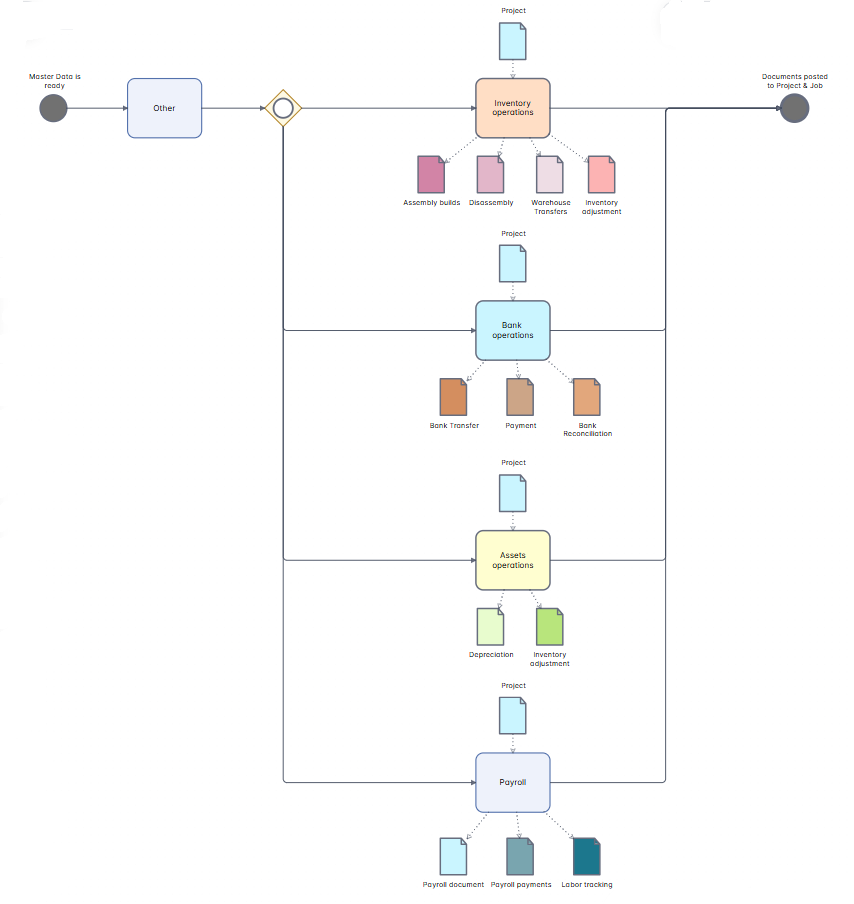
The Inventory operations, Bank operations, Assets operations and Payroll on the part of Project/Job:
- The inventory operations take a Project as their input. As an output, they generate four inventory-related documents: Assembly Builds, Disassembly, Warehouse Transfers, and Inventory Adjustments. All four documents are automatically linked to the Project and directly affect the Project’s inventory valuation, material costs, and overall financial reports.
- The bank operations take a Project as their input. As an output, they generate three bank-related documents: Bank Transfer, Payment and Bank Reconciliation. These documents represent cash movements between accounts, payments made from the Project, and the reconciliation of bank statements. All three documents are automatically linked to the Project and directly affect the Project’s cash flow tracking, bank account balances, and overall financial reports.
- The assets operations take a Project as their input. As an output, they generate two asset-related documents: Depreciation and Inventory Adjustment. Depreciation represents the systematic allocation of an asset’s cost over its useful life, while Inventory Adjustment corrects asset quantities or values. Both documents are automatically linked to the Project and directly affect the Project’s asset valuation, depreciation expenses, and overall financial reports.
- The payroll operations take a Project as their input. As an output, they generate three payroll-related documents: Payroll (Document), Payroll Payment, and Labor Tracking. The Payroll document records employee earnings and deductions, Payroll Payments represent cash disbursements to employees, and Labor Tracking captures time and labor costs allocated to the Project. All three documents are automatically linked to the Project and directly affect the Project’s labor costs, payroll expenses, and overall financial reports.
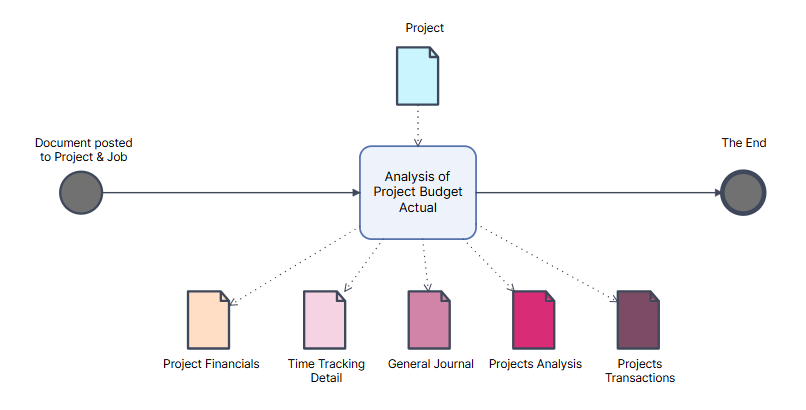
The analysis of Project Budget versus Actual represents the final step in the project lifecycle. It takes a Project as its input and is executed after all documents have been successfully posted to the Project and Job.
As an output, this analysis generates the following three documents:
- Project Financials – Provides a comprehensive overview of budgeted versus actual revenues, costs, gross margin, and overall project profitability.
- Time Tracking Details – Displays all logged hours, hourly rates, billable and non-billable time, and associated labor costs allocated to the Project.
- General Journal – Presents all posted accounting entries affecting the Project, including debits, credits, and account balances.
- Project Analysis – Consolidates all budgeted versus actual data into a single final report on overall project results.
- Projects Transactions – This detailed report presents all financial and operational transactions related to a project, offering a complete picture of its performance and enabling analysis of profitability, liquidity, indebtedness, asset and liability control, and resource engagement through recorded hours.
All four documents are automatically linked to the Project and serve as essential tools for project performance evaluation, variance analysis, cost control, financial reporting, and final project assessment.