
OData (Open Data) is an open web protocol for querying and updating data from/into 1C Platform applications like for AccountingSuite import and export data purpose. The protocol enables operations with objects by using HTTP commands as requests and receiving responses in XML or JSON formats. This protocol operates through a REST interface. OData is suitable for a wide range of applications, as it essentially provides a standardized interface for accessing database content. It enables any third-party programs or services to retrieve data via conventional HTTP, which is particularly useful in situations where 1C specialists are unavailable, but access to database information is still required.
OData Exchange is an additional solution in Data Import Tool options of data import and export for AccountingSuite to provide powerful Integration capabilities from 1C Platform side.
It is proposed to use this functionality for the following purposes:
- integration of an application with websites and online stores/e-Commerce/Marketplace;
- implementation of additional functionality of an application by third-party tools without modifying its appcication;
- loading data into the application and exporting data from it;
- integration of the application solution with corporate systems, potentially even without additional programming;
- working by schedule without clicking from user side.

Please note: We recommend that this functionality be used only by qualified specialists. It requires in-depth technical knowledge and it is intended for integration and interaction with third-party software. Improper configuration may lead to to security risks.
Before you start working on with OData, it is highly recommended to watch these videos and read articles.
- AccountingSuite customization – About ACS customization in general
- 1C:Enterprise. First Step (video guides) – Getting started guide series
- 1C Development Basics. Junior Course (video guides) – More detailed course about development
Integration Prerequisites #
To begin, you require 1C:Enterprise version 8.3.24 or later and a configured web server (IIS or Apache; see the relevant documentation for details), which will be responsible for data transmission via the REST interface.
OData in 1C supports all typical http operations defined by the OData Version 3.0 standard.
- POST – for creating objects with the request body
- PATCH – for updating
- DELETE – to delete objects.
- GET – for reading
For the cloud version, these prerequisites are already fulfilled.
Integration Process #
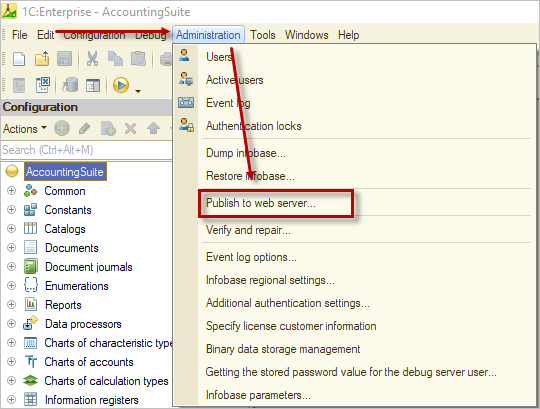
- This step is required only for on-premises version. To work with the OData protocol, it must be published through the settings menu in Designer. To do this, open the Designer, navigate to Administration, and select Publish to web server. Fill in all required fields;
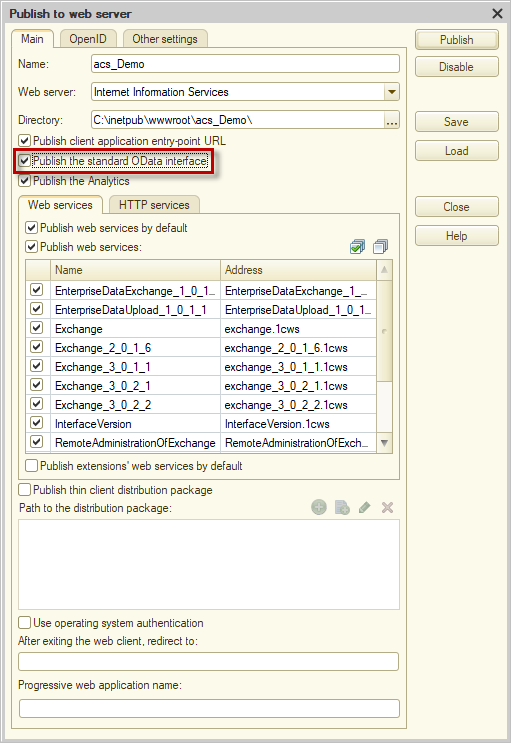
- Enable the option Publish standard OData interface, and click Publish.
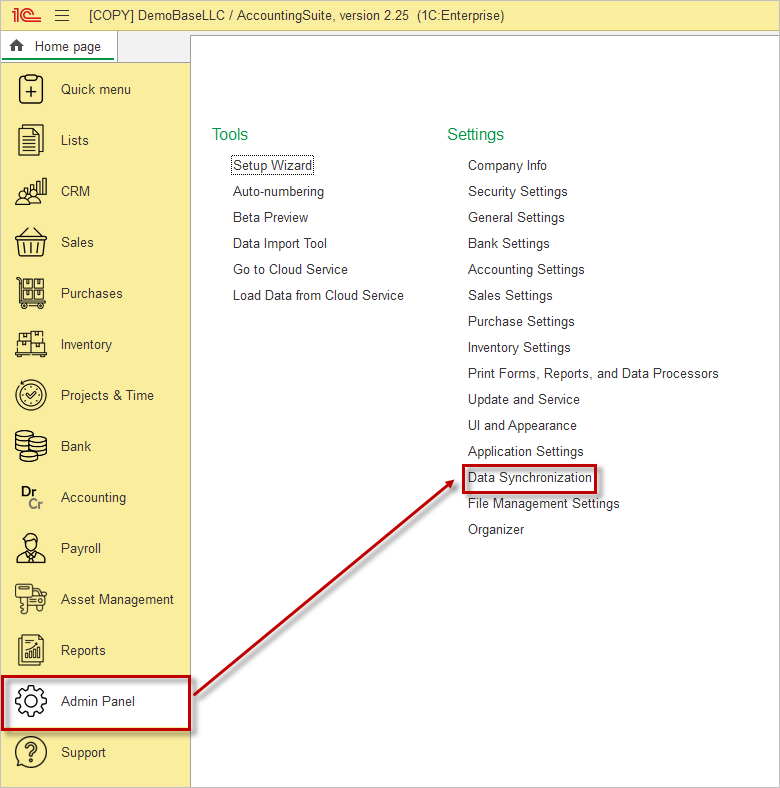
- Then, open your application, go to the Admin Panel, and select Data Synchronization.
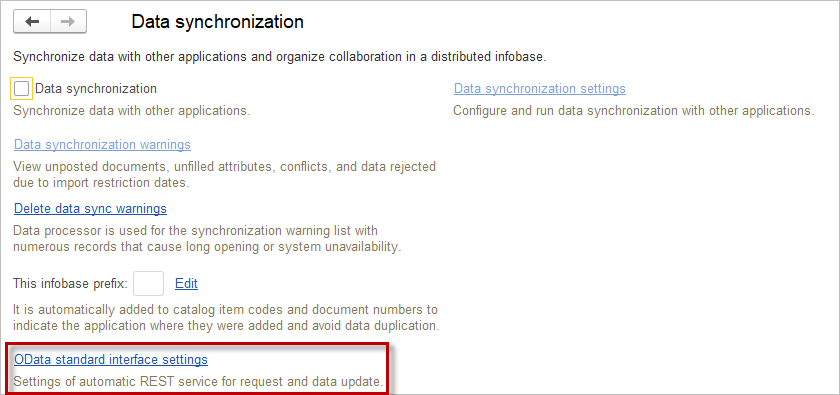
- Go to OData standard interface settings. Here you can create new user for REST service and determine, which objects will be available for REST service.
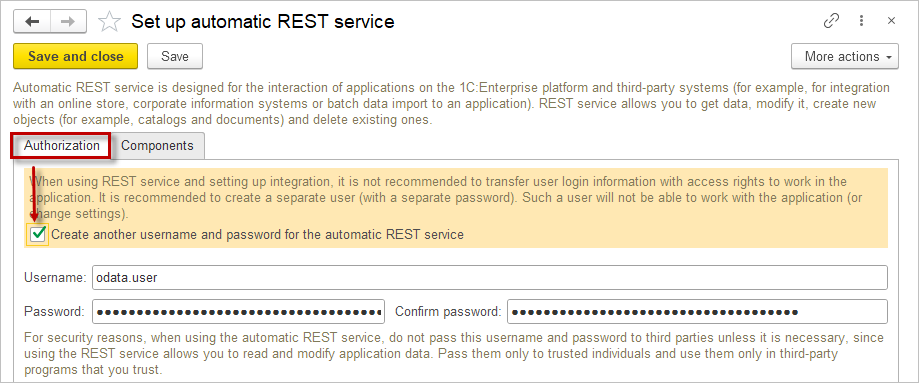
- For secure data transmission, it is not recommended to use a personal user account for integration. On the Authorization tab, enable Create another username and password for the automatic RESR service, specify the username and password, and save them.
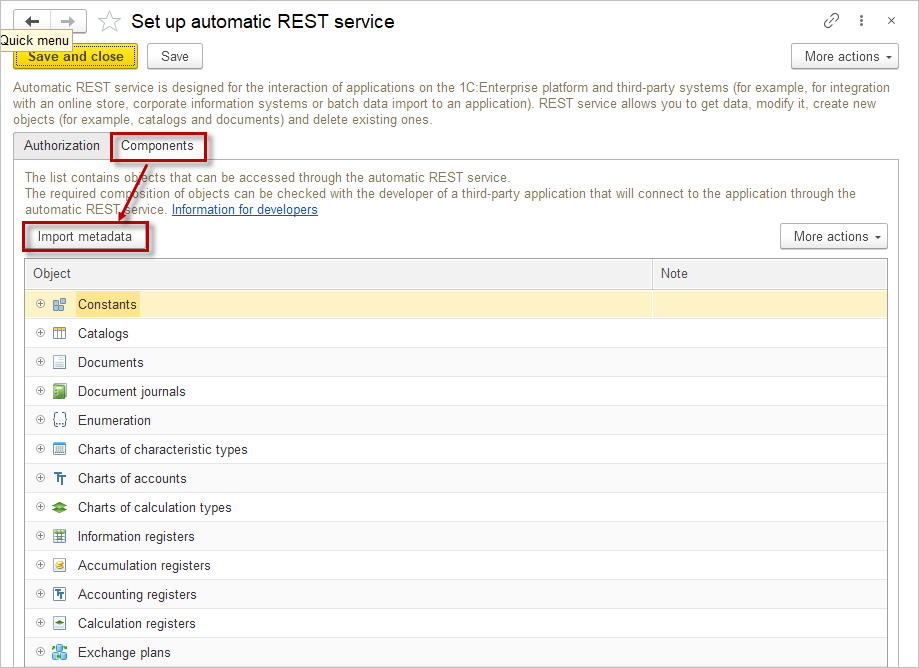
- On the Components tab, click Import metadata and select objects and data that you want to give access
Data Access #
Please note:
“Insufficient rights to use table” error means you need to use ODATA with user with such user’s right. Create a special user and user profile for data exchange with ODATA.
After all settings are completed and the configuration is published on the server, data can be accessed via a URL of the following format:
http://<server_name>/<base_name>o/odata/standard.odataTo retrieve data in JSON format, add the parameter ?$format=application/json to the URL, resulting in the following link:
http://<server_name>/<base_name>/odata/standard.odata?$format=application/jsonWhen accessing a resource, special keywords with predefined purposes may be used:
- $metadata – indicates that a description of the standard OData interface is required
- $filter – defines the filter applied when retrieving data.
- $select – defines the list of entity properties returned when accessing the standard OData interface
Request URL formation rules #
Before we start forming a URL path to a resource, we need to know how objects are named.
| Objects | URL name |
| Catalogs | Catalog |
| Documents | Document |
| Document journals | DocumentJournal |
| Constants | Constant |
| Exchage plans | ExchangePlan |
| Charts of accounts | ChartOfAccounts |
| Chart of calculation types | ChartOfCalculationTypes |
| Chart of characteristic types | ChartOfCharacteristicTypes |
| Information registers | InformationRegister |
| Accumulation registers | AccumulationRegister |
| Calculation registers | CalculationRegister |
| Accounting registers | AccountingRegister |
Applying filters #
Filters are an integral part of the actual data sampling. Here is the list of all aplicable filters:
•	$filter;
•	$top;
•	$allowedOnly;
•	$skip;
•	$count;
•	$inlinecount;
•	$orderby.
Filter #
A dedicated query language is used to define filters within the URL path.
The following types of operations are supported:
- Logical
| Name | Description | Example |
| eq | Equal to | /Catalog_Vendors?$filter=Description eq ‘Supplier’ |
| ne | Not equal to | /Catalog_Vendors?$filter=Description ne ‘Buyer’ |
| gt | Greater than | /Catalog_Items?$filter=Price gt ‘1000’ |
| ge | Greater than or equal to | /Catalog_Items?$filter=Price ge ‘1250’ |
| lt | Lesser than | /Catalog_Items?$filter=Price lt ‘2780’ |
| le | Lesser than or equal to | /Catalog_Items?$filter=Price le ‘2450’ |
| end | Logical and (conjuction) | /Catalog_Items?$filter=Type eq ‘Service’ end Price gt 500 |
| or | Logical or (disjunction) | /Catalog_Companies?$filter=Type eq ‘Customer’ or Balance gt 20000 |
| not | Negation | /Catalog_Companies?$filter=not (Consignee eq true) |
- arithmetic
| Name | Description | Example |
| add | addition | /Catalog_Item?$filter=Price add 100 gt 1000 |
| sub | subtraction | /Catalog_Item?$filter=Price sub 200 le 1600 |
| mul | multiplication | /Catalog_Item?$filter=Price mul 2 lt 300 |
| div | division | /Catalog_Item?$filter=Price div 2 gt 3200 |
- string functions
| Function | Description | Example |
| substringof(Str1, Str2) | Returns true if Str1 is a substring of Str2. | /Catalog_Companies?$filter=substringof(‘Big’, Description) eq true |
| endswith(Str1, Str2) | Returns true if Str1 ends with Str2. | /Catalog_Companies?$filter=endswith(‘outlet’, Description) eq true |
| startswith(Str1, Str2) | Returns true if Str1 starts with Str2. | /Catalog_Companies?$filter=startswith(‘La’, Description) eq true |
| substring(Str, Int1) substring(Str, Int1, Int2) | Returns a substring from Str1. In the variant with two parameters, the string is returned from the Int position to the end of the string. In the variant with three parameters, a substring is returned, starting from the Int1 position and the Int2 length. | /Catalog_Companies?$filter=substring(Tax Registration Numer, 1, 2) eq ’77’ |
| concat(Str1, Str2) | Returns a string resulting from the concatenation of Str1 and Str2. | /Catalog_Companies?$filter=concat(concat(State, ‘, ‘), Country) eq ‘Dubai, UAE’ |
Top #
It is possible to limit the number of records returned when accessing a resource by using the $top parameter.
http://host/odata/standard.odata/Catalog_Items?$filter=Price lt 1000&$top=10AllowedOnly #
If it is necessary to retrieve only those data objects that are not restricted to access, the $allowedOnly parameter must be added.
http://host/base/odata/standard.odata/Catalog_Items?allowedOnly=trueIf this parameter is not specified or is set to false, a 401 error may occur during query execution if the result contains data to which access is restricted. The error may not occur if additional conditions are specified that limit the selection to permitted data only.
Skip #
This parameter allows excluding the first several records from the query result. If the $top and $skip parameters are specified simultaneously, $skip is applied before $top. The order of application does not depend on the order in which the parameters are specified in the request.
http://host/base/odata/standard.odata/Catalog_Items?$skip=2Count #
This parameter allows returning the size of the selection instead of the selection itself. Upon successful execution, the response body contains only the number of elements in the collection, formatted as a standard numeric value
http://host/base/odata/standard.odata/Catalog_Items/$count?$filter=Price gt 500Orderby #
This parameter allows specifying the sorting order of the query result. The $orderby value contains a comma-separated list of attributes. Each attribute may include a sorting direction:
- asc — ascending order;
- desc — descending order.
The sorting direction must be separated from the attribute name by one or more spaces. If neither asc nor desc is specified, ascending order is applied by default.
http://host/base/zone/odata/standard.odata/Catalog_Items?$orderby=Description descInlinecount #
This parameter specifies that the system must include not only the retrieved records in the query result but also the total number of these records. To do this, the $inlinecount parameter must be set to allpages. Using $inlinecount with the value none suppresses the return of the record count together with the query result. If the $inlinecount parameter is not specified in the request, the record count is not returned along with the query result.
http://host/base/odata/standard.odata/Catalog_Items?$inlinecount=allpages