
AccountingSuite’s Chart of accounts offers exceptional flexibility, enabling precise tracking and reporting of direct and indirect costs directly within your financial statements. Properly distinguishing direct from indirect costs enables calculation of gross margin KPIs, a critical metric for service businesses targeting 40-60% margins (Revenue minus direct costs, expressed as a percentage). This separation supports cost-volume-profit (CVP) analysis, helping predict break-even points and profitability at different sales volumes—for instance, modeling how a 10% rise in direct labor impacts margins.
It also creates audit-ready trails, ensuring compliance with IFRS disclosure requirements and facilitating internal controls for expense verification. Without this, distorted gross profit figures can mislead stakeholders, inflate operating ratios, or trigger audit adjustments.
Account Subcategory assigned to each GL account controls where expenses appear in the Income statement — either in the Gross Profit section (for direct costs like cost of goods sold or services) or the Operating Income section (for indirect costs like overhead). This setup ensures accurate profit margin analysis and compliance with standards like IFRS.
Handling Direct Costs #
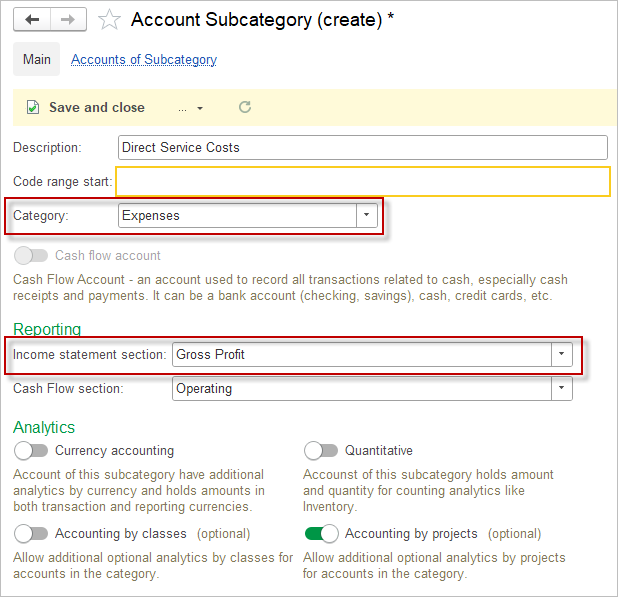
- Navigate to Settings > Chart of Accounts > Subcategories.
- Create New Subcategory, such as “Direct Service Costs”.
- In the Income Statement Section dropdown, select Gross Profit.
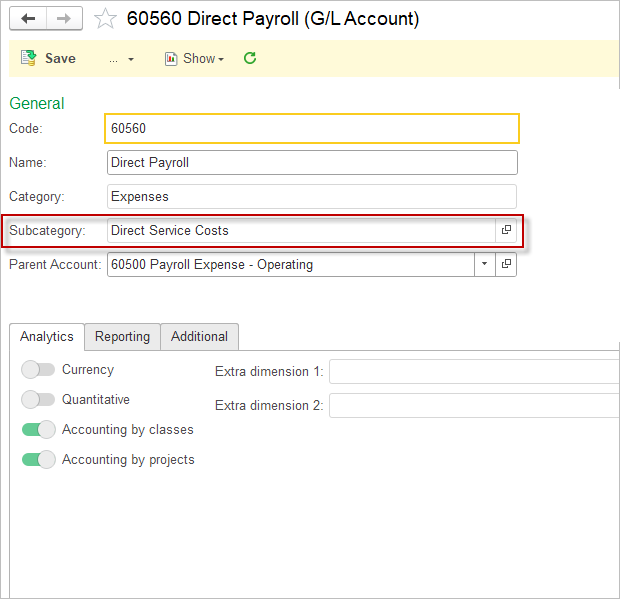
- Save the Subcategory and assign it to expense accounts for direct cost tracking.
- If required, enable Accounting by Classes or Accounting by Projects for this expense account.
Handling Indirect Costs #
Indirect costs default to the Operating Income section but follow the same flexible setup:
- Create a subcategory like “Operating Overhead” and assign Income Statement Section: Operating Income.
- Apply to Expense accounts such as utilities, administrative salaries, or marketing expenses. This keeps your Gross Profit clean, isolating core revenue minus direct costs.
Example: Service-Based Business Setup #
Imagine a consulting firm tracking project-specific costs:
| Account Name | Account Type | Subcategory | Income Statement Section | Purpose |
|---|---|---|---|---|
| Direct Consulting Labor | Expense | Direct Service Costs | Gross Profit | Billable hours costs |
| Subcontractor Fees | Expense | Direct Service Costs | Gross Profit | External project help |
| Office Rent | Expense | Operating Overhead | Operating Income | General facility costs |
| Marketing | Expense | Operating Overhead | Operating Income | Client acquisition |