
Adding Items to documents can be performed quickly and accurately by scanning their barcodes. This enhancement eliminats manual entry, reducing errors, and saving time when processing documents, that content Items, e.g.: Sales orders, Sales Invoices, Item Receipts, Warehouse Transfers, Inventory Adjustments etc. This functionality is particularly beneficial for businesses with large inventories or high transaction volumes, such as retail stores, wholesalers, and warehouses. It enables faster checkouts, seamless order fulfillment, and improved accuracy in stock management.
In the Mobile application, build-in camera can be used as scanner.
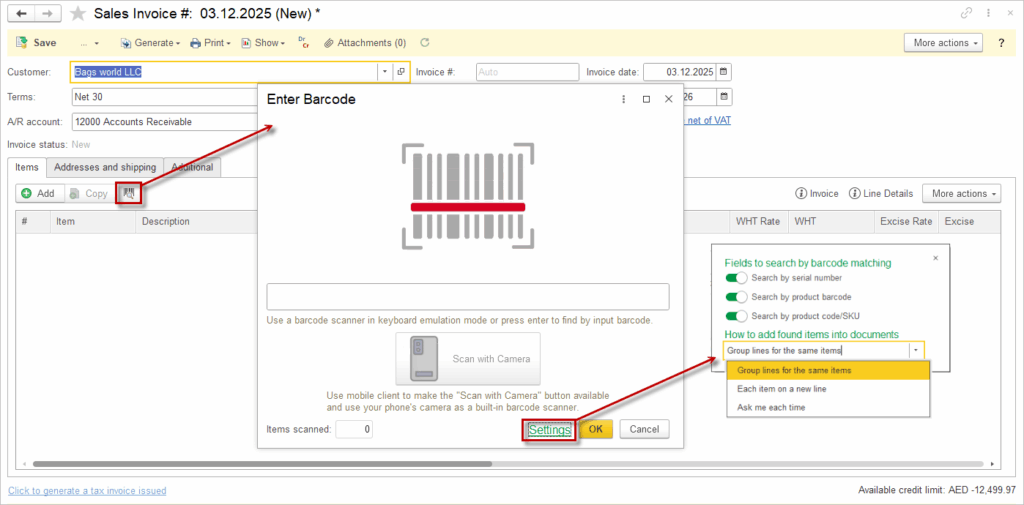
Search Logic #
Depending on the settings, the system searches by: Search by serial number, Search by product barcode, and Search by product code/SKU, letting the user choose which item attributes will be used to match the scanned barcode. The system will use only the enabled fields when trying to match a scanned or entered barcode to an item.
- In the How to add found items into documents section, open the drop‑down list.
- Choose one of the following options:
- Group lines for the same items – increase the quantity on an existing line when the same item is scanned again;
- Each item on a new line – create a separate line for every scan, even for identical items;
- Ask me each time – display a prompt so the user can choose the behavior for each scan.
The selected option is applied to all items added through barcode scanning on this invoice.
There is an option to input Barcode manually (untick Instant Barcode Entry option).