
Navigate to Reports → Inventory → Item Activity/Costing.
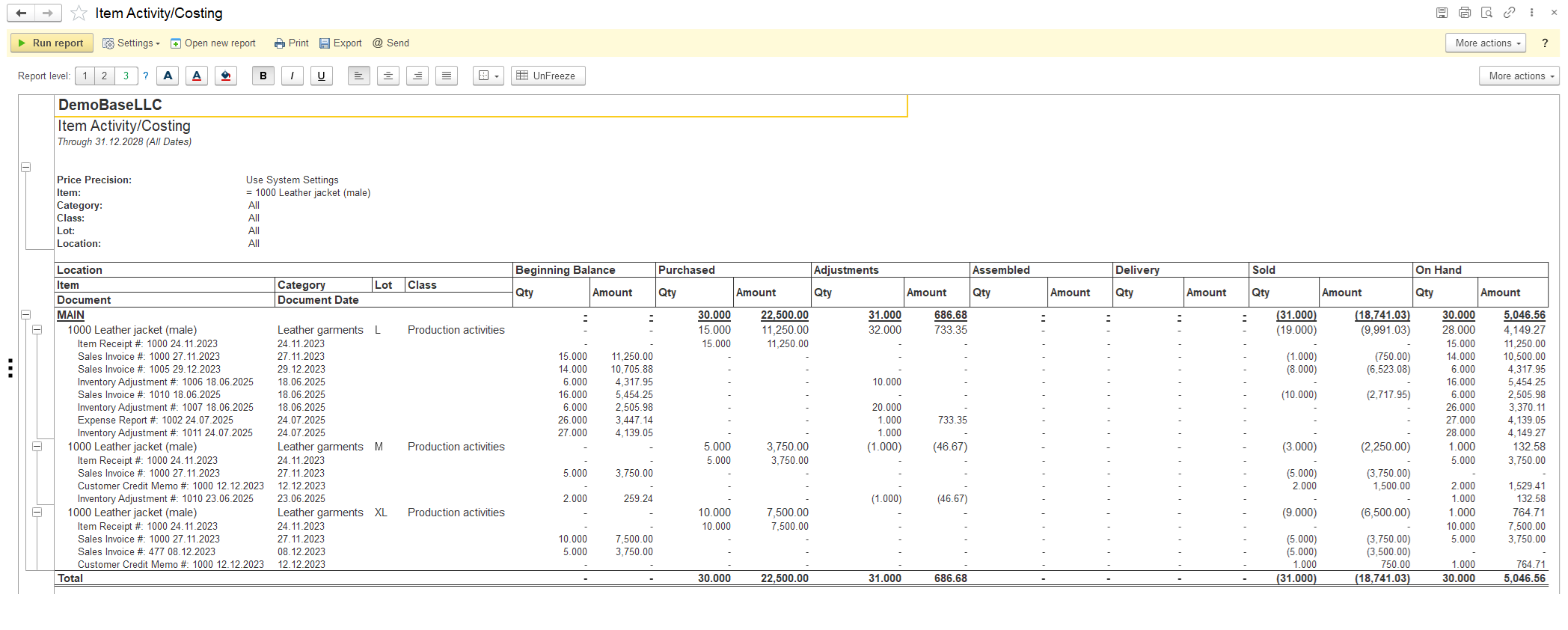
This report provides a complete, summarized history of all inventory movements and their financial impact for a specific item and document (with Recorder field mode) over a defined Period.
It answers the fundamental questions:
- Where did my inventory come from? (Beginning Balance, Purchases)
- What happened to it? (Adjustments, Used in Assembly/Disassembly, Delivered to Customers)
- How much do I have left? (The ending balance, which is calculated from these figures)
- What is its total value? It shows both the quantity and the monetary amount (cost) for every type of transaction.
Breaking Down the Columns:
- Location, Item, Class, Lot: These are identifiers.
- Location: Which warehouse, bin or store this inventory is in (see Locations).
- Item: The specific product (see Items).
- Class: Your extra category, branch (see Classes).
- Lot: A specific batch number, crucial for tracking expiration dates or manufacturing batches (see Lots).
- Category: A specific field that groups items of a similar nature together (see Category).
- Beginning Balance: The quantity and total cost value of this item that was in stock at the very start of the selected time period.
- Purchased: The quantity and total value of new stock that was received from suppliers during the period.
- Adjustments: The quantity and value of inventory that was added or removed outside of normal sales or purchases. This includes:
- Positive Inventory Adjustment: Found items, returns from employees, donations.
- Negative Inventory Adjustment: Damaged, stolen, spoiled, or written-off items.
- Warehouse Transfers to another Location
- Assembled: This shows when this specific item was produced like finished product (Positive with Assembly Builds) from a component (Negative with Disassemblies).
- Delivery – The quantity and total cost of inventory that was fulfilled and delivered to customers. The Shipments document affects inventory by reducing the Quantity on Hand in the amount indicated on the Shipment.
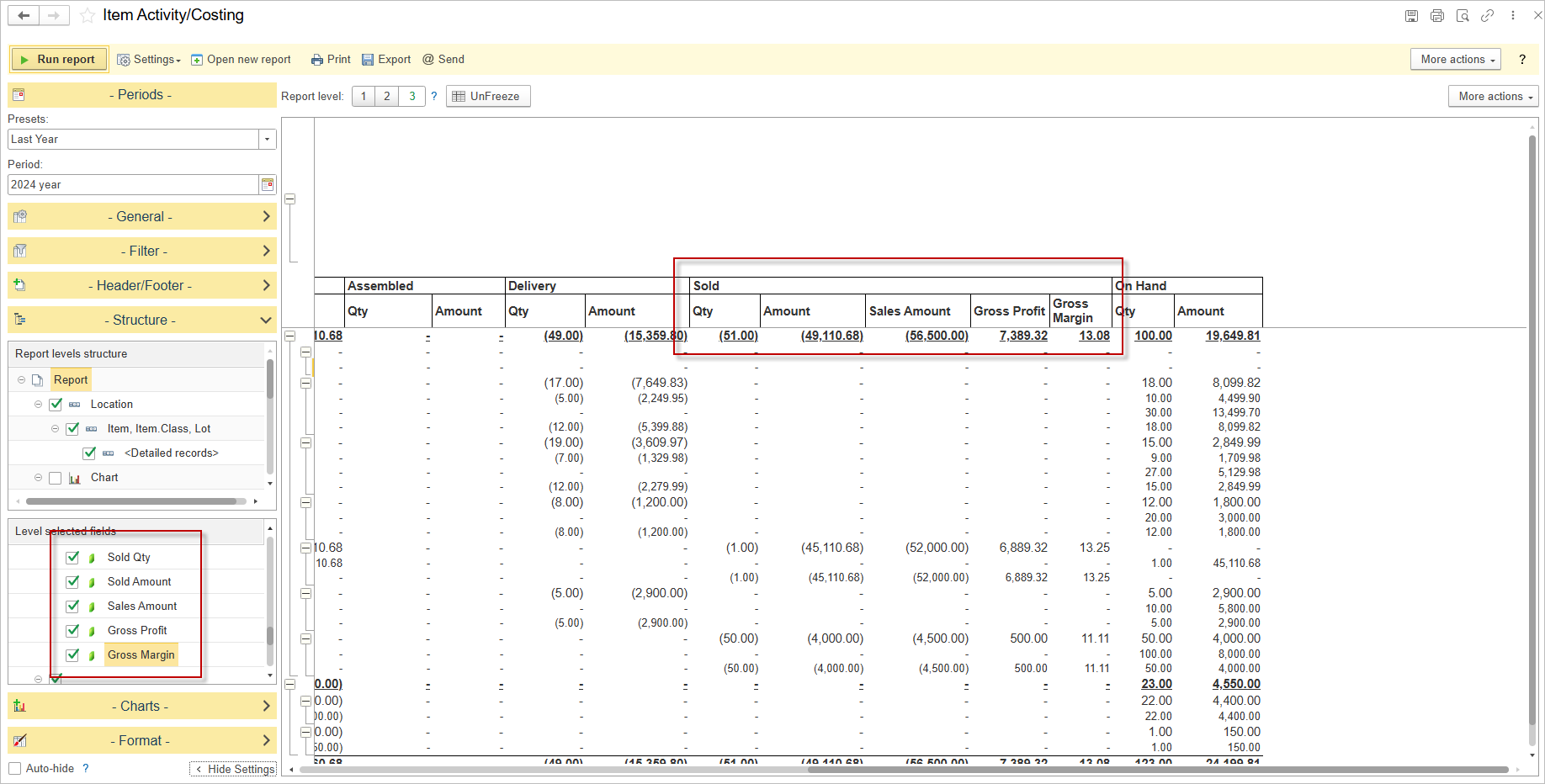
- Sold: The quantity and total cost of sold inventory (and optional with Sales Amount, Gross Profit, Gross Margin).
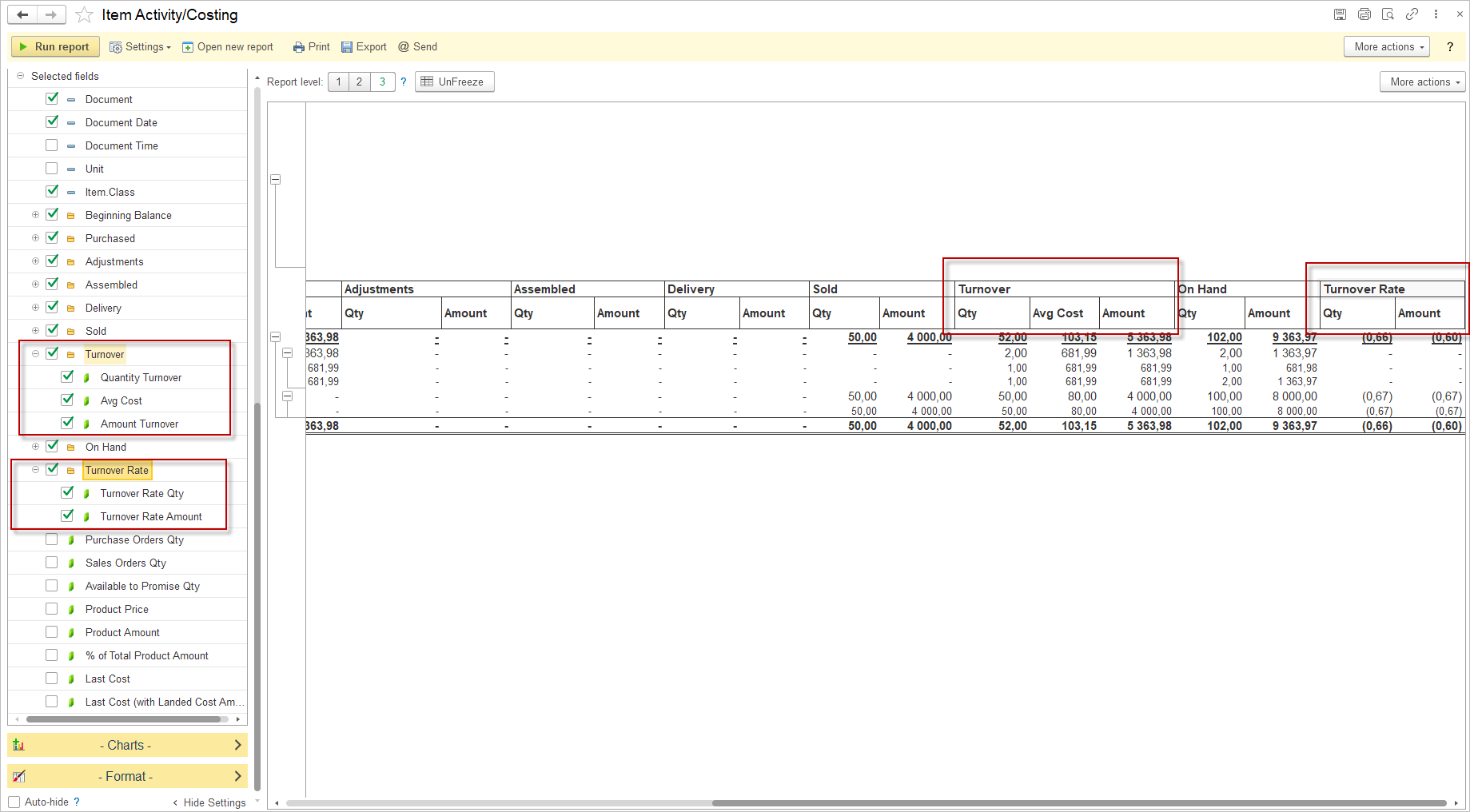
- Turnover (Turnover Qty, Turnover Avg Cost, Turnover Amount): The Turnover column shows how fast inventory moves for each item – simple count of goods sold and replaced in the period.
- Turnover Rate Qty and Turnover Rate Amount: The factor (rate) of turnover over period of the report.
What Is This Report Used For? (Its Purpose)
This report is a critical tool for multiple business functions:
A) Financial Analysis and Accounting:
- Cost of Goods Sold (COGS): The valuation of cost amount is a key component in calculating COGS for the income statement.
- Inventory Valuation: Provides the data needed to value ending inventory on the balance sheet.
- Audit Trail: Creates a clear, auditable trail of inventory movements to ensure financial records are accurate and compliant.
B) Inventory Management and Control:
- Identifying Shrinkage: By comparing theoretical inventory (Beginning + Purchased) with actual inventory (after accounting for Assembled and Delivery), managers can identify losses due to theft or damage (visible in the Adjustments column).
- Tracking Lot Traceability: Crucial for product recalls, allowing you to see which specific lots were sold or used.
- Analyzing Trends: Reviewing periods can show purchasing patterns, seasonality, and the impact of adjustments.
C) Supply Chain and Purchasing:
- Informing Replenishment: By understanding how quickly inventory is being sold and used/produced in assembly, purchasing managers can make smarter decisions about when to order more and in what quantity.
- Verifying Receipts: Confirms that purchased quantities have been correctly entered into the system.
Example Reading the Report:
Let’s assume the one row has these values for the month of January:
- Beginning Balance: Qty: 10, Amount: $500
- Purchased: Qty: 20, Amount: $1,100
- Adjustments: Qty: -2, Amount: -$110
- Assembled: Qty: -5, Amount: $275
- Sold: Qty: 18, Amount: $990
What this tells you:
- You started with 10 items worth $500 ($50/ea).
- You bought 20 more for $1,100 ($55/ea – note the cost increase).
- You had to write off 2 damaged items (valued at the average cost, likely $55/ea).
- You used 5 items to build some kits.
- You sold 18 items to customers.
- Your ending inventory for February 1st would be:
- Qty: (10 + 20 – 2 – 5 – 18) = 5 units
- Value: Calculated based on your costing method (FIFO, Average Cost), using the data provided.
You can set up and save your variant of report with diffident name. The Structure of the report allows to check Turnover Qty, Turnover Avg Cost, Turnover Amount, Turnover Rate Qty, Turnover Rate Amount, Sales Amount, Gross Profit, Gross Margin there.
You can also display the following additional fields
- Purchase Orders Qty — The quantity of goods on purchase orders (expected to be received from suppliers).
- Sales Orders Qty — The quantity of goods on sales orders (reserved for customer shipments).
- Available to Promise Qty — The uncommitted inventory available to fulfill new customer orders, calculated based on current stock, scheduled receipts, and pending sales.
Available to Promise Qty = Qty on Hand + Purchase Orders Qty – Sales Orders Qty. - Product Price — The current selling price per unit of the product.
- Product Amount — The total monetary value for the product (quantity multiplied by price).
- % of Total Product Amount — The percentage that this product’s total amount represents of the total value of all products.
- Last Cost — The most recent purchase price per unit paid to the supplier.
- Turnover Qty — the total volume of inventory movement during the period, calculated as the sum of all Sold Qty (negative), Purchased Qty (positive) and other types that flowed through inventory in the period. Where a negative value indicates Sold exceeded purchases, and a positive value indicates purchases exceeded sold qty.
- Turnover Amount — the total amount of inventory movement during the period, calculated as the sum of all Sold Amount (negative), Purchased Amount (positive) and other types that flowed through inventory in the period. Where a negative value indicates Cost of Goods Sold exceeded purchases, and a positive value indicates purchases exceeded Cost of Goods Sold.
- Turnover Avg Cost — The average cost of inventory over the period, calculated as Turnover Amount / Turnover Qty.
- Turnover Rate Qty — The rate inventory is sold and replaced over a period, calculated as Sold Qty ÷ Average Inventory Qty.
- Turnover Rate Amount — The rate inventory value turns over during a period, calculated as Sold Amount ÷ Average Inventory Amount.
Where in the formulas:
- Average Inventory Amount – The average value of inventory held during the period, calculated as (Beginning Balance Amount + On Hand Amount) ÷ 2.
- Average Inventory Qty – The average quantity of inventory held during the period, calculated as (Beginning Balance Qty + On Hand Qty) ÷ 2.
Turnover Rate Interpretation
| Value | Interpretation |
|---|---|
| 0 | No sales during the period |
| >0 to <1 | Sold less than the average inventory (low turnover) |
| =1 | Sold exactly the same quantity as the average inventory (or had zero purchases and sold all existing stock) |
| >1 | Sold more than the average inventory (high turnover, fast-moving item) |
| Negative | Returns exceeded sales during the period |
Turnover Qty and Amount Interpretation
| Turnover Qty | Turnover Amount | Interpretation |
|---|---|---|
| Positive (+) | Positive (+) | Purchases exceeded sales in both quantity and cost — inventory increased |
| Positive (+) | Negative (-) | Purchased more units than sold, but sold inventory had higher cost basis (COGS > Purchases) — inventory value decreased despite quantity increase |
| Negative (-) | Positive (+) | Sold more units than purchased, but purchased inventory had higher cost basis — inventory value increased despite quantity decrease |
| Negative (-) | Negative (-) | Sales exceeded purchases in both quantity and cost — inventory decreased |
| Zero (0) | Zero (0) | No inventory movement during the period |
| Zero (0) | Positive (+) | Purchases equaled sales in quantity, but purchase cost exceeded COGS — inventory value increased |
| Zero (0) | Negative (-) | Purchases equaled sales in quantity, but COGS exceeded purchase cost — inventory value decreased |

Current Limitation in the Item Costing Report
The Item Costing Report currently has a limitation related to the display of Amounts per product within a single transaction. If a transaction contains two or more lines with the same product but with different Prices or Lots, the report will not show the exact Amount for each individual line. Instead, it will display the average Amount for that product within the transaction.
All technical details and configuration instructions for the Report can be found in the dedicated section titled Report Form.