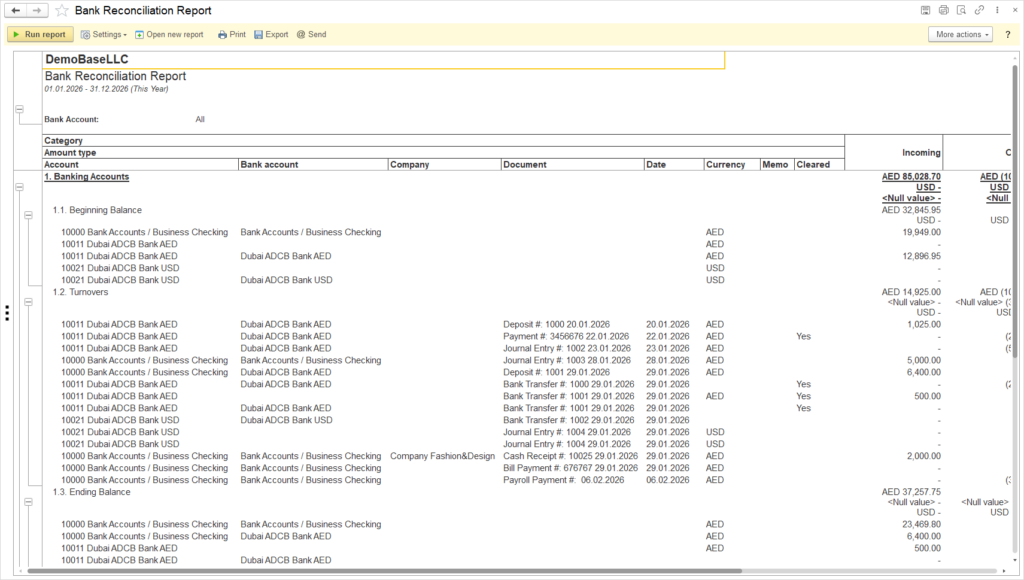
The Bank Reconciliation Report provides a detailed reconciliation of bank-related accounts for the selected period, showing beginning balances, movements, and ending balances in both transaction currency and reporting currency (reporting currency is referred to as RC and is the currency set in the General Settings).
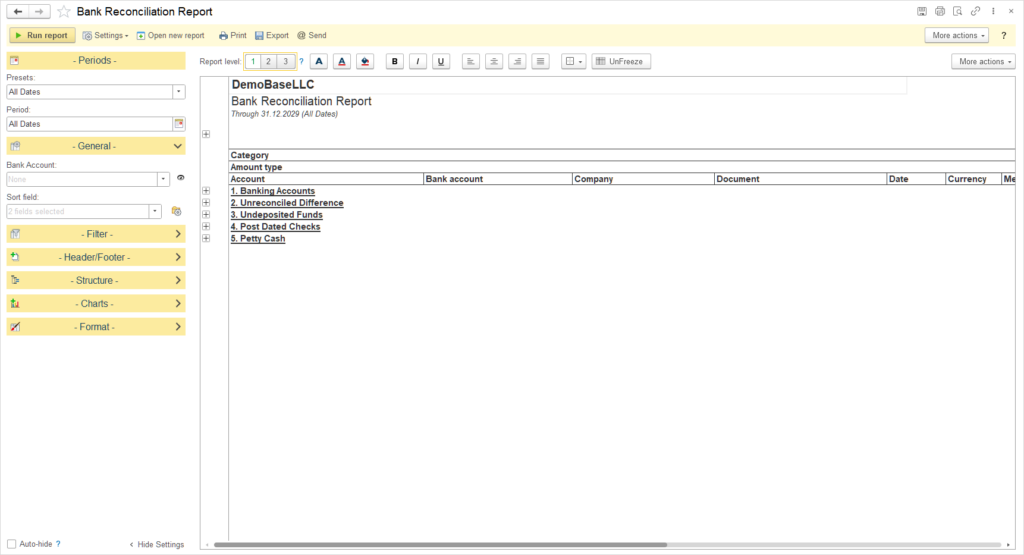
The report is designed to reconcile the balances of bank and cash-related accounts between the General Ledger and external bank records over the specified date range. It presents data in a grouped format where the split is made based on the Account subcategory (for example, Banking accounts, Undeposited funds, Post dated checks, Petty cash).
- Banking Accounts: includes individual bank accounts, with beginning balance, turnovers (incoming and outgoing), and calculated ending balance.
- Unreconciled Difference: is the total amount for a bank account over a specific period for documents that do not have the Cleared mark. This amount represents the difference between Incoming and Outgoing that have not been marked as Cleared. Thus, the Unreconciliation difference shows the balance of unverified documents for the period.
- Undeposited Funds: shows receipts recorded in the system but not yet deposited to a Bank account, with reference to Companies, documents and dates.
- Post Dated Checks: details checks issued or received that are dated after the reporting period, affecting future cash flows rather than current bank balances. Please refer to this article to learn more about PDC treatment.
- Petty Cash: summarizes movements and balances of petty cash accounts, typically representing minor cash expenditures.
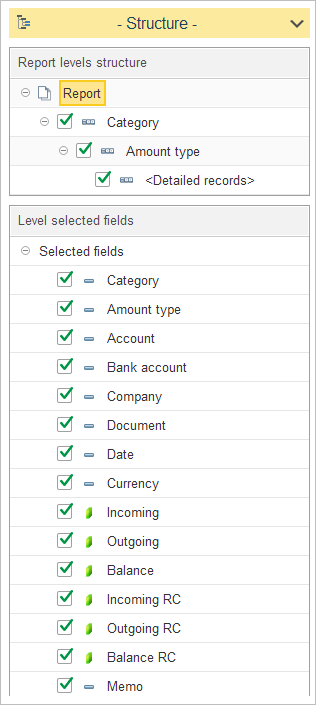
The report structure defines a two-level grouping and the list of fields shown in the detailed lines.
- The top level of the report groups data by Category, which separates main sections such as Banking Accounts, Unreconciled Difference, Undeposited Funds, Petty Cash, Post Dated Checks.
- Within each Category, data is further grouped by Amount type (for example, beginning balance, turnovers, ending balance), and then detailed records are displayed inside this level.
- The detailed records level includes the following fields: Category, Amount type, Account, Bank account, Company, Document, Date, Currency, Incoming, Outgoing, Balance, Incoming RC, Outgoing RC, Balance RC, Memo and Cleared.
- The Cleared column in the report indicates whether the bank reconciliation process has been performed for a specific document. The checkmark is entered on the Bank reconciliation document itself, and if the checkmark is set, YES will appear in the Cleared column in the report, meaning that the document has been verified and the cash flows have been confirmed. It is important to note that Cleared applies only to documents related to bank accounts.
- These fields ensure that for every line the user can see the analytical breakdown (account and bank account), document attributes (company, document, date, memo), and monetary indicators in both transaction currency and reporting currency.