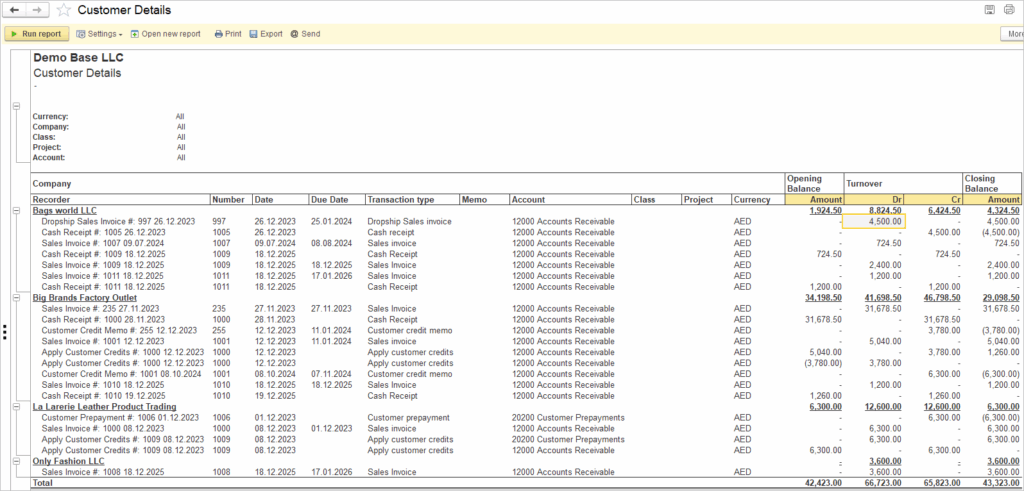
The Customer Details report was designed to give you valuable information about activity of your Customers. This detailed analytical report can be used to review all transactions related to Customer or to monitor Customer’s debt. It provides a complete breakdown of Customer activity over a selected period of time.
Navigate to: Reports → Sales → Customer Details
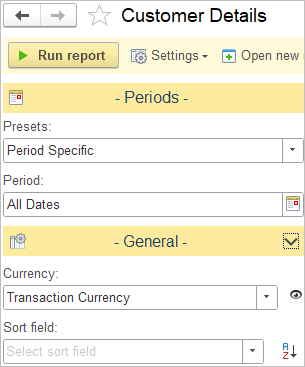
Available settings:
The General section of the Customer Details report defines how monetary values are displayed and which field will be used to sort the report.
Currency
- A dropdown that defines which Currency the report uses.
- “Transaction Currency” means the report will show amounts in the original currency of each transaction rather than converting them to a single base or reporting currency.
- “Default Currency” option will convert original currency of transactions to the default currency set in the General settings.
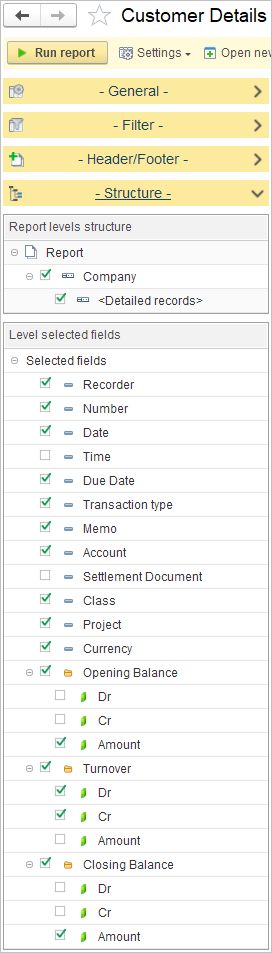
In Report levels structure, select how data is grouped in the report.
- At the top, options such as Company and Detailed records are available. This means the report will first show totals by Customer and then break them down by individual documents and dates for more detail.
In Level selected fields by disabling or enabling the appropriate checkboxes, you can customize the report to display only the information that is relevant to you.
- Fields available
- Recorder – the name of the document confirming financial transaction
- Number – system number of the financial document
- Date – transaction date
- Time – transaction time
- Due Date – payment due date for invoices
- Transaction type – type of financial operation
- Memo – description or commnet
- Account – related General Ledger account
- Settlement Document – reference to the related invoice document
- Currency – transaction currency
- Balances and Turnover
- Opening Balance shows the customer’s balance at the start of the reporting period. Available display options: Dr, Cr, Amount.
- Turnover displays movements during the selected period. Available display options: Dr, Cr, Amount.
- Closing Balance shows the final balance at the end of the reporting period. Available display options: Dr, Cr, Amount.